Short answer: an ecommerce SEO checklist is a prioritised list of the technical, on-page, content and measurement fixes that help an online store's category and product pages get found in Google, Bing and AI answers, and turn that traffic into orders. The 37 fixes below run in the order we work through them on a real store: tracking first, then keywords, then crawling and indexing, then product and category pages, then authority, AI search and revenue reporting. Most stores only need a few of them to see a difference, and the hard part is knowing which few.
We run SEO for Shopify, WooCommerce and custom stores, and the same pattern turns up on almost every audit. Store owners have been told to "add keywords" and "write blogs", while Google is quietly crawling thousands of filter URLs, indexing the wrong version of every product and showing an out-of-stock page for the bestseller. This guide fixes that. Every figure links to the page we checked in October 2026, and where popular advice is out of date, we say so.
What is an ecommerce SEO checklist?
An ecommerce SEO checklist is a working document you tick off to make an online store easier for search engines to crawl, understand and rank, and easier for shoppers to buy from once they land. It covers the parts of SEO that matter only when you sell products: thousands of near-identical product URLs, filters that multiply pages, stock that comes and goes, prices that must match your Merchant Center feed, and category pages that have to rank for commercial searches like "women's trail running shoes".
Think of it as the practical side of an ecommerce SEO strategy. The strategy decides which categories and products deserve organic traffic and why. The checklist is how you make sure nothing on the site stops that from happening.
Ecommerce SEO checklist vs a general SEO checklist: how the two differ
A general SEO checklist is built for a service business or a blog with a few dozen pages. SEO for ecommerce deals with scale, duplication and money pages that change daily. The table shows where the two split.
| General SEO checklist | Ecommerce SEO checklist | |
|---|---|---|
| Pages that earn revenue | Service pages and a contact form | Category, product and brand pages, often thousands |
| Biggest technical risk | A noindex tag or a slow host | Filter, sort and variant URLs wasting crawl and splitting signals |
| Keyword focus | Problem and service searches | Commercial and transactional searches with product attributes |
| Structured data | Organization, LocalBusiness, FAQ | Product, Offer, shipping, returns, reviews and breadcrumbs |
| Content that changes daily | Rarely any | Price, stock, variants and reviews |
| Extra search surfaces | Google Business Profile | Google Shopping free listings, image search and AI shopping answers |
| Success metric | Leads | Organic revenue and revenue per landing page |
If you already followed a general SEO checklist and traffic still stalled, the gap is usually in the right-hand column.
Why SEO for ecommerce pays: how organic search grows revenue
Paid search and social stop sending visitors the day the budget stops. Organic rankings keep working, and for a store they compound: a category page that ranks for a head term also ranks for dozens of long-tail variations, and every product it links to gets stronger with it. That is why SEO for ecommerce is usually the cheapest repeatable source of new customers once the foundations are fixed.
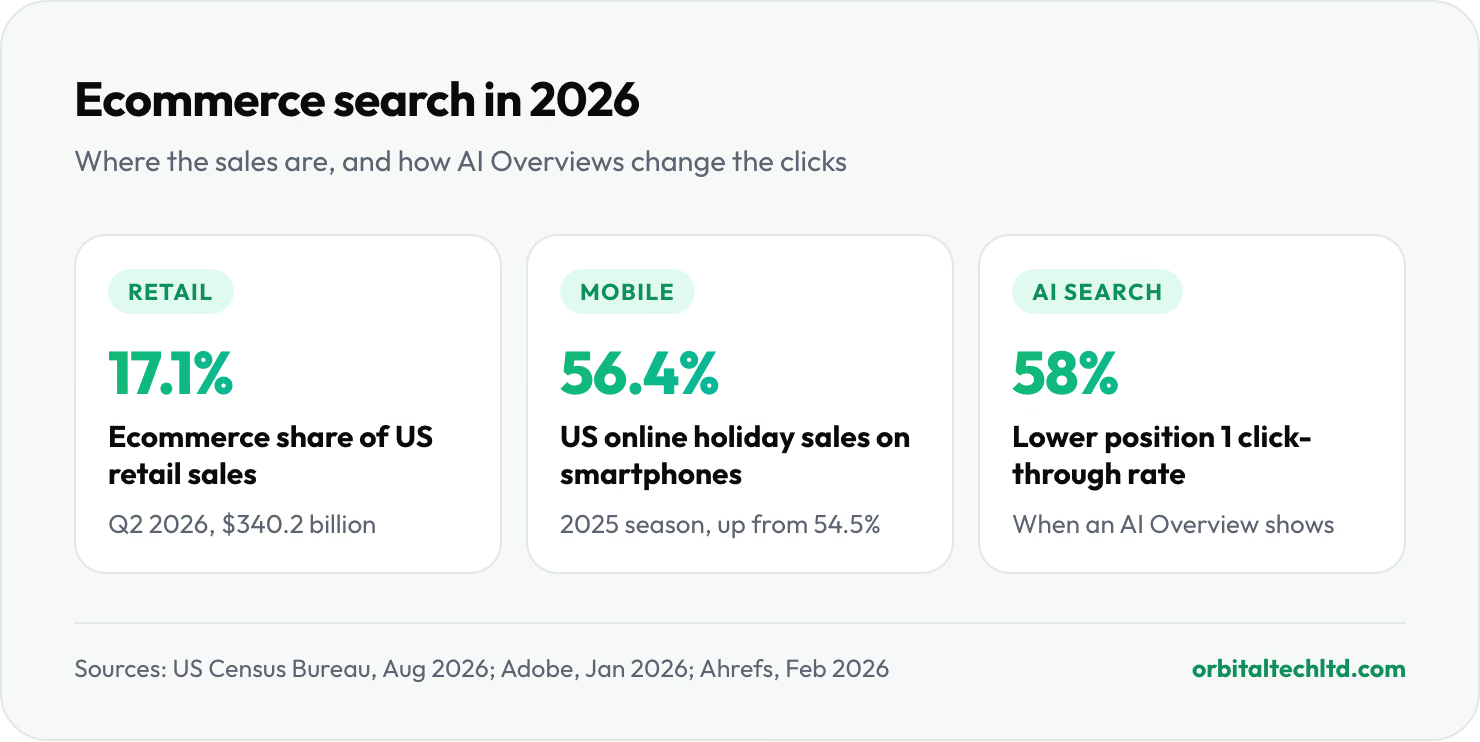
It also matters because shoppers research before they buy. Ecommerce reached 17.1% of all US retail sales in the second quarter of 2026, according to the US Census Bureau, and smartphones alone accounted for 56.4% of US online holiday sales in 2025, per Adobe. Many of those purchases begin with a search for a type of product, not a store name. A store that only shows up when someone types its brand name misses everyone still deciding, and those are the searches competitors win.

Ecommerce SEO in 2026, by the numbers
These are the figures we put in front of store owners before we start. Each one links to the page we checked.
| Measure | Figure | What it means for your store | Source |
|---|---|---|---|
| US ecommerce share of total retail sales | 17.1% ($340.2 billion), Q2 2026 | Online is now one in every six retail dollars in the US | US Census Bureau, Aug 2026 |
| Smartphone share of US online holiday sales | 56.4% in 2025, up from 54.5% | Google judges and shoppers buy on the mobile version of your store | Adobe, Jan 2026 |
| Average click-through rate for organic position 1 | 27.6% | The top spot still takes the largest share of clicks | Backlinko, Apr 2025 |
| Drop in position 1 click-through rate when an AI Overview shows | 58% lower | Being cited inside the AI Overview now matters as much as ranking under it | Ahrefs, Feb 2026 |
| Organic click-through rate on queries with an AI Overview | 1.76% fell to 0.61% | Plan for fewer but better-qualified clicks on research searches | Seer Interactive, Nov 2025 |
| Average cart abandonment rate | 70.22%, across 50 studies | SEO traffic is wasted if the product page and checkout lose the sale | Baymard Institute, Sep 2025 |
| Sites with mediocre or worse product page UX | 51% of 344 US and EU sites | Better product pages lift both rankings and conversion | Baymard Institute |
| Shopify share of all websites | 5.3% | The largest hosted store platform, with SEO basics built in | W3Techs, Oct 2026 |
| Platform share of ecommerce sites (mobile) | WooCommerce 44.4%, Shopify 25.3% | Most stores run on one of these two, so their quirks matter most | HTTP Archive Web Almanac 2025 |
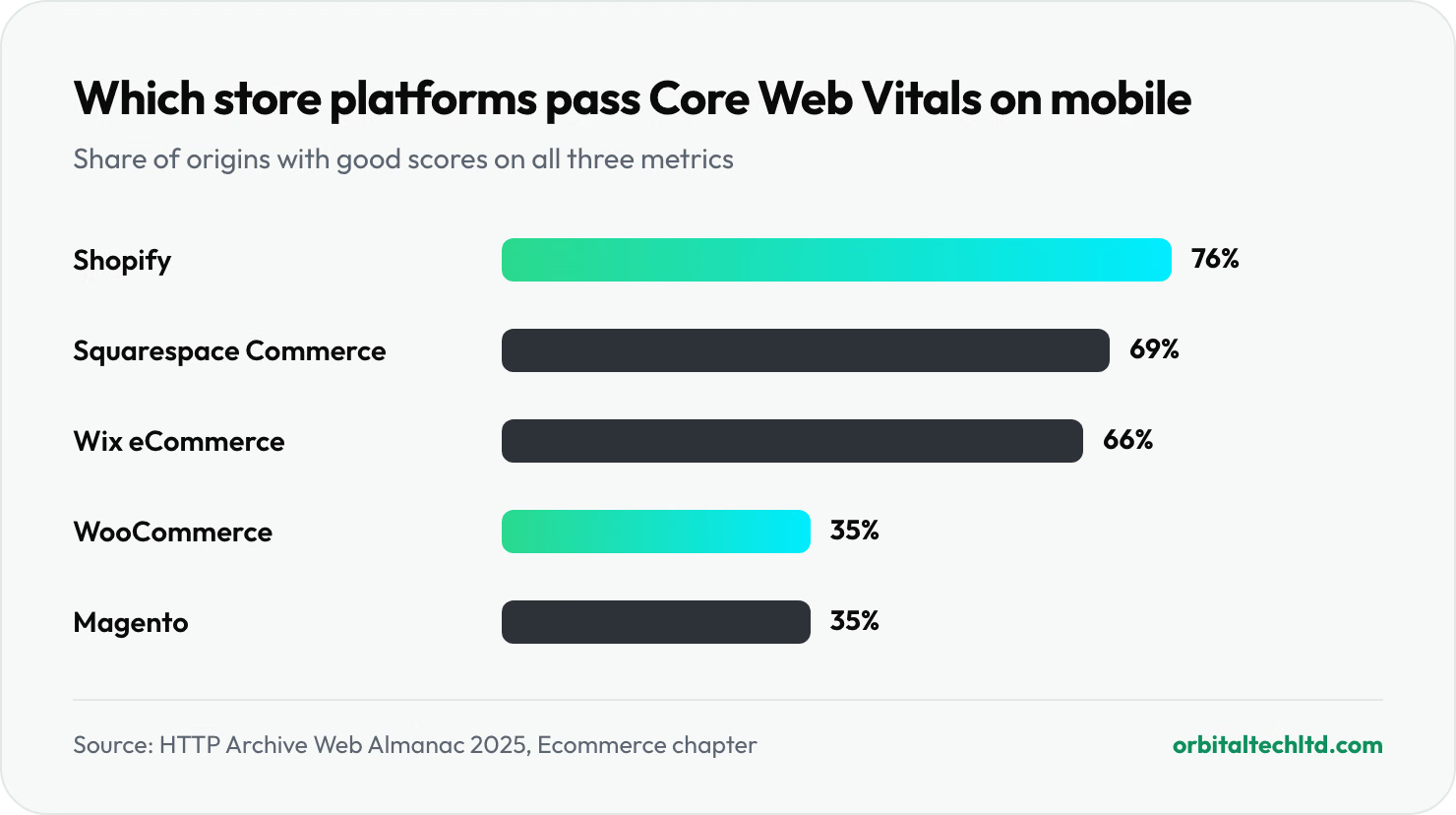
| Store origins passing Core Web Vitals on mobile | Shopify 76%, WooCommerce 35% | Hosting, theme and apps decide speed more than the brand name | HTTP Archive Web Almanac 2025 |
| Shopify Basic plan, US, monthly billing | $25 a month ($19 billed yearly) | Good Shopify SEO does not need an expensive plan | Shopify, Oct 2026 |
Two cautions. The Ahrefs and Seer studies measure correlation, and their samples lean towards informational searches rather than product searches, so treat them as direction rather than a forecast for your store. And the Census figure is updated quarterly; the next release is due on 19 November 2026.
How to use this ecommerce SEO checklist
Work through it in order. Each part depends on the one before: there is no point rewriting product descriptions if Google cannot crawl the products, and no point building links to a category page that is canonicalised to somewhere else. If you have a small store, the first three parts will take a weekend. If you have 10,000 SKUs, plan it as a project and fix by template, not page by page.
We have split the 37 fixes into seven parts. Mark each one done, not applicable, or to do, and write down who owns it. A checklist with no owners is a wish list.
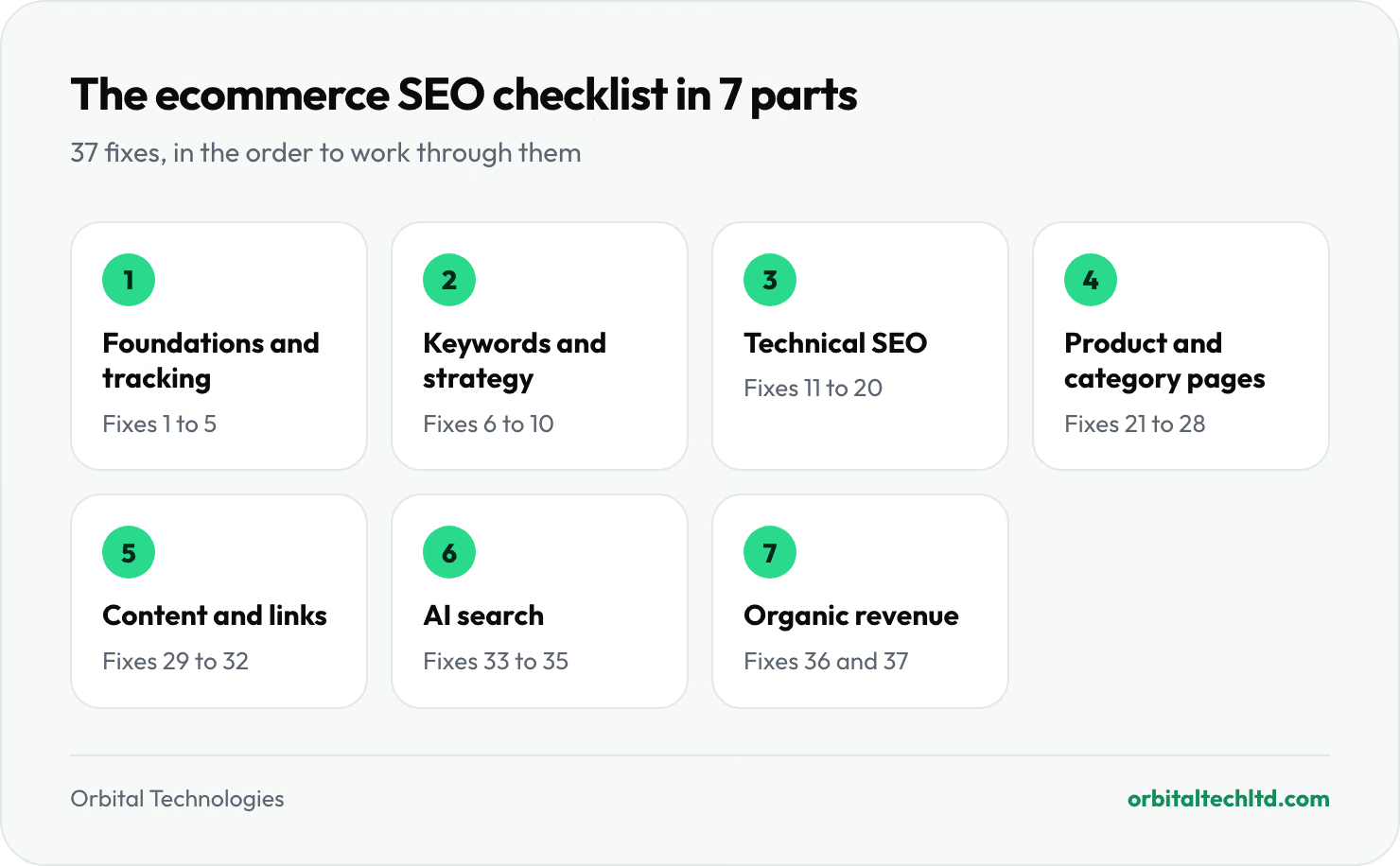
Part 1: Foundations and tracking (fixes 1 to 5)
Every ecommerce SEO checklist should start here, before you change anything: make sure you can see what happens when you do.
- Verify the store in Google Search Console as a domain property. The domain property covers http, https, www and every subdomain, so you see the whole picture. Submit your sitemap and read the Pages report: it tells you exactly which URLs Google has indexed and why the rest were left out.
- Turn on ecommerce tracking in GA4 and check it against your store's sales. You need purchase events with revenue, so you can report organic revenue by landing page later. If GA4 revenue is more than 10 to 15% away from what your platform reports, fix tracking before you trust any SEO report.
- Add the store to Bing Webmaster Tools. It takes two minutes if you import from Search Console. Bing powers Microsoft Copilot answers and its index is used well beyond Bing itself, so it is no longer optional.
- Connect Google Merchant Center and switch on free listings. Free listings put your products in the Shopping tab, Google Images and parts of the main results at no cost. Shopify and WooCommerce both have official Google apps that sync the feed.
- Record a baseline. Export three things before you change anything: clicks and impressions by page from Search Console, organic revenue by landing page from GA4, and a full crawl of the site. Without a baseline, nobody can prove what the work achieved.
Part 2: Keyword research and your ecommerce SEO strategy (fixes 6 to 10)
Ecommerce keyword research is about mapping searches to page types, not finding a list of words to repeat. The same shopper might search "running shoes" (a category), "best running shoes for flat feet" (a guide or filtered category), and "Brooks Ghost 16 size 10" (a product). Each needs a different page.
- Map search intent to page type. Broad commercial terms go to category pages, attribute terms ("waterproof", "for kids", a colour or a material) go to subcategories or indexable filters, model names go to product pages, and questions go to guides. Google already shows you the answer: search the term and look at what ranks. If the top ten are category pages, a blog post will not beat them.
- Find attribute keywords worth their own landing page. Pull every filter value on your site and check search volume. "Linen trousers" with 5,000 searches a month deserves an indexable page with its own title and copy. "Linen trousers, size 32, sorted by price" does not.
- Run a keyword gap analysis against two or three real competitors. Choose stores that sell what you sell, not Amazon. The gap report shows keywords they rank for and you do not, which is usually a list of categories you have not built yet.
- Assign one primary keyword to each URL and check for cannibalisation. If two of your pages rank for the same term and swap positions week to week, they are competing. Merge them, or make one clearly the parent and link to it from the other.
- Plan the guides that feed your categories. Buying guides, size guides and comparison pages answer the research questions and link down to the categories that sell. They are also the pages AI assistants quote most.
Keyword and gap analysis tools: what each is for, and which to use when
You do not need every tool. The table shows what each one is good at and when it earns its cost.
| Tool | Cost | Best for | Use it when |
|---|---|---|---|
| Google Search Console | Free | The searches you already appear for, with real clicks and positions | Always first. It is the only tool with Google's own data for your store |
| Google Keyword Planner | Free with an Ads account | Volume ranges and new ideas from a seed term or a competitor URL | You are on a budget and need rough demand for new categories |
| Merchant Center insights | Free | Which products and brands are popular in Shopping and how your prices compare | Deciding which products to push and checking you are priced to compete |
| Ahrefs | Paid | Competitor keywords, content gap, backlinks and keyword difficulty | Running a proper gap analysis and planning links |
| Semrush | Paid | Keyword gap, position tracking and a site audit in one suite | You want one subscription for research, tracking and audits |
| Screaming Frog SEO Spider | Free up to 500 URLs, then paid | Crawling the store like Google does: status codes, canonicals, duplicates | Every technical audit, and before and after any migration |
Our rule: start with Search Console and a crawler, add Ahrefs or Semrush when you are ready to go after competitors' traffic, and never pick a keyword on volume alone. Difficulty, intent and whether you actually stock the product matter more.
Part 3: Site architecture and technical SEO (fixes 11 to 20)
This part of the ecommerce SEO checklist is where most stores lose the most traffic, and where a few template fixes can unlock thousands of pages at once. Our technical SEO guide covers each topic in more depth; here is what matters for a store.
- Keep every product within three clicks of the home page. Home, category, subcategory, product. Deeper pages get crawled less often and pass on less authority. Use breadcrumbs and "related category" links to flatten deep catalogues.
- Use short, readable URLs that do not change. /collections/linen-trousers beats /category.php?id=4418. Once a URL is live, leave it alone; every change needs a 301 redirect and costs you a little.
- Control faceted navigation. Filters for size, colour, price and sort order can create millions of URL combinations. Decide which filter pages deserve to rank (from fix 7), make those indexable with their own titles, and keep the rest out of the crawl. Google's own faceted navigation guidance recommends blocking unneeded filter URLs in robots.txt or using URL fragments, rather than letting Google crawl them and hoping canonicals sort it out.
- Set a canonical tag on every page, pointing to the version you want indexed. Product variants, tracking parameters and products reached through several categories should all point to one clean product URL. Then check in Search Console that Google agrees with your choice.
- Submit clean XML sitemaps. Only indexable, canonical, 200-status URLs belong in a sitemap. Split large catalogues into product, category and content sitemaps so you can see indexing rates for each in Search Console.
- Check robots.txt does not block CSS, JavaScript or product images. Google renders pages like a browser. If it cannot load your scripts, it may not see your prices, reviews or "add to cart" button.
- Handle out-of-stock and discontinued products properly. Temporarily out of stock: keep the page live, mark it as out of stock in the page and the schema, and offer alternatives or a back-in-stock alert. Gone for good with a direct replacement: 301 it to the replacement. Gone for good with nothing similar: return a 404 or 410. Redirecting every dead product to the home page is treated as a soft 404 and throws the link value away.
- Make paginated category pages crawlable with plain links. Page 2 and beyond should have their own URLs, self-referencing canonicals and normal <a href> links. Infinite scroll with no paginated fallback hides products from Google.
- Pass Core Web Vitals on mobile with field data. Aim for Largest Contentful Paint under 2.5 seconds, Interaction to Next Paint under 200 milliseconds and Cumulative Layout Shift under 0.1, measured on real visits. On stores the usual culprits are oversized hero images, sliders, review widgets and too many apps loading scripts on every page.
- Serve the whole store over HTTPS with one preferred host. Every http and non-preferred www version should 301 to the canonical https host in a single hop. Check checkout, account and image URLs too, not only the home page.

Platform choice shows up clearly in the speed data. In the HTTP Archive Web Almanac 2025, 76% of Shopify store origins passed all three Core Web Vitals on mobile, against 35% for WooCommerce and Magento. The gap is mostly loading speed: 86% of Shopify origins had a good Largest Contentful Paint, compared with 39% of WooCommerce origins. A well-built WooCommerce store on good hosting can beat both numbers, but the default is slower, so fix 19 matters more there.
Part 4: Product and category page optimization (fixes 21 to 28)
Category pages are usually the biggest organic earners in a store, because they match the broad searches people make before they have chosen a product. Product pages win the specific, high-intent searches. Both need more than a name and a price, and on most stores this part of the ecommerce SEO checklist moves revenue fastest.
- Write a unique title tag and meta description for every category and top product. Lead with what the shopper searched for, then add a reason to click: price from, free shipping, range size or a review score. Templates are fine for the long tail, as long as they pull in real attributes.
- Add useful copy to category pages. A short introduction above the products and a longer section below them: what the range includes, how to choose, sizing notes and links to subcategories. Write it for the shopper; 150 to 300 words that actually help will beat 1,000 words of filler.
- Replace manufacturer descriptions with your own. If 40 other stores use the same supplier copy, Google has no reason to rank yours. Start with your top 50 products by revenue and add what only you know: fit, materials, how it compares, who it is for.
- Optimise product images. Use descriptive file names, alt text that says what the image shows, modern formats (WebP or AVIF) and sizes that match how they display. Show the product from several angles; image search sends real buyers, especially in fashion and home.
- Show genuine reviews and keep them crawlable. Reviews add fresh, unique text in the language shoppers actually use. Make sure the review widget renders in the HTML, not only after a click, and never mark up reviews you did not collect.
- Add Product structured data that qualifies for merchant listings. Google's merchant listing documentation asks for the product name, image and an Offer with price and currency, and recommends availability, shipping details, a return policy, GTIN or brand, and review data. Prices and stock in the markup must match the page and your Merchant Center feed, or the listing can be disapproved.
- Add BreadcrumbList markup and visible breadcrumbs. They help shoppers move up to the category and help Google understand where a product sits in the catalogue.
- Link from products back to categories and across to related products. "Complete the look", "related categories" and "customers also bought" blocks spread authority from strong pages to weak ones. Use plain links, not JavaScript click handlers.

Part 5: Content, links and authority (fixes 29 to 32)
A store with good pages and no authority still struggles against established retailers. Authority comes from content worth linking to and from relationships you already have.
- Publish buying guides that link to your categories. "How to choose a road bike", "linen vs cotton bedding" or "what size rug for a living room". Each answers a real research search, and each should link to the categories that answer the next question: what to buy.
- Ask suppliers, brands and partners for links. Manufacturers often list stockists. Local press, maker associations and charities you support are all natural sources. These links are relevant and hard for a competitor to copy.
- Turn unlinked brand mentions into links. Search for your store name without your domain. Where a blog or gift guide mentions you without linking, a polite email usually fixes it.
- Create one asset worth citing each quarter. Original data from your own sales (the most returned sizes, the colours that sell out first, seasonal trends) is what journalists and AI assistants quote. No other store has your numbers.
Part 6: AI Overviews, ChatGPT and other AI answers (fixes 33 to 35)
None of the checklists we compared covers this, yet every search we checked for this article shows an AI Overview above the results. Shoppers now ask assistants which product to buy before they ever see a list of links, so a modern ecommerce SEO strategy has to plan for being the source those answers quote. Our full guide to AI search optimization goes deeper.
- Let the right AI crawlers in. AI Overviews use the normal Googlebot, so if Google can crawl you, you are eligible. Blocking Google-Extended only stops your content being used to train Gemini; it does not remove you from AI Overviews. For ChatGPT search, allow OAI-SearchBot; for Perplexity, PerplexityBot. Check your robots.txt and any CDN bot settings, which sometimes block them by default.
- Write answer-ready passages on category pages and guides. Start sections with a direct, two to three sentence answer to the question the heading asks, then add the detail. Include the facts AI answers compare on: materials, dimensions, compatibility, who it suits and price range.
- Keep product facts identical everywhere. Your site, your Merchant Center feed, Amazon listings and review sites should agree on names, prices, specs and availability. Assistants trust facts they see repeated consistently, and Google's shopping data comes largely from feeds.
Part 7: Measure organic revenue and keep improving (fixes 36 and 37)
- Report organic revenue by landing page, every month. In GA4, filter sessions to organic search and look at revenue by landing page. Rankings and traffic are leading indicators; revenue tells you whether the ecommerce SEO checklist is paying for itself. Compare against the baseline from fix 5.
- Re-run the checklist every quarter and after every big change. New apps, a theme update, a migration or a new filter can undo months of work overnight. A quarterly crawl and a look at the Search Console Pages report catch most problems before they cost sales.
The Shopify SEO checklist: extra fixes for Shopify stores
If you are asking for a comprehensive SEO checklist to optimize a Shopify store for search engines, everything above applies, plus the platform-specific points below. Shopify handles a lot for you: it generates and updates sitemap.xml automatically, its themes output canonical tags, serves the store over HTTPS on a fast CDN and lets you edit titles and meta descriptions for every product and collection. Good Shopify SEO is mostly about the things it does not handle, or handles in a way that needs checking.
- Collection product URLs. Many themes link to products as /collections/name/products/item. Themes normally set the canonical tag to the plain /products/item URL (check yours), but Google still has to crawl both versions. Edit the theme so collection grids link straight to /products/ URLs.
- robots.txt.liquid. Shopify lets you edit robots.txt through a robots.txt.liquid template. Use it to block filter and sort parameters your theme creates, and leave the defaults in place unless you know why you are changing them. Shopify itself warns that a wrong edit can cost you all of your search traffic.
- Fixed URL prefixes. In practice you cannot remove /products/, /collections/ or /pages/ from Shopify URLs. That is fine for rankings; do not migrate platforms over it.
- App bloat. Every app can add scripts to every page, and uninstalled apps often leave code behind in the theme. Audit apps twice a year and remove leftover snippets; it is the most common reason a Shopify store fails Core Web Vitals.
- Variants. Colour and size variants share one product URL with a ?variant= parameter, which is usually right. Only split a variant into its own product when people search for it by name.
- Collection and product SEO fields. Shopify fills the search listing with the product title and the start of the description if you leave it blank. Write the title tag and meta description yourself for every collection and your top products.
- Structured data. Most current themes output basic Product markup. Check it in Google's Rich Results Test and add shipping, returns and review data if your theme or review app does not.
Teams that do SEO for Shopify well tend to keep apps lean, edit the theme rather than bolting on more apps, and spend their time on collection pages. Our Shopify SEO service follows exactly this list, and if you need theme changes made, our guide to hiring a Shopify developer explains what to look for.
Is Shopify good for SEO compared with WooCommerce?
Yes, for most stores. Shopify gives you a fast, secure base with fewer ways to break things. WooCommerce, running on WordPress, gives you full control of URLs, robots.txt, server settings and content, which large or content-heavy stores value, but it also leaves hosting, caching and plugin quality to you. The speed data reflects this: in HTTP Archive's 2025 Web Almanac, 76% of Shopify store origins passed Core Web Vitals on mobile against 35% of WooCommerce origins. Our Shopify vs WooCommerce comparison covers cost and features as well as SEO.
Ecommerce SEO audit vs ecommerce SEO checklist: which do you need?
An ecommerce SEO audit is a one-off investigation: someone crawls the store, pulls the data and produces a prioritised list of problems for that specific site. An ecommerce SEO checklist is the reusable standard you hold the store to. You need the audit once, when you start or after a big change, and the ecommerce SEO checklist every quarter after that.
If your store has fewer than a few hundred pages, working through this checklist yourself is effectively an audit. Larger catalogues, migrations and sites with a sudden traffic drop deserve a proper audit with log files and crawl data; our technical SEO audit checklist shows what that covers, and our guide to how much SEO costs shows what to budget.
Outdated ecommerce SEO advice you can skip
Several checklists that still rank recommend things Google stopped using years ago. Skip these:
- rel="prev" and rel="next" for pagination. Google confirmed in 2019 that it no longer uses them for indexing. Plain crawlable pagination links do the job (fix 18).
- The URL Parameters tool in Search Console. Google retired it in 2022. Control parameters with robots.txt, canonicals and clean internal links instead (fixes 13 and 14).
- The meta keywords tag. Google has ignored it for well over a decade. It only tells competitors which terms you are targeting.
- A fixed keyword density target for product pages. Write the product name naturally in the title, H1, first sentence and image alt text, then describe the product properly. Repetition does not help.
- Redirecting every discontinued product to the home page. Google treats these as soft 404s. Redirect to a close replacement or let the page return a 404 (fix 17).
3 tips from running ecommerce SEO on real stores
- Fix by template, not by page. A store has perhaps five templates: home, collection, product, guide and page. One fix to the product template improves every product at once. Spend your first month on templates and only then start editing individual pages.
- Start with the pages that already make money. Sort products and categories by revenue, then by Search Console impressions. Pages ranking in positions 5 to 15 with real revenue are the quickest wins in any ecommerce SEO strategy, because a small lift moves them onto page one or into the top three.
- Talk to whoever runs the feed and the promotions. Many SEO problems start in merchandising: a sale that creates a new collection URL every month, a feed with different product names, a seasonal page deleted in January. A ten-minute monthly call with that person prevents most of them.
Our verdict
A good ecommerce SEO checklist is short on theory and long on order. Get tracking right, map keywords to the right page types, stop Google wasting time on filter URLs, make category and product pages genuinely useful, earn a few relevant links, make sure AI crawlers can reach you, and measure revenue rather than rankings. Most stores that do only the first four parts well see the difference within a few months.
If you would rather have it done for you, our ecommerce SEO services work through this exact list on Shopify, WooCommerce and custom stores, and our Shopify development team can make the theme changes. You can also see how we approach online retail on our ecommerce industry page.