Short answer: technical SEO is the work that lets search engines and AI tools reach, read and store your pages: crawling, rendering, indexing, speed, mobile, structured data and security. Content decides whether a page deserves to rank. Technical SEO decides whether it gets the chance. Google's minimum bar is short (Googlebot is not blocked, the page returns a 200 status and it has indexable content), yet a surprising number of sites fail one of those three on pages that matter.
This guide explains what technical SEO is, how it differs from on-page and off-page SEO, and how to run a technical SEO audit, fix what it finds and choose the right tools. Where a figure appears, it links to the source we checked in October 2026. Where we describe a fix, it is one we have shipped on our own site or a client's.
What is technical SEO?
Technical SEO is the part of search engine optimization that deals with how a website is built and served, rather than what it says. It covers the server, the code, the URLs and the signals that tell crawlers which pages exist, which version of each page to keep and how quickly that page loads for a real visitor.
Google publishes its own floor for this. Its technical requirements list just three things a page needs to be eligible for indexing: Googlebot is not blocked, the page works (Google receives an HTTP 200 status), and the page has indexable content. Everything else in technical SEO is about clearing that floor reliably across thousands of URLs, then making the indexed pages fast, stable and easy to understand.
Why does technical SEO matter?
Because every other SEO investment depends on it. A brilliant article blocked by a stray noindex tag earns nothing. A product page that takes eight seconds to show its main image loses buyers before they read a word. And the stakes now include AI answers: Google says pages in AI Overviews and AI Mode need only be indexed and eligible for a snippet, with "no additional technical requirements". In plain terms, if your technical SEO is broken, you are invisible in classic results and in AI summaries at the same time.
Technical SEO vs on-page SEO vs off-page SEO
SEO is usually split into three jobs. They overlap, but each answers a different question and is usually done by a different person.
| Technical SEO | On-page SEO | Off-page SEO | |
|---|---|---|---|
| The question it answers | Can search engines reach, render and index this page? | Does this page answer the search better than the alternatives? | Do other sites trust and mention this site? |
| Typical work | Robots.txt, sitemaps, canonicals, redirects, Core Web Vitals, schema, HTTPS | Titles, headings, copy, internal links, images, search intent | Backlinks, digital PR, reviews, brand mentions |
| Who usually does it | A developer or technical SEO specialist | A writer or content strategist | A PR or outreach specialist |
| Main tools | Search Console, a crawler, PageSpeed Insights | Keyword research tools, the page editor | Backlink tools such as Ahrefs or Semrush |
| How a failure looks | Pages missing from Google, or slow and unstable | Indexed, but stuck on page three | Good pages that never build authority |
What is the difference between SEO and technical SEO?
SEO is the whole discipline of earning visibility in search. Technical SEO is one layer of it, the infrastructure layer. A useful test: if the fix lives in a template, a server setting or a config file, it is technical SEO. If the fix lives in the words on the page, it is on-page SEO. If it lives on someone else's website, it is off-page SEO. Most sites need all three, but in that order, because the first layer can cancel out the other two.
Technical SEO in 2026: the numbers worth knowing
We pulled these figures from primary sources rather than repeating what other guides say. Each one changes a decision you might make.
| Fact | Figure | Why it matters | Source |
|---|---|---|---|
| Google's minimum requirements for indexing | 3: not blocked, HTTP 200, indexable content | Check these first on every important template | Google Search Central |
| Extra requirements for AI Overviews and AI Mode | None beyond being indexed and snippet-eligible | Good technical SEO is the entry ticket to AI answers | Google Search Central |
| Sites that need to worry about crawl budget | 1 million+ pages changing weekly, or 10,000+ changing daily | Most small sites can ignore crawl budget entirely | Google crawl budget guide |
| Last sites moved to smartphone crawling | After 5 July 2024 | Google now judges your mobile version only | Google Search Central blog |
| Sites whose robots.txt returns a 404 | 13.2% of mobile sites | Not harmful by itself, but often a sign nobody owns crawling | Web Almanac 2025 |
| Pages with any structured data | 50% on desktop and mobile | Half the web still leaves schema on the table | Web Almanac 2025 |
| Words on a median mobile home page, raw HTML vs after JavaScript | 316 raw, 378 rendered | Crawlers that skip JavaScript miss part of your page | Web Almanac 2025 |
| Sites naming ClaudeBot in robots.txt | 3.4% of mobile sites, up from 1.6% in 2024 | AI crawler rules are now part of the job | Web Almanac 2025 |
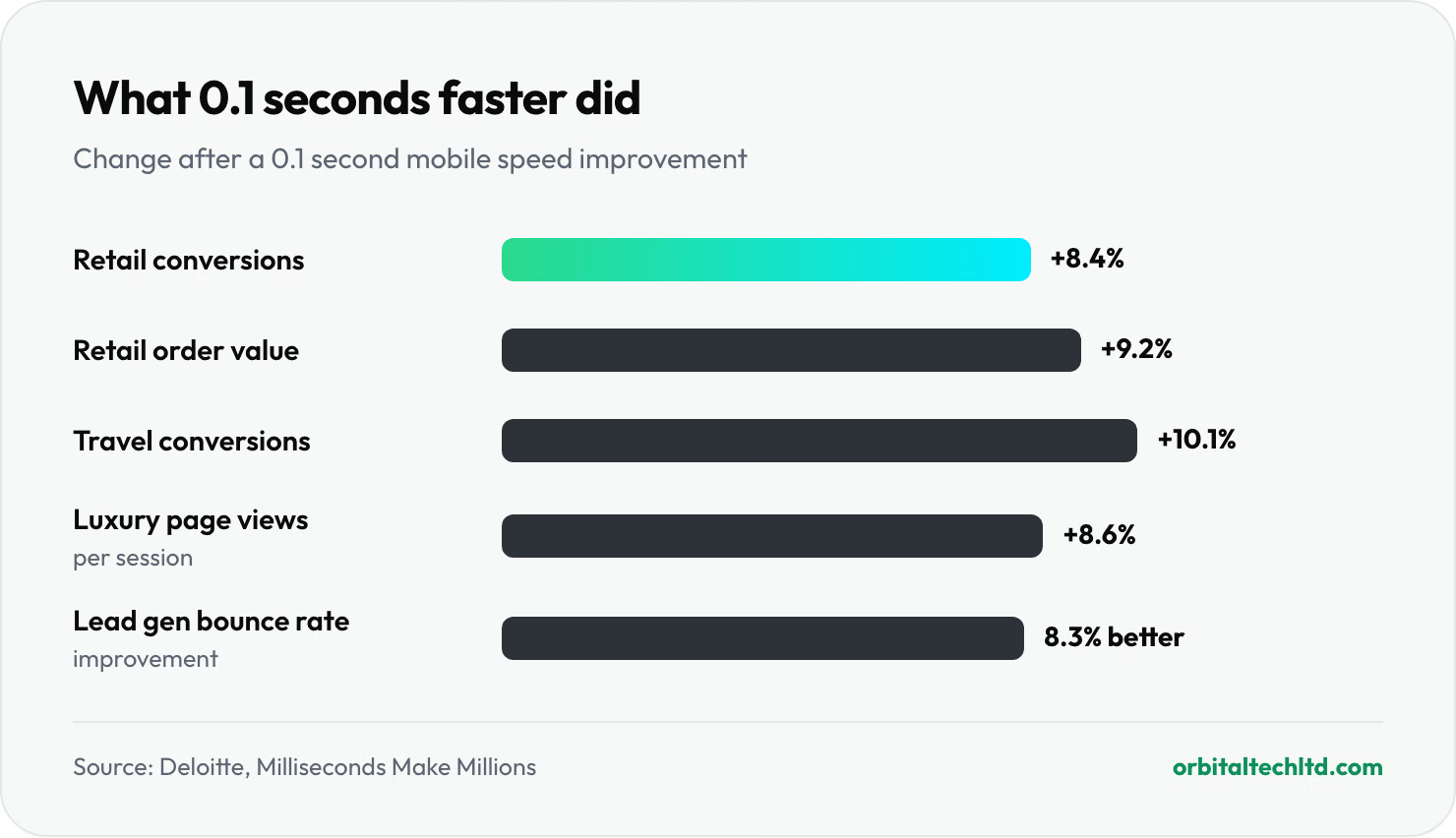
| Retail conversions after a 0.1 second faster mobile site | Up 8.4%, with order value up 9.2% | Speed work pays back in revenue, not only rankings | Deloitte, Milliseconds Make Millions |
| Vodafone's sales after a 31% better LCP | Up 8% | A controlled A/B test, not a correlation | web.dev case study |
Two of these deserve a second look. The crawl budget threshold means a 40-page business site that is "not getting crawled" almost never has a budget problem; it has a discovery or quality problem. And the JavaScript gap means that if your key copy, links or canonical tag only appear after scripts run, some crawlers will never see them.
How technical SEO helps your rankings and AI visibility
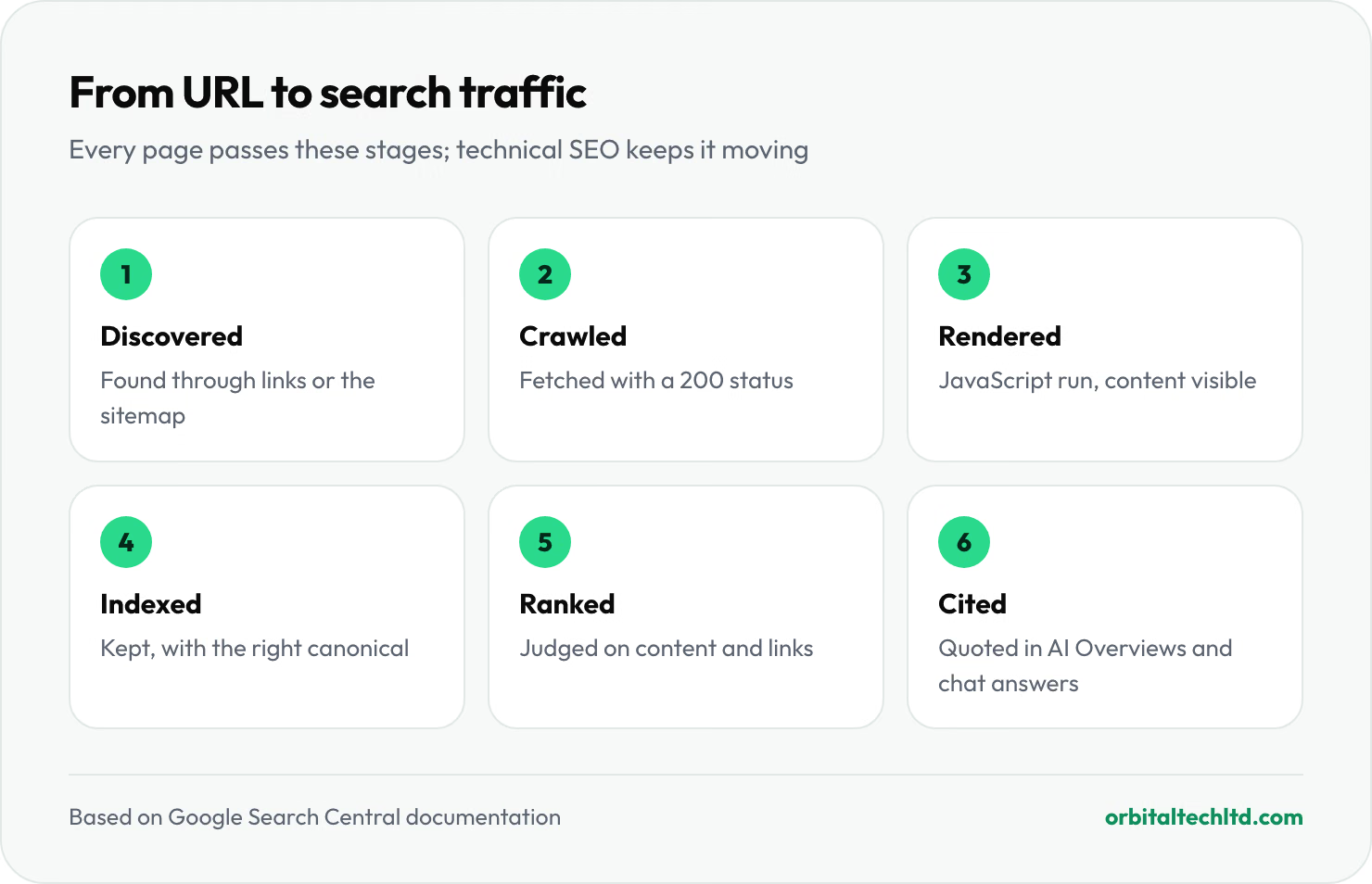
Every page goes through the same pipeline before anyone finds it in search: it is discovered, crawled, rendered, indexed and then ranked. AI search adds a sixth step, being chosen as a cited source. A technical fault at any stage stops the page there, and no amount of writing or link building gets it past.
- More of your pages count. Fixing indexing problems often recovers traffic from content you already paid for, which is why audits tend to be the cheapest win in SEO.
- Signals stop leaking. Clean canonicals and redirects mean links and relevance build up on one URL instead of being split across duplicates.
- Faster pages convert better. The Deloitte and Vodafone figures above show the gain shows up in sales, not just in a score.
- Richer results. Valid structured data makes pages eligible for review stars, breadcrumbs, product details and similar enhancements.
- AI tools can quote you. AI crawlers mostly read raw HTML, so server-rendered, well-structured pages are easier to cite.
- Fewer emergencies. Redesigns and migrations stop being traffic cliffs when someone checks redirects and indexing before launch.
The core areas of technical SEO
Most technical SEO work falls into eight areas. Here is what each covers and the one mistake we see most often in each.
- Crawlability. Robots.txt, internal links and server responses that let crawlers reach your pages. Most common mistake: a staging rule such as
Disallow: /that survives into production. - Indexability. Meta robots tags, canonicals and status codes that decide which URLs Google keeps. Most common mistake: canonical tags that point every page to the home page.
- Site architecture. URL structure, navigation and internal linking. Most common mistake: important pages reachable only through the site search box.
- Rendering. How JavaScript affects what crawlers see. Most common mistake: product copy or links injected by scripts after load.
- Speed and Core Web Vitals. Loading, responsiveness and visual stability for real users. Most common mistake: a lazy-loaded hero image, which delays the largest element on the page.
- Mobile. The phone version, which is now the only version Google indexes. Most common mistake: content or structured data that exists on desktop but is trimmed on mobile.
- Structured data. Schema.org markup in JSON-LD that labels what a page is. Most common mistake: markup describing things that are not visible on the page.
- Security and international. HTTPS, mixed content and, for multi-language sites, hreflang. Most common mistake: hreflang tags without return links, which Google ignores.
What is a technical SEO audit (and why does it matter)?
A technical SEO audit is a structured check of those eight areas, ending in a ranked list of fixes. It matters because technical problems are silent. Nobody emails you when a plugin update adds noindex to your blog or a CDN starts answering with a 302 instead of a 301. The audit is how you find out before the traffic graph tells you.
A good technical SEO audit produces three things: a list of issues grouped by template rather than by URL, a priority for each based on traffic and effort, and a named owner for every fix. A 400-row export from a crawler is not an audit; it is raw material for one.
Step-by-step guide: how to perform a technical SEO audit
This is the order we follow on client sites. It moves from "can Google reach the page at all" to "is the page as good as it can be", so you never polish something that is not indexed.
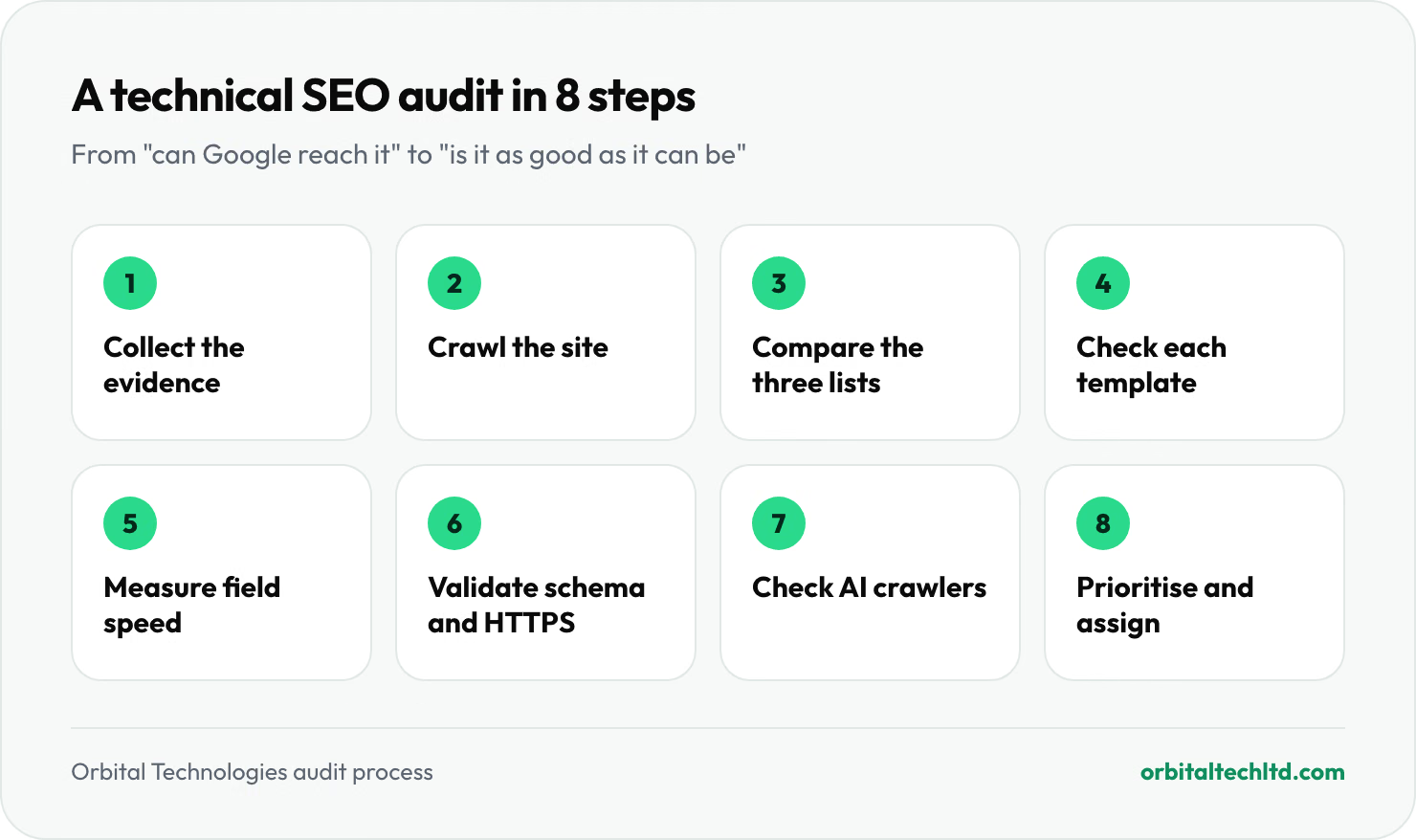
- Collect the evidence. Verify the site in Google Search Console and Bing Webmaster Tools. Export the Page indexing report, the Core Web Vitals report and the list of sitemaps. Note the date; you will compare against it later.
- Crawl the site. Run a crawler such as Screaming Frog or Sitebulb with JavaScript rendering switched on. Crawl politely: when we crawled our own site too fast, the host's firewall blocked our IP after about 250 requests, and the crawl reported the whole site as broken. Lower the speed to two or three requests a second on shared hosting.
- Compare the three lists. Put the crawled URLs, the sitemap URLs and the indexed URLs side by side. Pages in the sitemap but not crawled are orphans. Pages crawled but not in the sitemap may be duplicates. Pages in both but not indexed are your first priority.
- Check indexing signals on each template. Pick one URL per template (home, category, product, article, location) and run Search Console's URL Inspection. Confirm the Google-selected canonical matches yours and the rendered HTML contains your main content.
- Measure speed with field data. Use the Core Web Vitals report and PageSpeed Insights' field section, not just the lab score. Group failing URLs by template.
- Validate structured data and security. Run the Rich Results Test on each template and confirm every HTTP and non-www URL reaches the final HTTPS URL in one 301 hop.
- Check AI crawler access. Read your robots.txt and any CDN bot settings for GPTBot, OAI-SearchBot, ClaudeBot and PerplexityBot. Make a deliberate choice for each instead of inheriting a default.
- Prioritise and assign. Score each issue on impact and effort, fix indexing blockers first, then template-wide problems, then single pages.
For a small site this takes an afternoon. For a large store or a JavaScript web app it can take a week, mostly in step 3.
The complete technical SEO audit checklist
This condensed checklist covers the checks that catch most real problems. Each row is written as the state you want to see, so you can mark it pass or fail. If you want every check spelled out with thresholds, our technical SEO audit checklist with 45 checks goes area by area.
| Area | Pass when | Where to check |
|---|---|---|
| Robots.txt | Returns 200, blocks nothing you want ranked, lists the sitemap | yoursite.com/robots.txt, Search Console robots.txt report |
| XML sitemap | Lists only indexable, canonical URLs that return 200 | Search Console Sitemaps report, crawler |
| Status codes | No internal links to 404s, no 5xx errors, redirects in one hop | Crawler |
| Indexing | Every important page shows as indexed | Search Console Page indexing report |
| Canonicals | Each page has one self-referencing canonical, and Google agrees with it | URL Inspection |
| Noindex | Only on pages you mean to hide, such as thank-you and cart pages | Crawler |
| Internal links | Every important page is linked from at least one other page, within about three clicks of home | Crawler crawl-depth report |
| Core Web Vitals | LCP 2.5s or less, INP 200ms or less, CLS 0.1 or less for real users | Search Console, PageSpeed Insights |
| Mobile | Same content, links and schema as desktop; nothing blocked for smartphone Googlebot | URL Inspection with the live test |
| Rendering | Main copy, links and canonical present in the raw HTML | View source vs the rendered HTML in URL Inspection |
| Structured data | Valid, matches visible content, no errors on any template | Rich Results Test, Search Console Enhancements |
| HTTPS | One HTTPS version, no mixed content, HSTS in place | Browser, crawler |
| International | Hreflang tags with return links and an x-default | Crawler hreflang report |
| AI crawlers | A deliberate allow or block rule for each AI bot | robots.txt, CDN or firewall settings |
How to fix crawlability and indexation issues
Search Console tells you why a page is not indexed, but its labels are terse. This table translates the most common ones into their usual cause and the fix that works.
| Search Console status | Usual cause | Fix |
|---|---|---|
| Blocked by robots.txt | A Disallow rule matching the URL | Remove or narrow the rule, then test the URL in the robots.txt report |
| Excluded by noindex tag | A meta robots or X-Robots-Tag noindex, often from a plugin or a staging setting | Remove the tag at the template level and request indexing |
| Discovered - currently not indexed | Google knows the URL but has not crawled it yet: weak internal links, a new site or, on big sites, crawl budget | Link to the page from strong pages, keep it in the sitemap, request indexing |
| Crawled - currently not indexed | Google fetched the page and chose not to keep it, usually thin or near-duplicate content | Improve or merge the content; this is rarely a purely technical problem |
| Duplicate without user-selected canonical | Several URLs show the same content and none declares a canonical | Add a self-referencing canonical and 301 the variants |
| Duplicate, Google chose different canonical than user | Your canonical conflicts with redirects, internal links or the sitemap | Make every signal point to the same URL |
| Soft 404 | A "not found" or empty page that returns 200 | Return a real 404 or 410, or add real content |
| Server error (5xx) | Timeouts, overloaded hosting or a firewall blocking Googlebot | Check server logs and bot protection rules; upgrade hosting if errors repeat |
| Page with redirect | The URL in your sitemap or links redirects elsewhere | List the final URL instead; this status is fine for old URLs |
What worked on our own site
When we rebuilt orbitaltechltd.com in 2026, six new pages sat at "URL unknown to Google" or "Discovered - currently not indexed" for days, even though each returned 200, carried index, follow and had a self-referencing canonical. Three things fixed it. We added internal links to them from pages Google already crawled often. We resubmitted the sitemap. And we used Search Console's "Request indexing" button on each one. Submitting them through Google's Indexing API did not get them crawled, which matches Google's documentation: that API is officially for job postings and livestream pages only. Do not pay anyone to "force index" normal pages through it.
We also had dozens of URLs from the old site returning 404 in Search Console. We mapped each to its closest new page with a 301, returned 410 for pages that had no equivalent (old job adverts), and started "Validate fix" on the report. That is the pattern for any migration: redirect what has a match, retire what does not, and never send everything to the home page, which Google tends to treat as a soft 404.
Crawl budget: only a problem for big sites
Google's own guide says crawl budget matters for sites with more than a million pages that change weekly, or more than 10,000 that change daily. If that is you, Google recommends consolidating duplicates, blocking unimportant URLs such as filter combinations in robots.txt (not with noindex, which still has to be crawled), returning 404 or 410 for removed pages, fixing soft 404s, keeping lastmod dates in sitemaps honest and supporting 304 Not Modified responses. If you have 200 pages, spend the time on internal links instead.
Optimizing Core Web Vitals, page speed and mobile usability
Core Web Vitals are Google's three field measures of page experience, taken from real Chrome users at the 75th percentile. Interaction to Next Paint replaced First Input Delay in March 2024, so any guide or tool still reporting FID is out of date.
| Metric | Good | Poor | Most common causes | Fixes that usually work |
|---|---|---|---|---|
| Largest Contentful Paint (LCP): loading | 2.5s or less | Over 4s | Slow server response, lazy-loaded or oversized hero image, render-blocking CSS | Better hosting or a CDN, fetchpriority="high" on the hero image, AVIF or WebP, inline critical CSS |
| Interaction to Next Paint (INP): responsiveness | 200ms or less | Over 500ms | Heavy JavaScript, third-party tags, long tasks on click | Remove unused scripts, delay chat and tracking tags, break up long tasks |
| Cumulative Layout Shift (CLS): stability | 0.1 or less | Over 0.25 | Images without dimensions, late banners, web fonts swapping | Set width and height on media, reserve space for ads and banners, preload fonts |
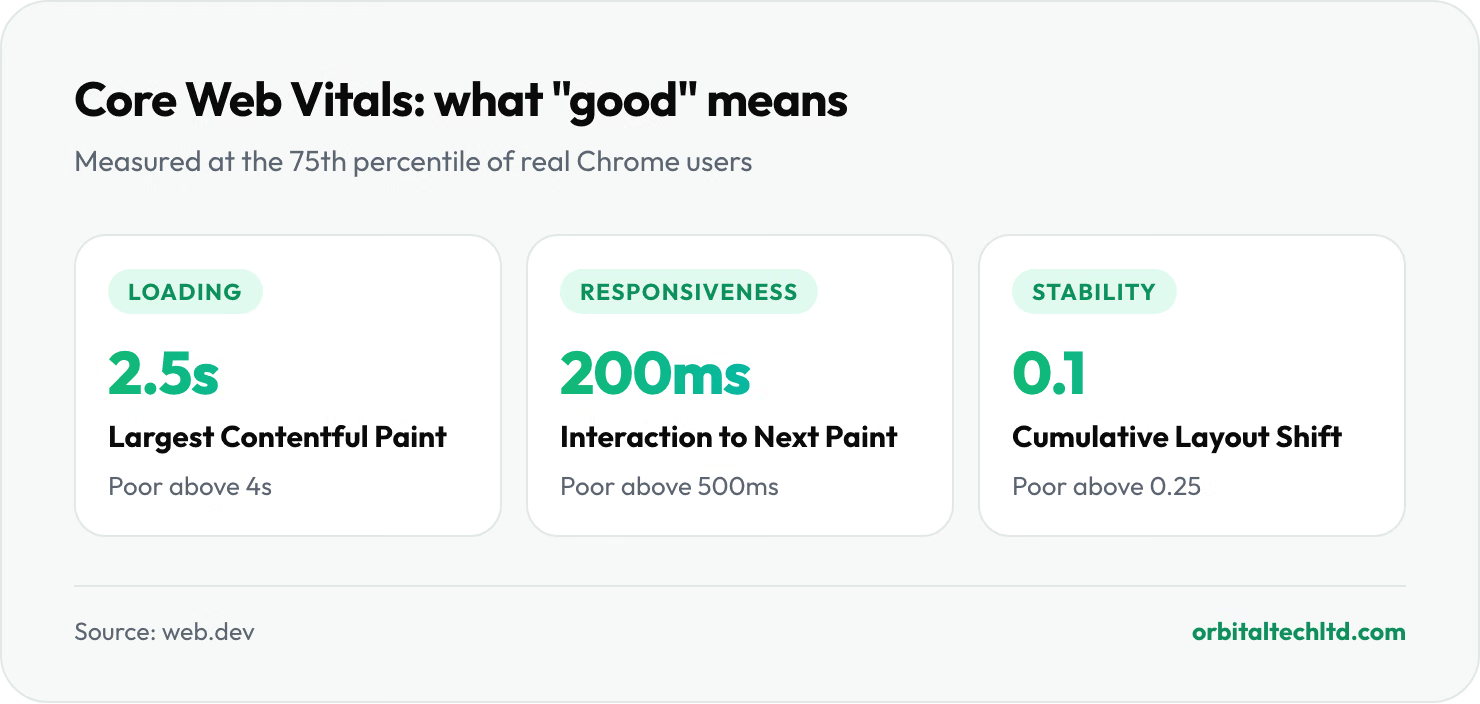
Start with server response time. If the first byte takes over a second, no amount of image compression will get LCP under 2.5 seconds. On the sites we work on, moving from budget shared hosting to a properly cached setup is often the single biggest speed gain, bigger than any plugin.
Mobile usability after mobile-first indexing
Google finished moving the last sites to smartphone crawling after 5 July 2024, so the mobile version of your site is the one that gets indexed and ranked. Google also retired its standalone Mobile-Friendly Test and the Mobile Usability report in December 2023, which is why older audit guides that still send you there no longer work. Use Lighthouse in Chrome DevTools and the live test in URL Inspection instead, and check three things: the same content and internal links appear on mobile as on desktop, tap targets are not crammed together, and no pop-up covers the main content on arrival.
JavaScript, structured data and AI crawlers
This is where technical SEO has changed most in the last two years, and where most competitor guides stop short.
JavaScript. Google renders JavaScript, but later and with limits. Many AI crawlers do not render it at all. The Web Almanac found that the median mobile home page has 316 words in its raw HTML and 378 once JavaScript has run. If your product descriptions, prices, internal links or canonical tags live in those extra words, render them on the server.
Structured data. Only half of pages use any schema. Add Organization and WebSite markup on the home page, BreadcrumbList across the site, and the type that matches each template: Article, Product, LocalBusiness or FAQPage. Keep the markup in JSON-LD and keep it truthful; markup that describes content the visitor cannot see risks a manual action.
AI crawlers. OpenAI uses GPTBot to gather training data and OAI-SearchBot to fetch pages for ChatGPT search answers. Blocking the first does not block the second, and the reverse is also true. Decide which you want, write the rules, then check that your CDN or firewall is not silently blocking them anyway. Our guide to AI search optimization covers the content side of being cited.
Technical SEO on Wix vs WordPress: who controls what
Your platform decides how much technical SEO you can do yourself. The difference shows up clearly in Google's own field data.
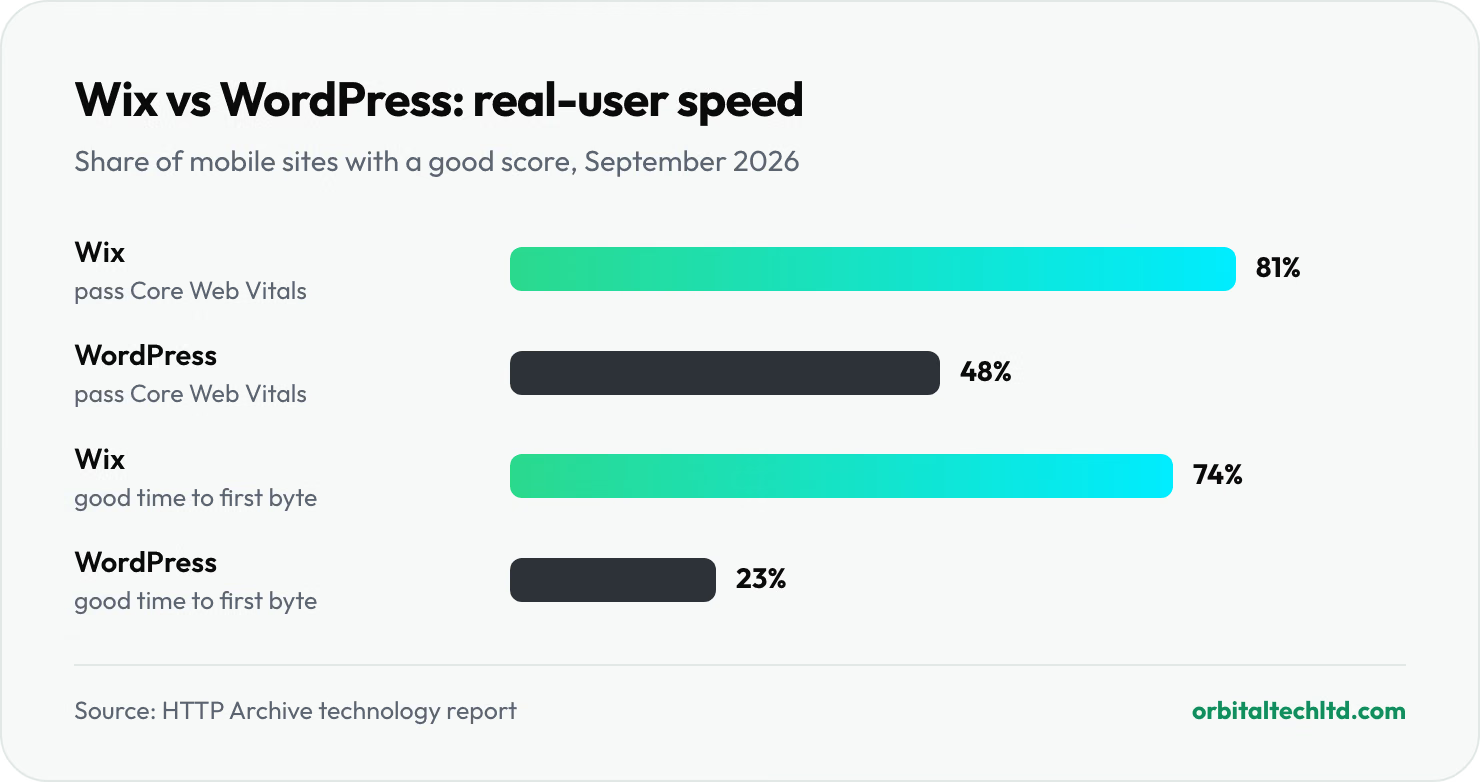
In the HTTP Archive technology report for September 2026, 81% of Wix sites passed all three Core Web Vitals on mobile against 48% of WordPress sites. Only 23% of WordPress sites had a good time to first byte, against 74% of Wix sites. Wix runs every site on the same tuned hosting; WordPress speed depends on whoever chose the host and the theme.
- On Wix the platform handles hosting, HTTPS, the sitemap and most speed work, and you can edit robots.txt, redirects, canonicals and structured data. You cannot change the server, the rendering or file names, so technical SEO is mostly about using the settings well.
- On WordPress you control everything, which cuts both ways. A lean theme on good hosting with caching passes Core Web Vitals easily. A heavy page builder on budget hosting is how sites end up in the 52% that fail. Plugins such as Yoast SEO or Rank Math handle sitemaps, canonicals and schema; hosting and caching are on you.
Our full Wix vs WordPress comparison goes through cost, design and ecommerce as well as SEO.
Best technical SEO audit tools (free and paid)
You can run a solid audit on a small site for nothing. Paid tools earn their price on bigger sites, regular monitoring and client reporting. Prices below were checked on each vendor's pricing page in October 2026.
| Tool | Price | Best for | Limits to know |
|---|---|---|---|
| Google Search Console | Free | Indexing status, real-user Core Web Vitals, URL Inspection | Only your own verified sites; data is sampled and delayed a few days |
| Bing Webmaster Tools | Free | A second index view, site scan, IndexNow submissions | Bing data only, though Bing's index also powers Microsoft Copilot |
| PageSpeed Insights and Lighthouse | Free | Field and lab speed data per URL, with fix suggestions | One URL at a time |
| Rich Results Test | Free | Validating structured data per template | Checks Google-supported types only |
| Ahrefs Webmaster Tools | Free | Site audit and backlink data for sites you verify | Your own sites only |
| Screaming Frog SEO Spider | Free up to 500 URLs; £199 a year | Deep desktop crawls, JavaScript rendering, custom extraction | Runs on your machine; a learning curve |
| Sitebulb | Desktop plans, Cloud from £95 a month | Clear, prioritised audit reports that non-specialists can read | Cloud is priced for agencies and large sites |
| Semrush | SEO plan $139 a month; limited free plan | Scheduled site audits alongside keyword and competitor research | Crawl limits depend on plan |
| Ahrefs | Lite $129 a month, Standard $249 | Site audit plus the strongest backlink and keyword gap data | Usage-based limits on lower plans |
Keyword research and gap analysis tools: where they fit
Keyword tools are not technical SEO tools, but they decide which pages your technical work should protect first. Two kinds of gap analysis are worth running together:
- Keyword gap. Ahrefs' Content Gap or Semrush's Keyword Gap compares your domain with two or three competitors and lists the searches that send them traffic but not you. The benefit is a content plan built on proven demand rather than guesses.
- Technical gap. Run PageSpeed Insights and a short crawl on the competitors that outrank you. If they pass Core Web Vitals and you do not, or their category pages carry schema and yours do not, you have found a technical edge to close.
Which tool to use when
| Your situation | Use this |
|---|---|
| A small business site under 500 pages | Search Console, PageSpeed Insights and the free Screaming Frog |
| A site that is losing traffic and you do not know why | Search Console's Page indexing report first, then a full crawl |
| An online store with filters and thousands of URLs | Screaming Frog paid or Sitebulb, plus server log analysis |
| Monthly monitoring across several sites | Semrush or Ahrefs scheduled audits |
| Planning new content against competitors | Ahrefs or Semrush keyword gap reports |
| Checking AI crawler access | Your robots.txt, CDN bot settings and server logs |
Can ChatGPT do an SEO audit?
Not on its own. ChatGPT and other assistants cannot crawl your whole site, see your Search Console data or measure what real visitors experience, and those are the three sources a technical SEO audit is built on. Where they do help is in the middle of an audit: explaining an unfamiliar status in Search Console, checking a robots.txt you paste in, writing redirect rules, turning a crawler export into a summary or drafting the fix list. Treat every rule they quote as a lead to confirm against Google's documentation, because assistants still recommend retired tools such as the Mobile-Friendly Test.
Technical SEO services: do it yourself or hire a technical SEO agency?
Most small sites can handle their own technical SEO with free tools. Bring in help when the fixes reach into code or the stakes rise.
- Do it yourself if you run a site of under a few hundred pages on WordPress, Wix or Shopify. The fixes are mostly settings. Our guide to SEO for small business covers what comes next.
- Hire a freelancer or developer when fixes touch templates, server rules or speed work beyond image compression.
- Hire a technical SEO agency for large stores, international sites, JavaScript web apps, a falling traffic graph you cannot explain, or any site migration.
Good technical SEO services share a few traits. The agency asks for Search Console access before quoting. The audit groups issues by template and ranks them by traffic at risk. Someone can actually ship the fixes, or work directly with your developer. And the report says what not to fix. Be wary of anyone promising a site health score of 100, guaranteed indexing or rankings, or "instant indexing" through Google's Indexing API.
On price, Ahrefs' survey of SEO providers found the most common fee for a one-off SEO project was $2,501 to $5,000. Our guide to how much SEO costs breaks down audits, retainers and what each budget buys.
3 expert tips for technical SEO that sticks
- Check redirects at the edge, not just in your app. We found our own HTTP to HTTPS redirect was a 302 coming from the CDN in front of the server, not from our code, so no change to the site could fix it. Test with
curl -I http://yoursite.comand read the very first response. - Make technical SEO part of every release. Save a crawl before each deploy and compare titles, canonicals, status codes and noindex tags afterwards. Most technical SEO disasters are a single release that nobody checked.
- Read your firewall rules once a quarter. Bot protection that blocks an aggressive crawler can also block Googlebot or an AI crawler on a bad day. If Search Console shows server errors you cannot reproduce, look at the firewall log before the code.
Our verdict
Technical SEO is not glamorous, but it is the part of SEO with the most predictable payback: you fix what stops pages being found, and the traffic those pages already deserved arrives. Start with Google's three minimum requirements, run a technical SEO audit in the order above, fix indexing before speed and speed before polish, and give AI crawlers a deliberate rule. Then repeat a light check every month.
If you would rather hand it over, every engagement on our SEO services starts with a technical SEO audit, and because our web development team sits in the same company, the fixes get shipped instead of filed. For online stores, our ecommerce SEO work covers faceted navigation and product schema in depth.