Short answer: a simple web app or MVP typically costs $15,000 to $90,000 to build, a customer portal or internal tool with integrations $20,000 to $150,000, and a full SaaS product $40,000 to $300,000 or more. These ranges come from the hours each type of app takes, which we break down below, so you can check any quote against them.
A web app is software that runs in the browser: people log in, enter data and get work done, rather than just reading pages. Think customer portals, booking systems, internal dashboards and SaaS products. That makes it a different kind of project from a marketing website. If you need a website rather than an app, our guide to how much a website costs is the better place to start.
Web app costs at a glance
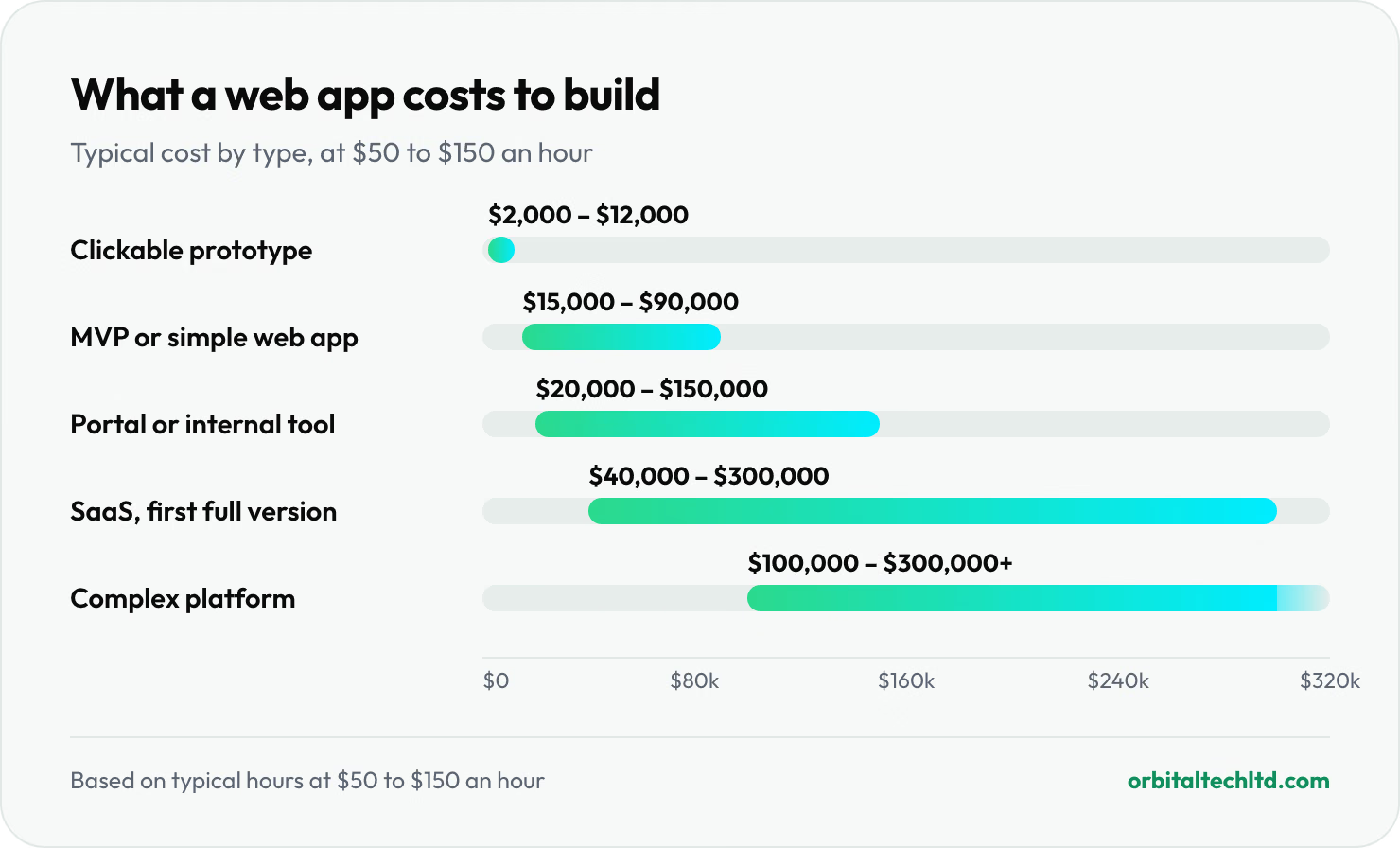
Web app development is paid for in hours. For a reference point on rates, the median wage for software developers, QA analysts and testers in the US was $64.44 an hour in May 2025, according to the US Bureau of Labor Statistics. That is what employees earn. Agencies and freelancers charge for overheads, project management and testing too, and rates vary widely by location: teams in lower-cost countries often charge under $50 an hour, while US agencies can charge well above $150. We use $50 to $150 below as a middle range.
The hours are our estimates of what each type of app takes to design, build, test and launch:
| Type of web app | Typical hours | At $50 an hour | At $150 an hour |
|---|---|---|---|
| Clickable prototype (no working back end) | 40 to 80 | $2,000 | $12,000 |
| MVP or simple web app | 300 to 600 | $15,000 | $90,000 |
| Customer portal or internal tool with integrations | 400 to 1,000 | $20,000 | $150,000 |
| SaaS product, first full version | 800 to 2,000 | $40,000 | $300,000 |
| Complex platform, such as a marketplace | 2,000+ | $100,000+ | $300,000+ |
An MVP here means a first version with sign-up and login, the handful of screens that prove the idea, one or two integrations and a basic admin area. A first full SaaS version adds things like team accounts with roles, subscription billing, onboarding, settings and reporting. Our guide to MVP development cost breaks MVPs down further, from a landing page test to a mobile or AI MVP.
What drives the cost of a web app
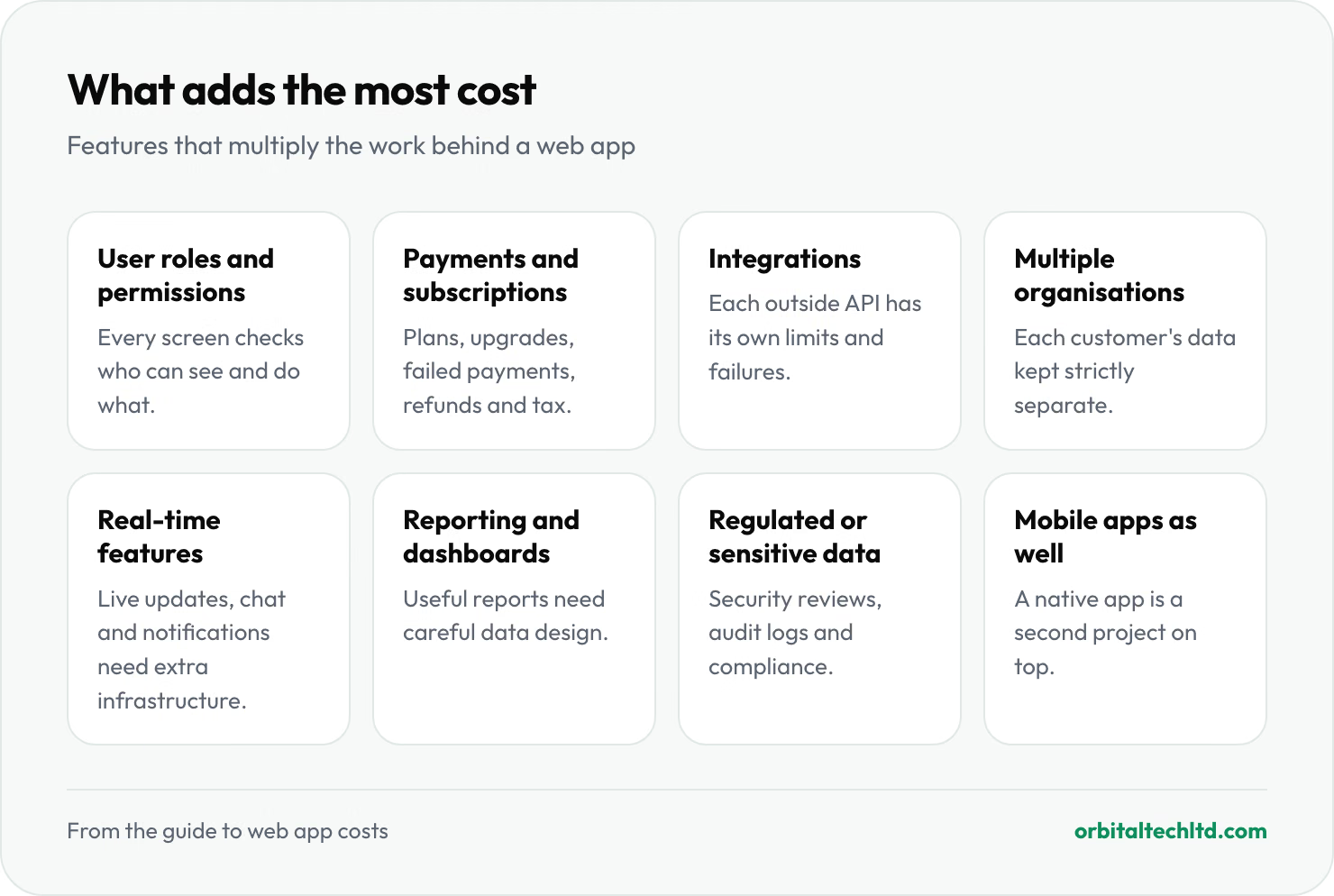
The biggest factor is scope: how many features, and how complicated each one is. These are the features that add the most hours:
| Feature | Why it adds cost |
|---|---|
| User roles and permissions | Every screen and action has to check who is allowed to see and do what |
| Payments and subscriptions | Plans, upgrades, failed payments, refunds, invoices and tax all need handling |
| Integrations | Each outside system has its own API, limits and failure cases to handle |
| Multiple organisations in one app | Each customer's data must be kept strictly separate from everyone else's |
| Real-time features | Live updates, chat and notifications need extra infrastructure |
| Reporting and dashboards | Useful reports need careful data design, not just charts |
| Regulated or sensitive data | Health, financial or personal data brings security reviews, audit logs and compliance work |
| Mobile apps as well | A native iOS and Android app is a second project on top of the web app |
Design matters too. An internal tool for ten staff can use a standard component library and still work well. A product you sell to customers needs proper user experience design, because the interface is what they are paying for.
How to keep the cost down
- Cut the first version hard. List every feature, then keep only what proves the idea or does the core job. Most first versions are built with too much, and the extra features delay the moment you learn what users actually want.
- Buy what you can. Use existing services for payments, email, authentication and search instead of building them. Stripe, for example, charges 2.9% + 30¢ per successful domestic card payment with no monthly fee, which is far cheaper than building and maintaining your own payment handling.
- Use mainstream technology. Popular frameworks such as Laravel, React and Next.js have large pools of developers, so you are not locked into one team and can hire later.
- Agree a fixed scope before building. Changes are cheapest on paper. A written scope with milestones stops costs drifting.
- Prototype first if you are unsure. A clickable prototype costs a fraction of a build and lets you test the idea with real users before committing.
Is it cheaper to build an app yourself?
In cash, yes, if you or a co-founder can code. No-code tools can also take you a long way for simple apps, especially internal tools and early prototypes. The costs show up elsewhere: your time, the months it takes to learn, and limits you hit later. Many teams start with no-code or a prototype, prove there is demand, and then pay for a proper build once they know what to build.
What a web app costs to run
The build is not the last bill. Budget for:
- Hosting and infrastructure: servers, database, file storage and backups. A small app can run on tens of dollars a month; costs grow with users and data.
- Third-party services: email delivery, error monitoring, search, maps, AI models and payment fees, often priced per use.
- Maintenance: security updates, framework upgrades, bug fixes and keeping integrations working when other companies change their APIs. A common rule of thumb is to budget 15 to 20% of the original build cost each year; treat it as a starting point, not a quote.
- New features: once people use the app, they will ask for more. Most successful apps keep a developer or team working on them.
How web app pricing works
- Fixed price for an agreed scope. You know the cost upfront. It works best when the scope is well defined, and changes are priced separately.
- Time and materials. You pay for hours worked. Flexible when requirements are still changing, but you carry more of the budget risk.
- A dedicated team each month. A fixed monthly cost for a team that keeps building. Suits products that will be developed continuously.
Questions to ask before you hire
- Who owns the code and the accounts it runs on? You should, from day one.
- Will I see working software regularly? Demos every week or two are the best protection against surprises.
- What does the quote include? Design, testing, deployment, documentation and support after launch are often left out.
- What happens if the scope changes? Ask how changes are estimated and approved.
- Can another developer take this over? Mainstream technology, clean code and documentation keep you free to change teams.
Web app development at Orbital
Every project starts with a week of discovery, and within 72 hours of that you get a written plan with the scope, milestones, technology and a costed estimate you can hold us to. We then build in two-week sprints with a demo each time. You own the code and the accounts it runs on.
We price builds either as a fixed price for an agreed scope or monthly for a dedicated team, and send a written quote within one business day of understanding what you need. See our custom software development services for portals, internal tools and SaaS products, or MVP development if you are testing a new idea.