Short answer: a technical SEO audit checks whether search engines can find, crawl, render and index your pages, and whether those pages load fast and work on phones. This checklist covers 35 checks in nine steps, in the order we run them. You can do most of it with free tools in an afternoon for a small site.
Technical SEO is the foundation the rest of your SEO sits on. Great content will not rank if Google cannot index it, and links pointing at a page that redirects three times lose some of their value on the way. Fix the foundations first, then invest in content and links.
Tools you need
- Google Search Console (free). The only place to see how Google itself crawls and indexes your site. If it is not set up, start there.
- PageSpeed Insights (free). Core Web Vitals from real Chrome users, plus a lab test of a single page.
- A site crawler. Screaming Frog's free version crawls up to 500 URLs, which covers most small sites. Ahrefs and Semrush both have site audit tools for larger sites.
- Google's Rich Results Test (free), for checking structured data.
Crawl the whole site first, then work through the steps below with the crawl and Search Console open side by side.
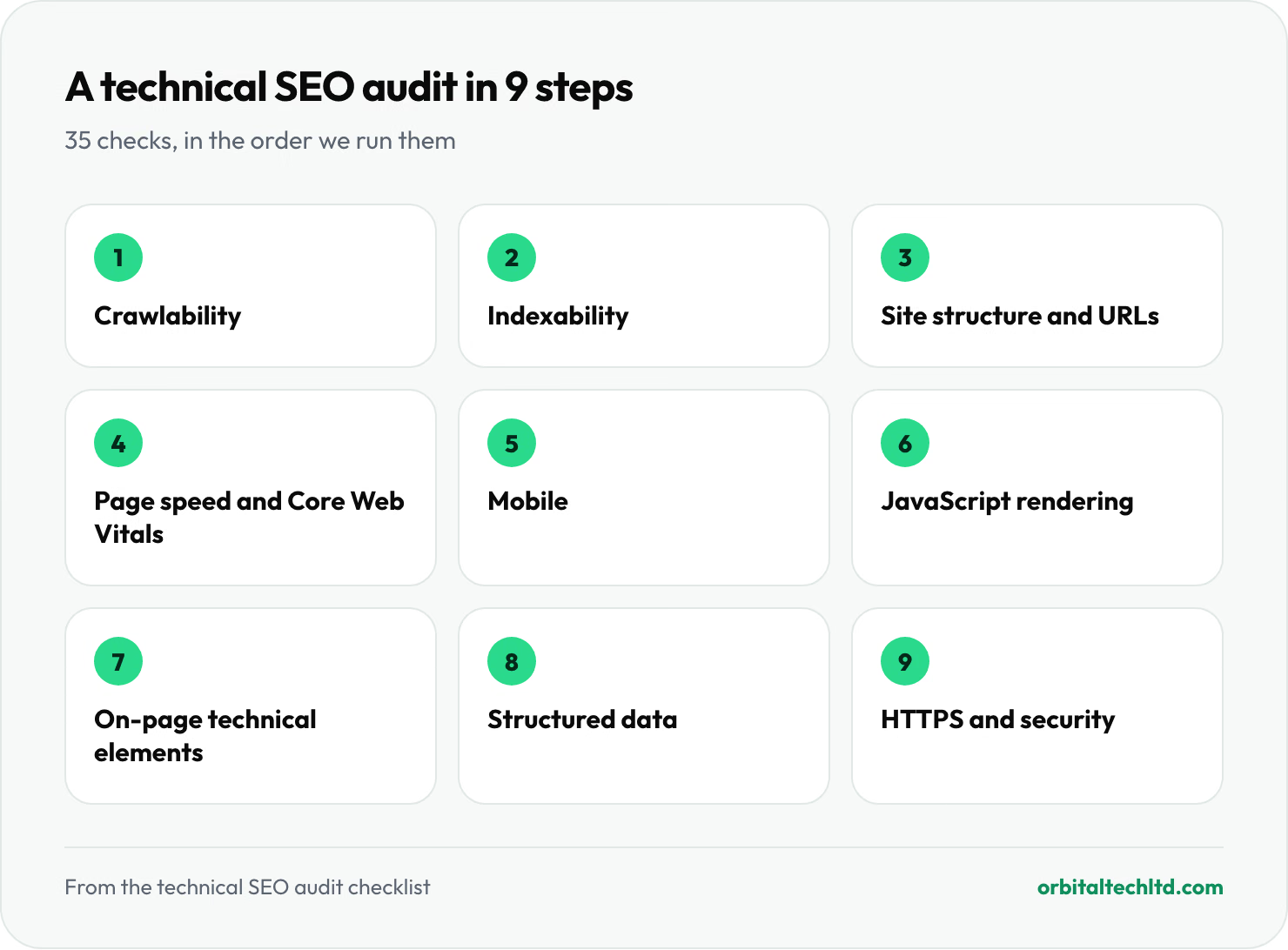
Step 1: Crawlability
Can search engines reach every page that matters?
- robots.txt is not blocking important pages. Open
yoursite.com/robots.txtand check that no rule blocks sections you want in search, along with the CSS and JavaScript files your pages need to render. - An XML sitemap exists and is submitted. Check it is listed in robots.txt and submitted in Search Console, and that Search Console reports it as read successfully.
- The sitemap only lists pages you want indexed. Every URL in it should return a 200 status, be indexable and be the canonical version. Redirects, 404s and noindexed pages do not belong there. One sitemap can hold up to 50,000 URLs or 50MB; larger sites need several.
- Important pages are a few clicks from the home page. Use your crawler's crawl depth report. Pages buried five or six clicks deep tend to be crawled less often and rank worse.
- No orphan pages. Compare the URLs in your sitemap with the URLs your crawler found through links. A page with no internal links pointing to it is hard for search engines and visitors to find.
A common mistake: robots.txt does not keep a page out of Google. Google's own documentation says it is "not a mechanism for keeping a web page out of Google". A blocked page can still be indexed if other sites link to it. To keep a page out of search results, use a noindex tag instead.
Step 2: Indexability
Of the pages search engines can reach, are the right ones being indexed?
- Review the Page indexing report in Search Console. Look at the reasons pages are not indexed. "Crawled, currently not indexed" on important pages usually means Google sees them as low value or too similar to other pages.
- noindex is only used where you mean it. Filter your crawl for noindexed pages. A stray noindex left over from a staging site is one of the most common causes of sudden traffic loss.
- Canonical tags point to the right URL. Every indexable page should have a canonical tag pointing to itself, or to the preferred version if it is a duplicate. Canonicals pointing at redirects, 404s or noindexed pages send mixed signals.
- Duplicate versions of your site resolve to one.
httpandhttps,wwwand non-www, and trailing slash and no trailing slash should all redirect to a single version. Google treats a redirect as a stronger canonical signal than a canonical tag. - URL parameters are under control. Sorting, filtering and tracking parameters can create thousands of near-duplicate URLs. Check that these either canonicalize to the clean URL or are not linked internally.
Step 3: Site structure and URLs
- No broken internal links. Every internal link returning a 404 wastes crawl time and frustrates visitors. Fix the link or redirect the old URL.
- No redirect chains or loops. A link should reach its destination in one hop. Update internal links to point straight at the final URL.
- URLs are short and readable.
/services/seois better than/index.php?page=27&cat=4. Do not change working URLs just for this, but get it right on new pages. - Breadcrumbs reflect the site's structure. They help visitors and search engines understand where a page sits, and can appear in search results when marked up with structured data.
Step 4: Page speed and Core Web Vitals
Use the Core Web Vitals report in Search Console for field data from real visitors, then PageSpeed Insights to dig into individual templates. Google measures each metric at the 75th percentile of page loads, separately for mobile and desktop.
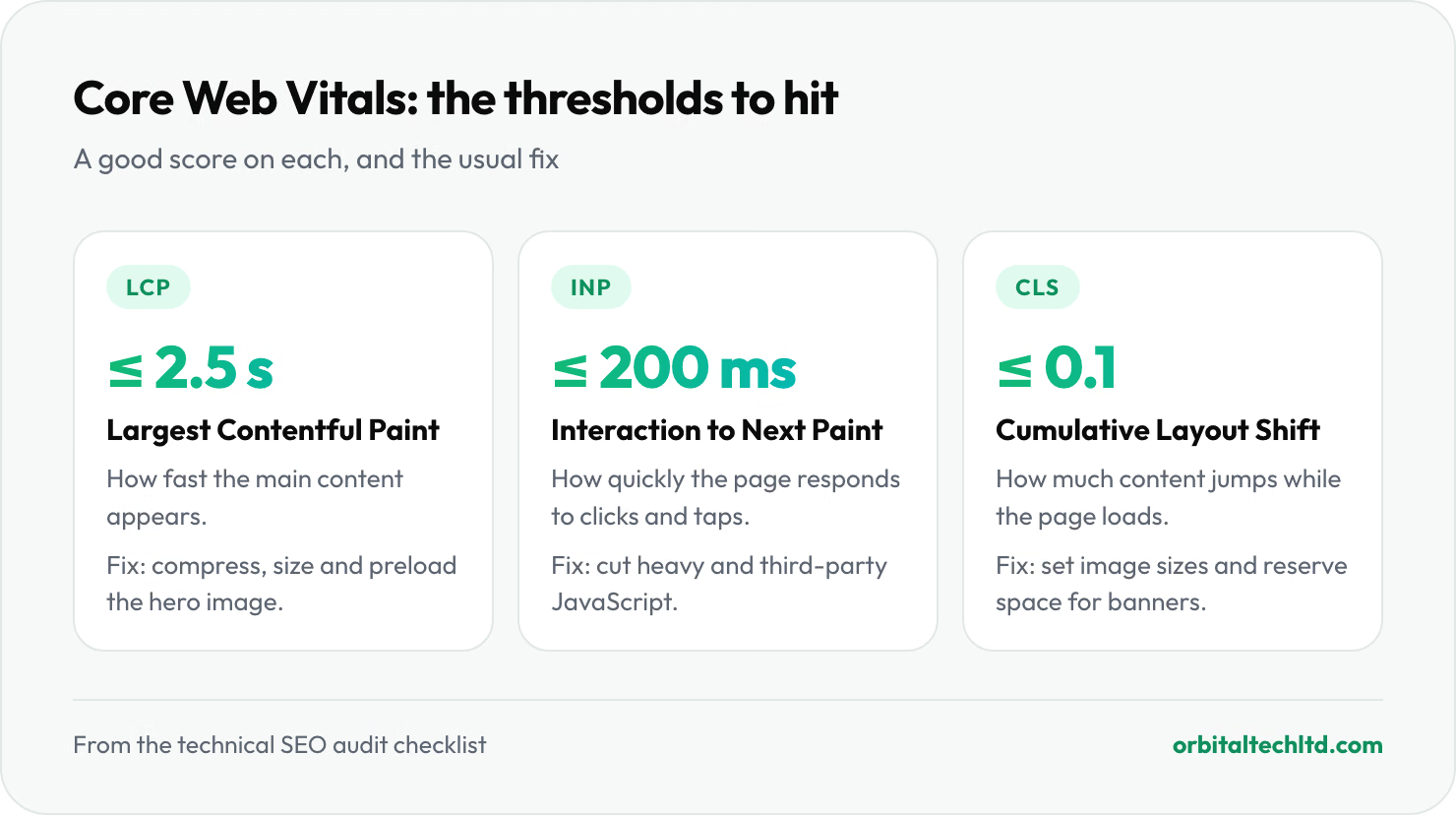
- Largest Contentful Paint (LCP) is 2.5 seconds or less. Usually a large hero image or heading. Fix it by compressing and correctly sizing the image, serving it in a modern format such as AVIF or WebP, and preloading it.
- Interaction to Next Paint (INP) is 200 milliseconds or less. INP replaced First Input Delay in 2024 and measures how quickly the page responds to clicks and taps. Heavy JavaScript, especially third-party scripts, is the usual cause of a poor score.
- Cumulative Layout Shift (CLS) is 0.1 or less. Content jumping as the page loads. Set width and height on images and embeds, and reserve space for banners and ads.
- The server responds quickly. A slow time to first byte holds back every other metric. Caching, a CDN and better hosting are the usual fixes.
Step 5: Mobile
Google indexes and ranks the mobile version of your pages, so this is where problems cost the most.
- The mobile version has the same content as desktop. Text, images, structured data and internal links hidden or removed on mobile may as well not exist for Google.
- Pages fit the screen. No sideways scrolling, readable text without zooming, and buttons large enough to tap.
- No intrusive pop-ups on arrival. Full-screen interstitials that cover the content when someone lands from search are a poor experience on a phone.
Step 6: JavaScript rendering
- Google sees your main content. Use the URL Inspection tool in Search Console and view the rendered HTML. If the main text is missing, Google is not seeing it either.
- Links are real links. Search engines follow
<a href>links. Navigation built from buttons or click handlers without anhrefmay not be followed. - Lazy-loaded content still appears. Content that only loads on scroll or click should be present in the rendered HTML, or Google may never see it.
Step 7: On-page technical elements
- Every page has a unique title tag. Around 50 to 60 characters, describing the page and including its main topic. Your crawler will list missing and duplicate titles.
- Every page has a unique meta description. It does not affect rankings directly, but a clear one improves click-through from search results.
- One H1 per page. It should say what the page is about, and headings below it should follow a logical order.
- Images have descriptive alt text. It helps visitors using screen readers and helps images appear in image search.
- hreflang is correct on multilingual sites. Each language version should reference all the others and itself. Skip this check if your site is in one language.
Step 8: Structured data
- Structured data is valid. Run key templates through the Rich Results Test and check the Enhancements reports in Search Console for errors.
- It matches what is on the page. Marking up reviews, prices or FAQs that visitors cannot see goes against Google's guidelines.
- The basics are in place. Organization markup on the home page and breadcrumb markup on inner pages help search engines understand who you are and how your site fits together. JSON-LD is the format Google recommends.
Step 9: HTTPS and security
- The whole site runs on HTTPS with a valid certificate, and every
httpURL redirects to itshttpsversion. - No mixed content. Images, scripts and stylesheets loaded over
httpon anhttpspage trigger browser warnings and can be blocked. - No security issues in Search Console. Check the Security issues report. A hacked site or malware warning will wipe out traffic faster than any other problem on this list.
How to prioritise what you find
A first audit on an established site often turns up hundreds of issues. Most do not matter much. Sort them by impact and effort:
- Fix first: anything stopping important pages being indexed, such as stray noindex tags, robots.txt blocks, broken canonicals and server errors. One fix can recover a whole section of the site.
- Fix next: problems across a template, such as slow product pages or missing titles on every blog post. Fixing the template fixes every page that uses it.
- Fix when you can: one-off issues on low-traffic pages, such as a missing alt tag or a long title.
Re-run the crawl after each round of fixes to confirm they worked, and annotate the date in your analytics so you can see the effect later.
How often to run a technical SEO audit
Run a full audit once a year, and a lighter check every month: Search Console's indexing, Core Web Vitals and security reports, plus a crawl for new broken links. Always run a full audit before and after a redesign, a platform migration or a URL change. Those are the moments sites most often lose traffic.
Can ChatGPT do an SEO audit?
Partly. AI assistants are good at explaining what an issue means and suggesting fixes for code you paste in. They cannot crawl your whole site, see your Search Console data or measure real-user Core Web Vitals, which is where most technical problems show up. Use them alongside the tools above, not instead of them.
Doing it yourself or getting help
A small site on a mainstream platform can follow this checklist in-house. A large site, an ecommerce store with filters and thousands of products, or a JavaScript-heavy web app usually needs a developer to fix what the audit finds, not just someone to find it. If you are weighing up the cost, our guide to how much SEO costs covers what audits and retainers typically run. The same fixes decide whether AI tools can quote you, which our guide to getting cited in AI search covers step by step.
Every engagement on our technical SEO services starts with this audit, and our own developers ship the fixes.