Short answer: to hire Shopify developers well, write down the job first (a theme tweak, a new store, a migration or an integration), then shortlist three to five people from Shopify's Partner Directory, a freelance marketplace or a referral. Check live stores they have built on your phone, ask the questions below, and agree a written scope with milestones before anyone touches your store. On Upwork, Shopify developers charge a median of $15 to $29 an hour, with experts around $95. A customised theme usually costs $500 to $9,000, and a fully custom theme $3,000 to $45,000, depending on who builds it and how many hours it takes.
Shopify makes it possible to open a store without writing code, and plenty of merchants never need a developer. You need one when the store has to look like your brand rather than a template, connect to systems Shopify does not handle on its own, or load faster than an app-heavy theme allows. This guide covers how to hire a Shopify developer: what a Shopify developer or Shopify expert actually does, what each route costs in 2026, where to find good people, and the questions that separate a careful developer from a risky one. Every figure was checked in October 2026 and links to its source.
Hire Shopify developers in 2026: the numbers that matter
Most hiring guides quote one rate and move on. These are the figures that actually shape your budget and your risk when you hire Shopify developers, side by side.
| Measure | Figure | Source |
|---|---|---|
| Median hourly rate for Shopify developers on Upwork | $15 to $29 | Upwork, Oct 2026 |
| Typical Upwork rate by level | Beginner $15, intermediate $33, expert $95 an hour | Upwork, Oct 2026 |
| Client rating of Shopify developers on Upwork | 4.8 out of 5, from 45,035 reviews | Upwork, Oct 2026 |
| Median pay of US web developers and digital designers | $99,520 a year, or $47.85 an hour | US Bureau of Labor Statistics, May 2025 |
| Starting monthly retainers at 12 Shopify agencies | $1,500 to $7,500 | Sōvyn agency roundup, 2026 |
| Shopify plans | $19 to $299 a month billed yearly; Plus from $2,300 | Shopify pricing |
| Shopify stores passing Core Web Vitals on mobile | 76% (339,538 of 445,297 stores) | HTTP Archive, Sep 2026 |
| Shopify Scripts switched off | June 30, 2026, replaced by Shopify Functions | Shopify Help Center |
| Collaborator access left unused | Expires automatically after 90 days | Shopify Help Center |
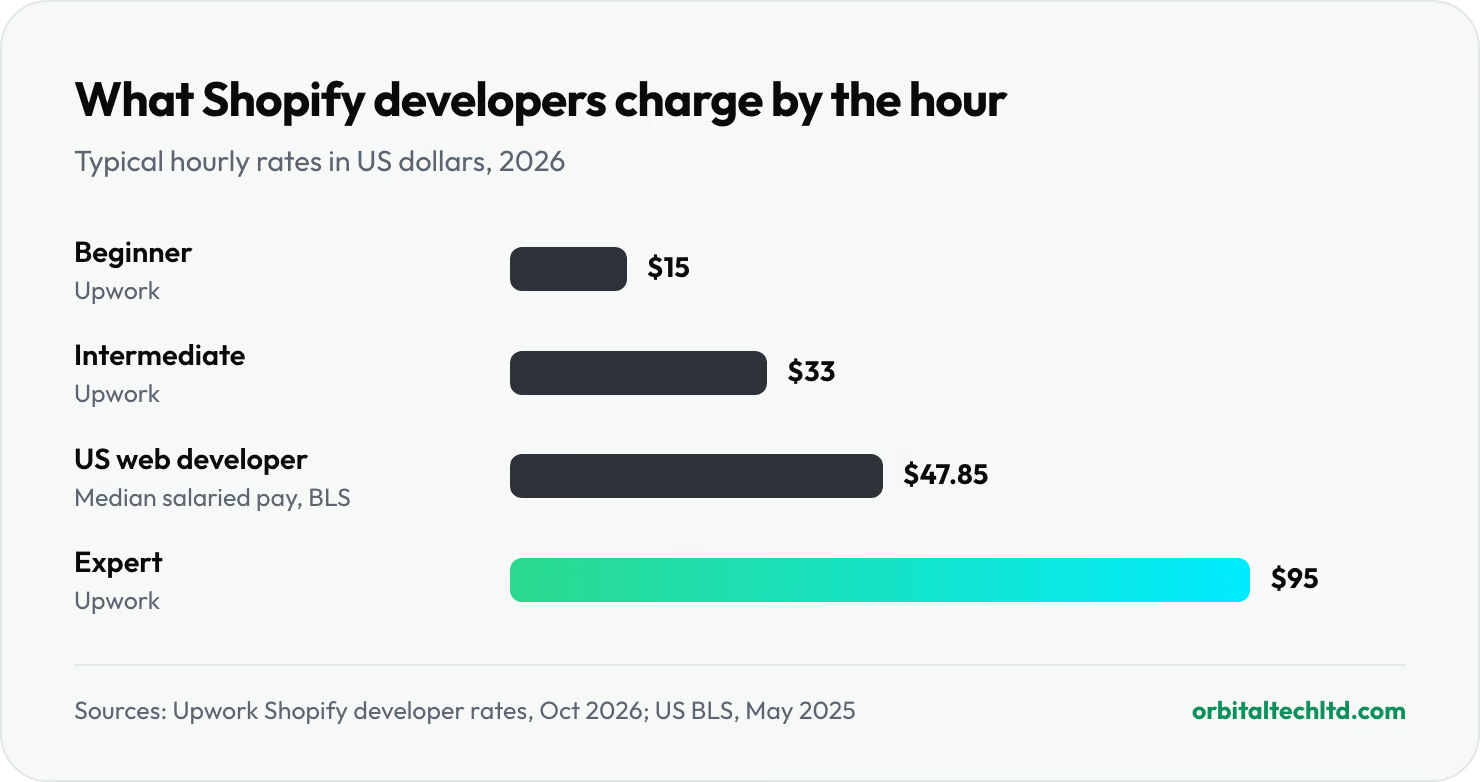
Two numbers stand out. First, the spread: an expert on the same marketplace charges about six times a beginner's rate, and on a 100 hour build that is the difference between $1,500 and $9,500. Second, one in four Shopify stores still fails Google's Core Web Vitals on phones even though Shopify hosts them all on the same fast infrastructure. That gap is usually the theme and the apps, which is exactly the work you are paying a developer to get right.
What does a Shopify developer do?
A Shopify developer builds, changes and maintains stores on Shopify. The work is written in Liquid, Shopify's template language, plus HTML, CSS and JavaScript, and for bigger jobs it uses Shopify's APIs, Shopify Functions and the Hydrogen framework. Most requests fall into one of seven types:
| Type of work | What it involves | When you need it |
|---|---|---|
| Store setup | Products, collections, payments, shipping, taxes and an existing theme configured | Launching your first store |
| Theme customisation | Changing an existing theme's layout, sections and styles | The theme is close, but not quite right |
| Custom theme development | A theme designed and built from scratch for your brand | Your brand and conversion rate matter more than speed to launch |
| Apps and integrations | Connecting Shopify to your ERP, warehouse, accounting or CRM, or building a custom app | Data has to flow between Shopify and other systems |
| Migration | Moving products, customers, orders and URLs from another platform | Switching from WooCommerce, Magento or a custom store |
| Speed optimisation | Removing unused apps and scripts, optimising images and theme code | Pages load slowly, especially on phones |
| Headless storefront | A custom front end built on Shopify's APIs, with Shopify still running products, checkout and orders | You need full control over the experience and can fund its upkeep |
Shopify expert, developer or designer?
The titles overlap, so ask what the person actually does. A Shopify expert is a loose term; Shopify used to call its directory of hired help the Experts Marketplace, and it now calls the same people Partners. A Shopify designer works on layout, branding and the theme editor, often without writing code. A Shopify developer writes and maintains the code. Theme developers know Liquid and Online Store 2.0 sections; app and integration developers know the Admin API, webhooks and Shopify Functions; headless developers know React, Hydrogen and the Storefront API. Hiring one when you need another is the most common reason a project overruns.
Theme customisation, a custom theme or headless?
Customising a good theme is the right choice for most new stores: it is quicker, cheaper and already tested on thousands of shops. The paid themes on the first page of the Shopify Theme Store cost $200 to $380 when we checked in October 2026, as a one-off fee.
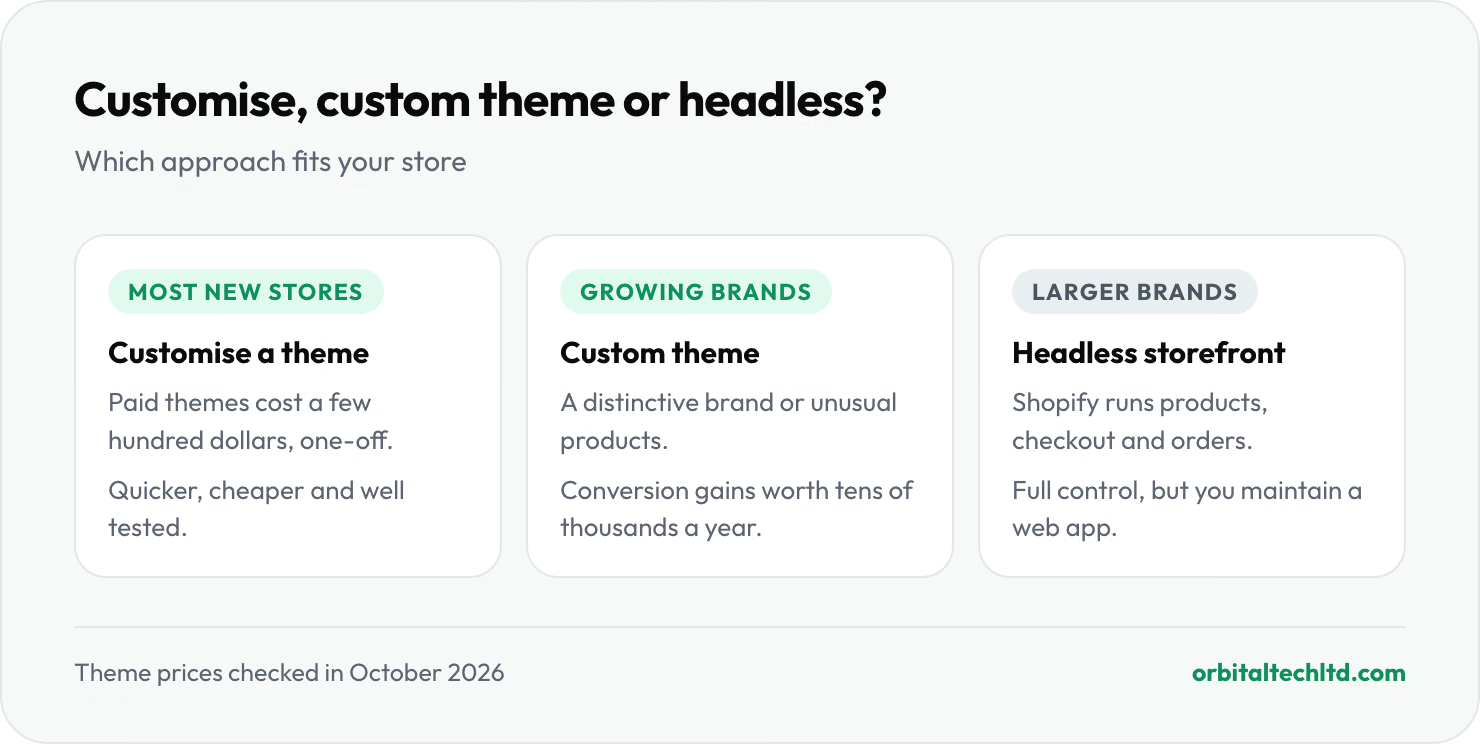
A custom theme makes sense when your brand needs to look distinctive, when you sell configurable products, bundles or subscriptions that standard product pages handle badly, or when you keep adding apps to make a theme do things it was not built for and the store is getting slower. Headless, where Shopify's Hydrogen framework replaces the storefront customers see, gives full control over design and speed. The trade-off is that you now maintain a web application, and many apps from the Shopify App Store will not work on a headless front end without extra development. It usually pays off only for larger brands with a development budget every month.
Can I hire someone to build my Shopify store?
Yes. Hiring someone to build or set up a Shopify store is routine, and Shopify is designed for it: you keep ownership of the store and its billing, and the developer works inside it through a collaborator account. You do not need to share your password, and you should not.
Whether you should hire Shopify developers depends on the job. If you are selling a handful of products on a standard theme, you can set up the store yourself in a weekend and spend the money on stock or ads instead. Hire when the job needs code, when a mistake would cost real sales (a migration, a checkout change, an integration with your warehouse), or when your own hours are worth more than a developer's rate. A store owner earning $60 an hour from their business who spends 40 hours fighting a theme has spent $2,400 of their own time, which buys a lot of developer hours at $33.
How much does it cost to hire a Shopify developer?
The Shopify developer cost, or what you pay to hire Shopify developers, depends on three things: the type of work, the developer's level, and how they bill. Freelance marketplaces publish real rate data, so start there.
Shopify developer rates by experience
Upwork reports a median of $15 to $29 an hour for Shopify developers on its platform, and typical rates of $15 for beginners, $33 at intermediate level and $95 for experts. Those figures cover a global pool of talent, so they sit well below US salaries: the median US web developer or digital designer earns $47.85 an hour before benefits, taxes and equipment, according to the Bureau of Labor Statistics. Agencies in the US and Europe usually bill more than either, because the rate also pays for design, project management and testing.
Cost by type of job
Upwork also publishes typical project prices for freelance Shopify work. These are fixed-price ranges for the job, not hourly rates:
| Project on Upwork | Typical price | Level needed |
|---|---|---|
| Theme customisation | $500 to $2,000 | Entry to intermediate |
| App integration and development | $1,500 to $8,000 | Intermediate to expert |
| Store migration | $2,000 to $7,000 | Intermediate to expert |
| Custom theme development | $3,000 to $10,000 | Intermediate to expert |
| Shopify Plus setup and optimisation | $5,000 to $15,000+ | Expert |
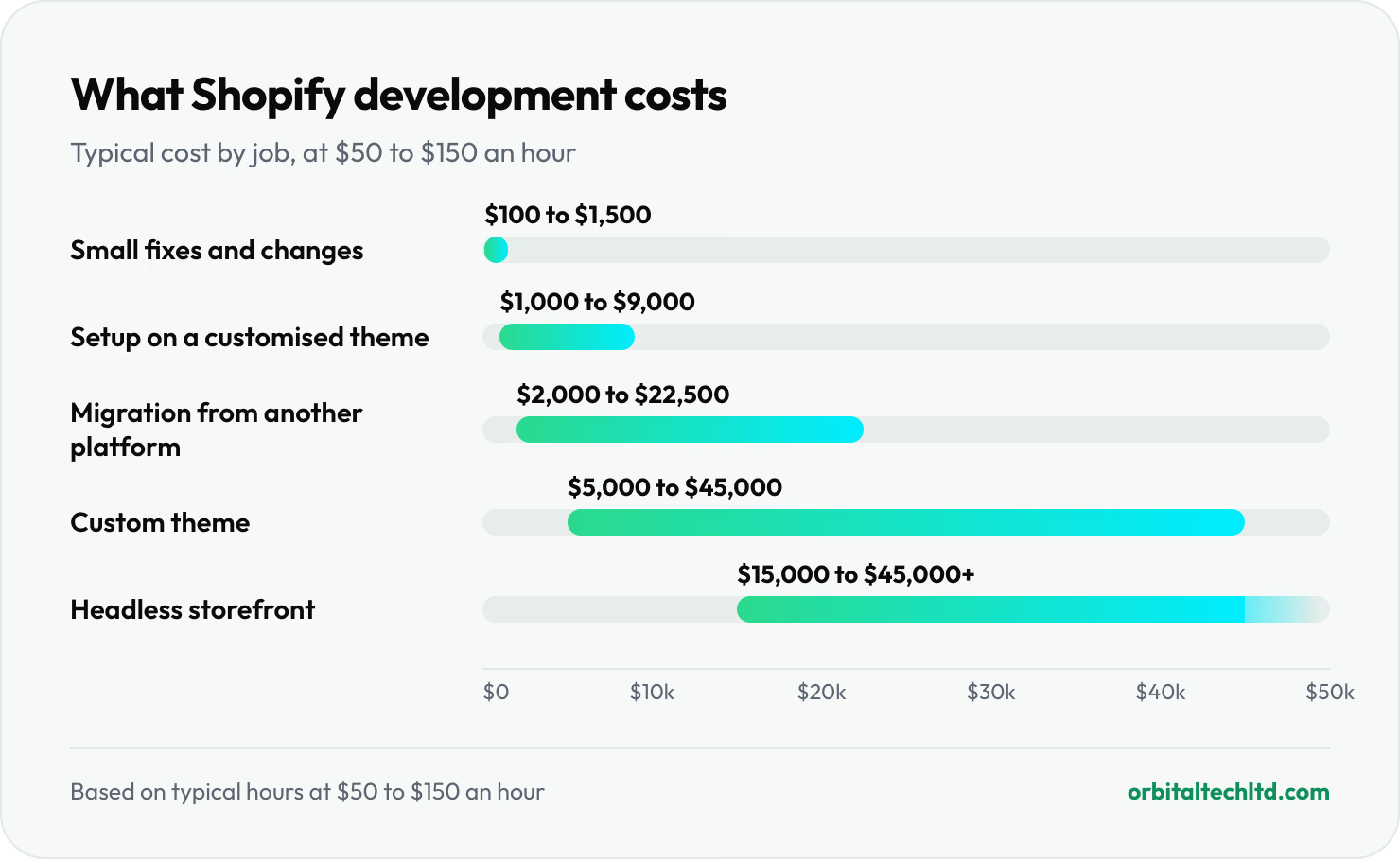
Marketplace prices are the floor. To show what the same jobs cost with an experienced freelancer or agency, we priced them by the hour at $50 to $150, a planning range rather than a market average. The hours are our estimates:
| Job | Typical hours | At $50 an hour | At $150 an hour |
|---|---|---|---|
| Small fixes and changes | 2 to 10 | $100 | $1,500 |
| Store setup on a customised theme | 20 to 60 | $1,000 | $9,000 |
| Migration from another platform | 40 to 150 | $2,000 | $22,500 |
| Custom theme | 100 to 300 | $5,000 | $45,000 |
| Headless storefront | 300+ | $15,000+ | $45,000+ |
Freelancer, agency or in-house: the monthly picture
For ongoing work, compare the monthly bill rather than the hourly rate. A freelancer on a 20 hour monthly retainer at $33 an hour costs about $660. The twelve agencies in Sōvyn's 2026 roundup list starting retainers of $1,500 to $7,500 a month. A full-time US developer at the BLS median costs $99,520 a year in salary alone, about $8,300 a month before benefits. Most stores under a few million dollars in sales do not have enough Shopify work to keep a full-time developer busy, which is why staff augmentation or a retainer is the usual middle ground.
Our guide to how much a website costs covers design and running costs beyond the build itself.
How much does Shopify take from a $100 sale?
The developer is a one-off or monthly cost; Shopify's own fees run on every order, so price them in at the same time. On the Basic plan in the US, Shopify Payments charges 2.9% plus 30 cents for an online card payment, so Shopify keeps $3.20 of a $100 sale. On Grow it is 2.7% plus 30 cents ($3.00), and on Advanced 2.5% plus 30 cents ($2.80). If you use an outside payment provider instead of Shopify Payments, Shopify adds 2% on Basic, 1% on Grow and 0.6% on Advanced, on top of that provider's fees, per its pricing page. Ask any developer who recommends a payment app which of these fees it triggers. Our Shopify vs WooCommerce guide works through these fees for a whole year of orders.
Where to hire Shopify developers
There are five main places to hire Shopify developers, and each trades price against how much vetting you have to do yourself.
| Route | Typical cost | Who vets them | Best for |
|---|---|---|---|
| Shopify Partner Directory | Set by each partner; filter by price | Shopify tiers partners on track record; you check reviews | A shortlist of Shopify-only specialists |
| Freelance marketplaces (Upwork, Fiverr) | $15 to $95 an hour on Upwork | You do, using reviews and job history | Small, well-defined jobs |
| Vetted talent networks (such as Toptal) | Higher than open marketplaces | The network screens; Toptal offers a trial of up to two weeks | Senior help without running a long search |
| Agencies | Retainers from about $1,500 a month | You check case studies and references | Custom themes, integrations, Plus and headless builds |
| Referrals and Shopify communities | Varies | Other store owners | Finding someone a peer has already tested |
The Partner Directory is the sensible starting point because everyone in it works only on Shopify. It lists more than 30 services, from store builds and theme customisation to custom app integrations and troubleshooting, and lets you filter by price, location and service. Partners are tiered by their history on Shopify. A listing is not a guarantee, though: Shopify says partners work independently, so you still check their work.
Freelance marketplaces have the widest choice and the lowest rates. When you hire Shopify developers there, you pay through the platform for approved work, hourly or by milestone, which protects you on a first project. The cost is your time: you will get many proposals and need to filter hard.

Freelance Shopify developer or agency?
A freelance Shopify developer is usually the better value for store setup, theme changes, bug fixes and small integrations. You talk to the person writing the code, and you pay only for their hours. The risks are availability, since one person can fall ill or take a bigger client, and coverage, since few freelancers are equally strong at design, code and SEO.
An agency costs more per hour but brings design, development, testing and project management under one contract, and someone accountable for all of it. That matters for custom themes, migrations, Shopify Plus work and headless builds, where a mistake can take the checkout down or lose search rankings. Use this rule of thumb:
- Under about 40 hours of work, one clear task: a freelancer.
- A full build, migration or integration with several systems: an agency, or a senior freelancer who has done the same job before and can show it.
- Constant changes every month: a retainer with either, or a dedicated developer through staff augmentation.
How to hire Shopify developers, step by step
- Write a one-page brief. Your Shopify plan, the theme you use, the apps you rely on, what you want changed, your deadline and your budget range. Upwork's own hiring guide gives the same advice: the more specific the post, the better the proposals.
- Shortlist three to five people. Use the Partner Directory, a marketplace or referrals. Skip anyone without live Shopify stores you can visit.
- Check their work on your phone. Open two or three stores they built, add a product to the cart and time how long pages take to appear. Run one through Google's PageSpeed Insights.
- Interview the top two. Use the questions in the next section and ask each to explain how they would approach your brief.
- Start with a small paid task. A fix or one new section, billed at their normal rate, shows how they communicate, estimate and test before you commit to a large project.
- Agree scope, milestones and ownership in writing. What is included, what counts as a change, when each milestone is paid, and that the code and any custom app belong to you.
- Give access through a collaborator account. Grant only the permissions the job needs, and remove access when the work ends.
12 questions to ask before you hire Shopify developers
Good answers to these are specific and calm. Vague answers, or promises that everything is easy, are the warning.
- Can I see live stores you built, and speak to one owner? Screenshots prove nothing; live stores show speed and quality on a real phone.
- Will my team be able to edit pages without you? A well-built Online Store 2.0 theme gives you sections and settings in the theme editor instead of hard-coded pages.
- Which apps will the store depend on, and what do they cost each month? Each app adds a subscription, and many add scripts that slow the store.
- How will you keep the store fast? One in four Shopify stores fails Core Web Vitals on mobile. Ask how they measure it and what they do about it.
- How is the theme code managed? The right answer involves version control and Shopify CLI, with changes tested on an unpublished copy of the theme before going live.
- Have you moved stores from Shopify Scripts to Shopify Functions? Scripts stopped working on June 30, 2026. A developer still recommending them is out of date.
- How will you protect my search rankings during a migration? Every old product and category URL needs a 301 redirect. Our technical SEO audit checklist covers what to check before and after.
- Who owns the theme and any custom apps? You should, with the code handed over at the end.
- How do you price changes outside the scope? Ask for the hourly rate for extra work up front.
- What happens after launch? Agree how bugs found in the first weeks are fixed, and what ongoing support costs.
- Which permissions do you need in my store? A careful developer asks for the minimum, not everything.
- How and when will you update me? Agree a channel and a rhythm, especially across time zones.
Red flags
- No live stores to show, or only stores that have since closed.
- A fixed price given before they have seen your store or brief.
- A request for your owner login instead of a collaborator request.
- A plan that solves every problem with another paid app.
- Reluctance to put ownership of the code in writing.
How to give a developer access to your Shopify store safely
Whenever you hire Shopify developers, give them access through Shopify's built-in route, a collaborator account. You find a 4 digit collaborator request code under Users in your Shopify admin and send it to the developer, who then sends a request from their Partner account. You see the permissions they asked for, can cut them back, and approve or reject the request. Collaborators do not count towards your plan's staff limit, and access expires automatically if they have not logged in for 90 days, per the Shopify Help Center. Shopify also shows when the partner account was created and which country it signed up from, which helps you spot a request that does not match the person you hired. You can generate a new code at any time so old ones stop working.
A scope checklist before you hire
The cheapest way to cut the Shopify developer cost is a clear brief, because unclear scope is where hours disappear. Before you contact anyone, fill in this checklist and send it with your first message.
| Question | Why it matters |
|---|---|
| Which Shopify plan are you on? | Some features, such as deeper checkout changes, need Shopify Plus |
| Which theme, and is it Online Store 2.0? | Older themes cost more to change |
| Which apps do you pay for now? | Removing or replacing apps is often part of the job |
| Which systems must connect to Shopify? | Each integration (ERP, warehouse, accounting) adds hours |
| Roughly how many products and variants? | Drives migration and setup time |
| What does done look like? | A clear finish line prevents scope creep |
| Deadline and budget range | Lets the developer suggest the right approach, not the biggest one |

When to hire Shopify developers, and when to wait
Hire one if you are moving to Shopify from another platform, need your store to talk to a warehouse, ERP or accounting system, sell products standard themes handle badly, have outgrown a theme and keep adding apps to patch it, or are moving to Shopify Plus. If a store already brings in steady sales, even a small lift in conversion pays for the work.
Wait if you are still testing whether a product sells. A free or low-cost theme, set up yourself, is enough to prove demand. Spend on a developer once you know what the store needs to do better, not before.
3 tips before you hire Shopify developers
- Pay for a small test task first. Two to five paid hours on a real fix shows how a developer estimates, communicates and tests, and costs far less than a failed project.
- Pay by milestone, not up front. Tie each payment to something you can see working on a preview theme, and hold the last payment until the store is live and checked.
- Get the handover in writing. Code in your store or your repository, admin access removed at the end, and a short note on how to edit what was built.
Our verdict
For most stores, the best way to hire Shopify developers is to match the person to the job: a vetted freelancer for small, defined tasks, and an agency or senior specialist for builds, migrations and integrations where mistakes cost sales. Use the rate data to set a budget, a written brief to get comparable quotes, and a paid test task to choose. The developer who asks the most questions about your business before quoting is usually the one to hire.
Shopify work at Orbital
We build custom Shopify themes your team can edit, integrations with the systems behind your store, migrations that keep your rankings, and headless builds on Hydrogen, on standard Shopify or Shopify Plus. After a discovery week, you get a written scope with a costed estimate within 72 hours; we then build in two-week sprints on a preview theme, and nothing is published without your sign-off. You own the theme code and any custom apps. See our Shopify development page for how we work, our Shopify SEO services for help being found once the store is live, and our ecommerce page for everything we do for online stores.