Short answer: mobile app development is the work of planning, designing, building, testing, publishing and maintaining an app for iPhone and Android phones. A professional team runs it in seven stages: discovery, planning, UX and UI design, development, testing, launch and maintenance. A typical first version with user accounts and a backend takes about 700 hours across those stages, or four to six months, and costs roughly $35,000 at $50 an hour or $105,000 at $150 an hour. After launch, budget 15 to 20% of the build cost every year to keep it running.
Most guides to the mobile app development process list the same stages and stop there. This one puts hours, weeks and dollars against each stage, so you can see where a quote is thin and where your money actually goes. It also covers the rule changes that shape a 2026 project: Apple's new build requirement from April, Google Play's target API deadline in August and its testing rule for new accounts. We build iOS and Android apps for clients, so the timelines below come from how we plan our own projects, and every outside figure links to the page we checked in October 2026.
What is mobile app development?
Mobile app development is the process of creating software that runs on smartphones and tablets, most often on Apple's iOS and Google's Android. It covers far more than writing code. A working app needs research into what users want, screen designs, the app itself, a server (the backend) that stores accounts and data, testing on real devices, approval from the App Store and Google Play, and updates for as long as the app is live.
You will also see it called mobile application development. The two terms mean the same thing; "application" is simply the longer form of "app". Enterprise vendors such as SAP and Salesforce tend to use the longer phrase, and app studios the shorter one.
Mobile app development vs web app development vs software development: how they differ
Software development is the umbrella. App development is the part of it that produces tools people use directly, and mobile is one branch of that. What makes mobile different is that two companies, Apple and Google, control distribution, approve every release and change their rules every year.
| Mobile app development | Web app development | Software development (broad) | |
|---|---|---|---|
| Runs on | iOS and Android phones and tablets | Any browser | Anything: servers, desktops, devices, operating systems |
| How users get it | Download from the App Store or Google Play | Visit a URL | Varies |
| Who approves releases | Apple and Google review every version | You | Usually you |
| Phone features | Full access: camera, GPS, push, Bluetooth, Face ID | Limited and browser dependent | Depends on the platform |
| Update speed | Hours to days, through store review | Instant | Varies |
| Yearly forced work | New iOS and Android versions and new store SDK rules | Browser changes, rarely breaking | Depends |
That last row is the one buyers underestimate. A website built in 2022 still loads today. An app left alone for two years can drop out of Google Play search for new users and cannot ship a single bug fix on iOS until it is rebuilt with Apple's current tools. If your product does not need phone features or a home screen icon, a web app may be the better start; our guide to what a web app costs to build covers that route.
Why businesses invest in mobile application development
The usual reasons are customer loyalty (an icon on the home screen and push notifications bring people back without paying for ads), staff productivity (field, warehouse and sales teams work faster with an app built for their job), new revenue from subscriptions or in-app purchases, and first-party data on how customers behave. The money is real: Sensor Tower counted $167 billion of in-app purchase revenue across iOS and Google Play in 2025, and for the first time non-game apps earned more than games.
Mobile app development in 2026, by the numbers
These are the figures that frame every project this year. Each was checked on its source in October 2026.
| Measure | Figure | Source |
|---|---|---|
| In-app purchase revenue, iOS and Google Play, 2025 | $167 billion, up 10.6%; non-game apps overtook games for the first time | Sensor Tower, State of Mobile 2026 |
| App downloads, 2025 | Nearly 150 billion, up 0.8% | Sensor Tower |
| App Store submissions reviewed in 2025 | 9,100,620, of which 2,093,244 (23%) were rejected | Apple App Store Transparency Report 2025 |
| Apple review speed | At least 50% of submissions reviewed within 24 hours, 90% within 48 hours | Apple App Review |
| Average app project on Clutch | $90,780, with a typical timeline of 11 months | Clutch Mobile App Pricing Guide |
| Most common app project budget on Clutch | $10,000 to $49,999 | Clutch |
| Median pay of US software developers | $64.44 an hour ($134,040 a year), May 2025 | US Bureau of Labor Statistics |
| Apple build requirement | Since 28 April 2026, uploads must be built with Xcode 26 and the iOS 26 SDK | Apple Developer |
| Google Play target API rule | From 31 August 2026, new apps and updates must target Android 16 (API level 36) | Android Developers |
| Google Play testing rule for new personal accounts | A closed test with at least 12 testers opted in for 14 days before production | Play Console Help |
| Mobile OS share, United States | iOS 53.5%, Android 46.5% (September 2026) | StatCounter |
| Mobile OS share, worldwide | Android 69.3%, iOS 30.7% (September 2026) | StatCounter |
Two numbers deserve a second look. Almost one App Store submission in four was rejected in 2025, which is why testing and launch get their own stages below. And Clutch's average project of about $90,780 over 11 months is far larger than its most common budget, because a minority of big projects pull the average up. Most first versions are smaller than the average suggests.
The 7 stages of the mobile app development process at a glance
Here is the whole process on one page. The hours and costs are for a reference project we use in planning: a first version (MVP) for iPhone and Android with sign-up, one core feature, push notifications, a backend and a simple admin panel, built once with a cross-platform framework. The two cost columns show the same hours at $50 and $150 an hour, which covers most of the agency market.
| Stage | Main output | Calendar time | Hours | Share | At $50/hr | At $150/hr |
|---|---|---|---|---|---|---|
| 1. Discovery and research | Problem statement, user interviews, competitor review | 1 to 3 weeks | 40 | 6% | $2,000 | $6,000 |
| 2. Planning and tech stack | Written scope, feature list, architecture, estimate | 1 to 2 weeks | 40 | 6% | $2,000 | $6,000 |
| 3. UX and UI design | User flows, wireframes, screen designs, clickable prototype | 3 to 5 weeks | 110 | 16% | $5,500 | $16,500 |
| 4. Development | The app, the backend and API, the admin panel | 10 to 14 weeks | 400 | 57% | $20,000 | $60,000 |
| 5. Testing and QA | Test plan, device testing, bug fixes, beta | 2 to 4 weeks, overlapping | 80 | 11% | $4,000 | $12,000 |
| 6. Launch | Store listings, review, release, analytics | 1 to 3 weeks | 30 | 4% | $1,500 | $4,500 |
| Build total | About 4 to 6 months | 700 | 100% | $35,000 | $105,000 | |
| 7. Maintenance and growth | Fixes, OS updates, new features | Ongoing | 15 to 20% of build a year | $5,250 to $7,000 | $15,750 to $21,000 | |
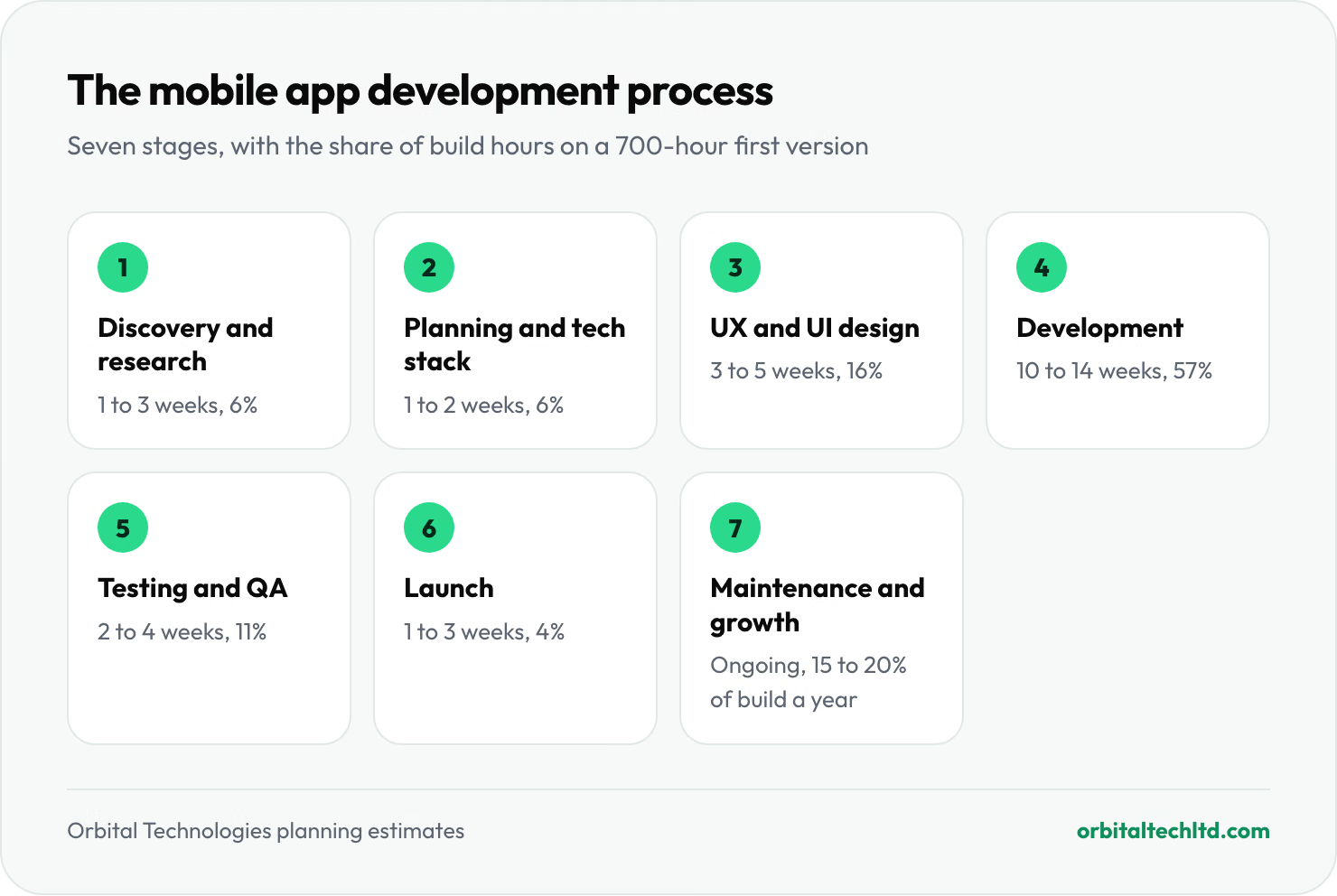
These are our planning estimates, not promises, and the stages overlap: design for later screens often runs while early screens are being built, and testing starts in the first sprint. The useful part is the shape. Development is a bit over half the budget, design about a sixth, and the first two stages, which decide whether the rest is spent well, cost barely a tenth.
Stage 1: Discovery and market research (1 to 3 weeks)
Discovery answers one question before any money goes into screens: should this app exist, and for whom? The work is interviews with five to ten likely users, a look at the apps they use today and what they complain about in reviews, and a short written problem statement. For internal apps, it means watching the staff who will use it do the job as it is done now.
One check belongs here and is often skipped: is an app the right format at all? Apple's App Review Guideline 4.2 rejects apps that are little more than a repackaged website, and copycat or spam apps fall under Guideline 4.3. If the idea is "our website, but in the App Store", discovery should either find the phone-native reason to exist (offline use, the camera, push, location, faster repeat ordering) or recommend a web app instead. Finding that out costs about 40 hours. Finding it out after launch costs the whole budget.
Output: a one-page brief with the problem, the target users, three to five things they must be able to do, and how you will measure success.
Stage 2: Planning, scope and choosing the tech stack (1 to 2 weeks)
Planning turns the brief into a written scope: every screen, every user role, every integration, and what is deliberately left out of version one. It is also where the team chooses the platform approach (native or cross-platform), the backend, the hosting and the methodology, and produces an estimate you can hold them to.
In 2026 the tech stack decision has a new edge. Apple has required builds made with Xcode 26 and the iOS 26 SDK since 28 April 2026, and Google Play requires new apps and updates to target Android 16 (API level 36) from 31 August 2026, with extensions available only to 1 November. A team that plans around an older framework version or a plugin that has not been updated can lose weeks to upgrades before it ships a single feature. Ask which versions they will build on and when those versions stop being accepted.
Which development methodology fits: agile, waterfall, RAD, Scrum or Kanban?
| Methodology | How it works | Best for |
|---|---|---|
| Agile (usually Scrum) | Work in one or two week sprints, each ending with a build you can try on your phone | Most mobile apps, where priorities change after people use early builds |
| Waterfall | Each stage finishes and is signed off before the next begins | Small, fixed-scope apps or regulated projects that need heavy documentation |
| Rapid application development (RAD) | Build prototypes fast, show users, refine, repeat | Early ideas and internal tools where speed beats polish |
| Kanban | A continuous flow of tasks on a board, with no fixed sprints | Maintenance and support after launch |
| DevOps practices | Automated builds, tests and releases on every change | Any app that ships updates often; it sits alongside the others |
In practice most app teams run a hybrid: a fixed-price, waterfall-style discovery and design phase, then agile sprints for development, then Kanban for support. That gives you a firm budget for the uncertain early work and flexibility where change is cheapest.
Stage 3: UX and UI design and prototyping (3 to 5 weeks)
Design starts with user flows (the steps to sign up, book, pay or report a job), moves to grey-box wireframes, then to full screen designs in your brand, and ends with a clickable prototype in a tool such as Figma. The prototype is the cheapest place in the whole project to find a confusing flow: moving a button in Figma takes minutes, moving it in code takes a sprint.

Good app design follows each platform's rules rather than one design forced onto both. Apple's Human Interface Guidelines recommend tap targets of at least 44 by 44 points, and Google's Material Design asks for at least 48 by 48 density-independent pixels. Navigation patterns, back gestures and system fonts differ too. Accessibility belongs here as well: dynamic text sizes, colour contrast and screen reader labels are cheap to design in and expensive to retrofit, and the European Accessibility Act has applied to many consumer apps sold in the EU since 28 June 2025.
Output: designs for every screen in scope, a component library the developers will reuse, and a prototype tested with at least a handful of real users.
Stage 4: Development: the app, the backend and the APIs (10 to 14 weeks)
This is where most of the budget goes. Development has three parts that run side by side:
- The app (front end): every screen, navigation, sign-in, the core feature and phone features such as the camera, location, biometrics and push notifications.
- The backend and API: the database, user accounts, business logic, payments, notifications and connections to your other systems, such as a CRM, ERP or booking tool.
- The admin panel: a web dashboard where your team manages users, content and orders without calling a developer.
The backend surprises people most. On a typical business app it takes a third or more of development hours, because accounts, data and notifications live on a server, not on the phone. A quote that covers "the app" but not the server is not comparable with one that covers both.

Work is planned in sprints of one or two weeks. At the end of each one you should get a test build on your own phone, through Apple's TestFlight and a Google Play internal testing track, and a short demo. If a team cannot show you something you can tap every two weeks, you are not seeing the real progress.
Who is on an app development team?
| Role | What they do | Typical involvement on a 700-hour MVP |
|---|---|---|
| Product or project manager | Owns scope, priorities, the timeline and your communication | Part time throughout |
| UX and UI designer | Flows, screens, prototype, design system | Heavy in stage 3, light during the build |
| Mobile developers | Build the app in Flutter, React Native, Swift or Kotlin | One or two, full time in stage 4 |
| Backend developer | API, database, integrations, admin panel | One, often part time |
| QA engineer | Test plans, device testing, regression checks | Part time from the first sprint |
| DevOps (often shared) | Build pipelines, hosting, monitoring, store signing | A few days at set-up and launch |
Where AI fits in mobile app development now
AI shows up in two places. Inside the team, coding assistants now write a fair share of boilerplate, tests and data models, which shortens the build but does not remove the need for review: generated code still has to pass the same security checks and store guidelines. Inside the product, features such as smart search, document scanning, chat support and recommendations are now common requests. They add backend work, running costs per user and privacy disclosures in both stores, so treat each AI feature as its own line in the scope. Our AI integration team can tell you which ones are worth it.
Stage 5: Testing and quality assurance (2 to 4 weeks, overlapping)
Testing is not a phase at the end; it starts in the first sprint and gets a dedicated push before launch. A sensible plan covers functional tests (does every flow work), device tests on a spread of real iPhones and Android phones with different screen sizes and OS versions, performance (start-up time, battery, slow networks), security (how tokens and personal data are stored), and accessibility.
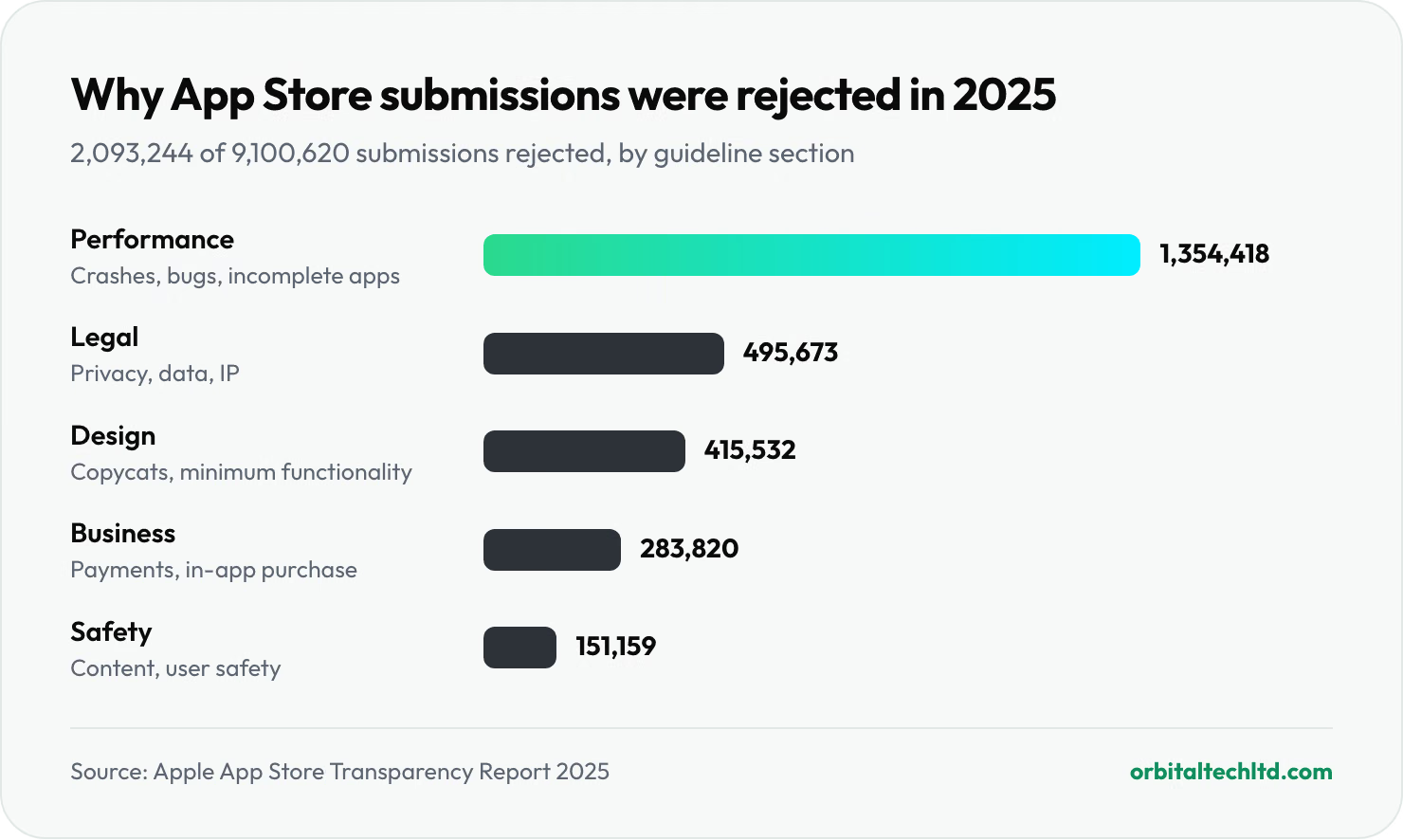
Why it matters so much: Apple's 2025 transparency report shows 2,093,244 rejected submissions out of 9,100,620 reviewed, and the largest group by far was "Performance", which covers crashes, bugs, broken links, placeholder content and incomplete information. Most of those are testing failures, not policy disputes.
Beta testing has its own rules on Android. A newly created personal Google Play developer account must run a closed test with at least 12 testers who stay opted in for 14 days in a row before it can apply for production access. Organisation accounts are not covered by that rule, which is one reason we recommend registering the developer account in your company's name. On iOS, TestFlight lets you invite up to 10,000 external testers.
Output: a test report, a list of known minor issues you have agreed to ship with, and a release candidate build.
Stage 6: Launch on the App Store and Google Play (1 to 3 weeks)
Launch is more paperwork than code. You need developer accounts ($99 a year for Apple, $25 once for Google Play), store listings with screenshots and descriptions, a privacy policy, Apple's privacy "nutrition label" and Google Play's Data safety form, age ratings, and demo login details for the reviewers. Two rules catch many first submissions: if users can create an account in the app, both stores require a way to delete it from inside the app (see Apple's account deletion guidance), and every permission request needs a clear reason in plain words.
Review itself is quicker than its reputation: Apple says it reviews at least half of submissions within 24 hours and 90% within 48 hours. Plan for one rejection anyway, and leave a week between the target launch date and any marketing you cannot move. A staged rollout, where the update reaches a small share of users first, lets you catch problems before everyone has them.
For a step-by-step walk through the submission screens, review times and common rejection reasons, see our guide on how to make an app.
Stage 7: Maintenance, updates and growth (ongoing)
Launch day is the start of the app's life, not the end of the project. Every year Apple releases a new iOS in September and Google a new Android version, the stores raise their SDK requirements, and libraries your app depends on publish security fixes. Google Play goes further for old apps: existing apps must target at least Android 15 (API level 35) to stay available to new users on newer devices. An app nobody touches slowly disappears.
Budget 15 to 20% of the original build cost a year for this, more if you plan to keep adding features. On our reference project that is about $5,250 to $21,000 a year, plus hosting and third-party services. The best use of that budget after the first few months is usually the analytics: watch where users drop out of sign-up, which features they ignore, and what reviews say, then spend the next sprint on the biggest leak.
Mobile app development timeline: how long it takes by type of app
Time follows hours. A small team of a designer and two developers puts in roughly 80 to 120 hours a week between them. Add the time you need to give feedback, supply content and approve designs, and these are realistic calendar ranges from first workshop to the stores:
| Type of app | Typical build hours | Calendar time to launch |
|---|---|---|
| Simple app (a few screens, no accounts) | 150 to 300 | 6 to 10 weeks |
| MVP with accounts and a backend | 400 to 900 | 3 to 5 months |
| Business app with payments and integrations | 800 to 1,600 | 4 to 7 months |
| Marketplace or on-demand app | 1,500 to 3,000 | 7 to 12 months |
Clutch's typical project timeline of 11 months is longer than most rows here because it includes larger projects and work after launch. The slowest parts of most projects are not coding; they are decisions, content and changes of mind. A product owner on your side who can answer questions within a day saves more time than an extra developer.
Cost to develop a mobile app with a professional firm
App development is paid for in hours, so the cost to develop a mobile app with a professional firm is the scope in hours multiplied by the team's rate. Using our reference ranges for an app built once for iPhone and Android, including design, backend, testing and launch:
| Type of app | At $50 an hour | At $150 an hour |
|---|---|---|
| Simple app | $7,500 to $15,000 | $22,500 to $45,000 |
| MVP with accounts and a backend | $20,000 to $45,000 | $60,000 to $135,000 |
| Business app with integrations | $40,000 to $80,000 | $120,000 to $240,000 |
| Marketplace or on-demand app | $75,000 to $150,000 | $225,000 to $450,000 |
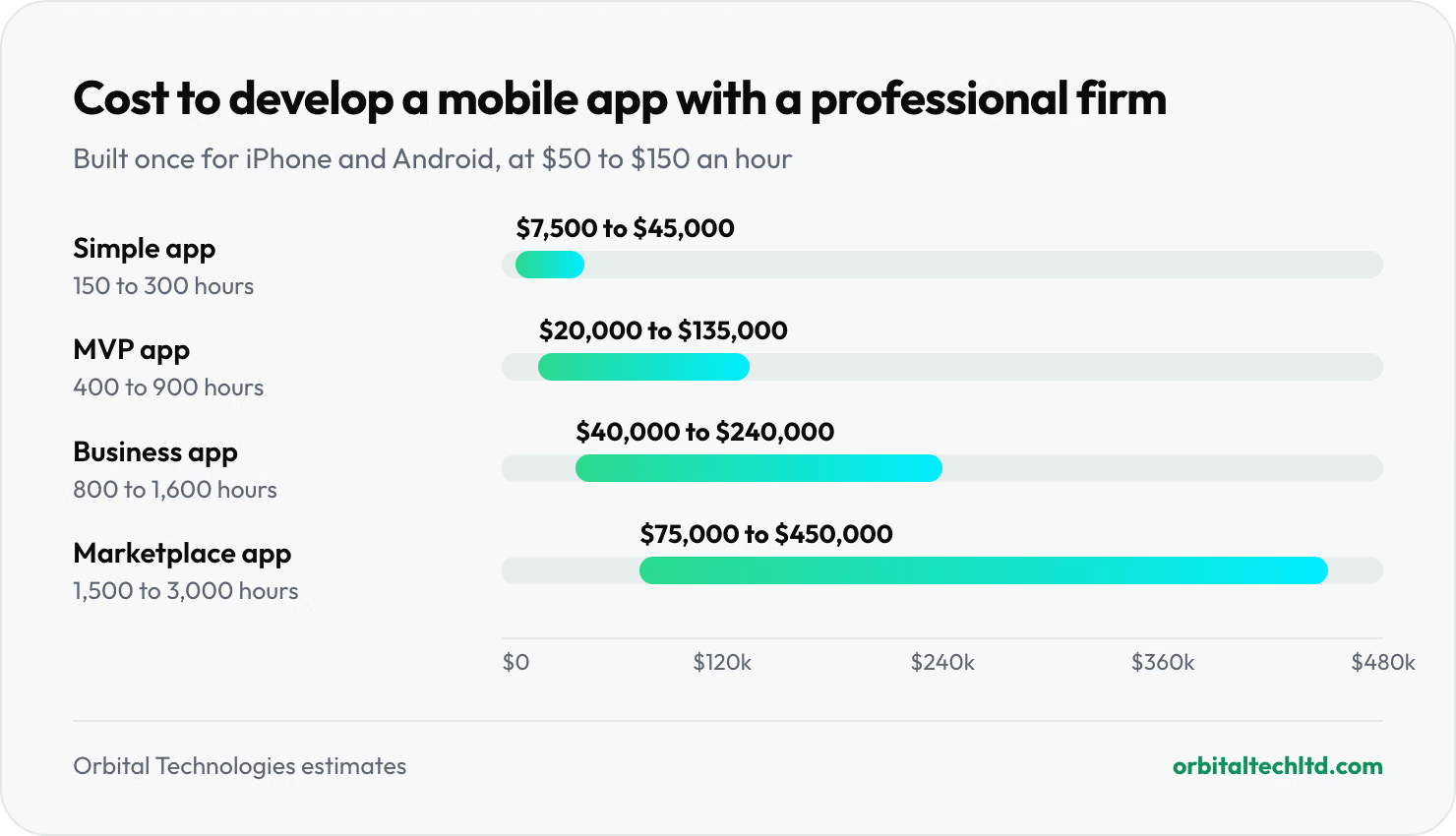
Within each row, scope moves the price more than the rate does. The biggest cost drivers are the number of user roles (a marketplace has at least three: customer, provider and admin), integrations with other systems, offline use, real-time features such as chat or live tracking, and how custom the design is. Building two separate native apps instead of one cross-platform app adds roughly 30 to 60% to the development stage in our estimates. For the full breakdown, with hidden running costs and the 2026 store fees, read our guide to how much it costs to build an app, or for a first version only, what an MVP costs.
Mobile app development services in the USA: what US firms charge
Rates for mobile app development services in the USA vary more than the "US agency" label suggests. Clutch's 2026 pricing data lists $25 to $49 an hour as the average rate for app developers based in the United States, because many US-registered firms deliver the work with teams abroad. A fully onshore team costs much more: the median US software developer earns $64.44 an hour in wages alone, before benefits, tools, office space and the agency's margin, so onshore studios usually bill well above $100 an hour.
| Model | What you get | Watch for |
|---|---|---|
| US onshore studio | Same time zone, US contracts and law, in-person workshops | The highest rates; senior people in the pitch, juniors on the work |
| US firm with an offshore team | US contract and project management, lower build cost | Ask where the developers sit and how many hours overlap with yours |
| Offshore or nearshore agency | The lowest rates, large talent pools | Time zones, communication and who owns the code and accounts |
| Freelancers | Flexible, cheap for small jobs | One person rarely covers design, app, backend and testing |
For a US business, the question is less "US or offshore" and more "who is accountable, in writing, for the whole result". Our page on offshore software development explains how a hybrid model handles time zones and ownership.
Native, cross-platform, hybrid or PWA: the types of mobile apps
Before choosing a framework, choose the type of app. The type decides cost, performance and how much of the code you write twice.
| Type | How it is built | Strengths | Trade-offs |
|---|---|---|---|
| Native | Swift for iOS and Kotlin for Android, as two separate apps | Best performance, newest OS features on day one | Two codebases, roughly double the build and maintenance |
| Cross-platform | One codebase in Flutter, React Native or Kotlin Multiplatform | One team, one codebase, near-native feel | Occasional platform-specific code; new OS features can lag |
| Hybrid | A web app inside a native shell (Ionic with Capacitor) | Reuses web skills and code | Weaker performance; risk of Apple's "repackaged website" rejection if it adds nothing |
| Progressive web app (PWA) | A website that installs to the home screen | No store review, instant updates, cheapest | Limited phone features, no store presence, weaker on iOS |
| Low-code or no-code | Visual builders such as FlutterFlow or Bubble | Fast prototypes and internal tools | Platform lock-in and limits as the app grows |
Best platforms for mobile app development in 2026
"Platform" means two things here: the operating systems you ship to (iOS, Android or both) and the framework you build with. On the first, StatCounter's September 2026 figures settle most debates for US companies: iOS has 53.5% of US mobile users and Android 46.5%, so a US consumer app that skips either platform skips nearly half its market. Worldwide, Android has 69.3%. On the second, these are the best platforms for mobile app development today:
| Framework | Language | Backed by | Best for |
|---|---|---|---|
| Swift and SwiftUI | Swift | Apple | iOS-only apps, Apple Watch, heavy use of the newest Apple features |
| Kotlin and Jetpack Compose | Kotlin | Android-only apps, deep hardware access | |
| Flutter | Dart | Custom, brand-heavy designs that must look identical on both platforms | |
| React Native (often with Expo) | JavaScript or TypeScript | Meta and the community | Teams already using React on the web; sharing logic with a web app |
| Kotlin Multiplatform with Compose Multiplatform | Kotlin | JetBrains | Sharing business logic while keeping native screens; Android teams going cross-platform |
| .NET MAUI | C# | Microsoft | Companies already standardised on .NET and Azure |
| Ionic with Capacitor | HTML, CSS, JavaScript | Ionic | Simple apps from an existing web team |
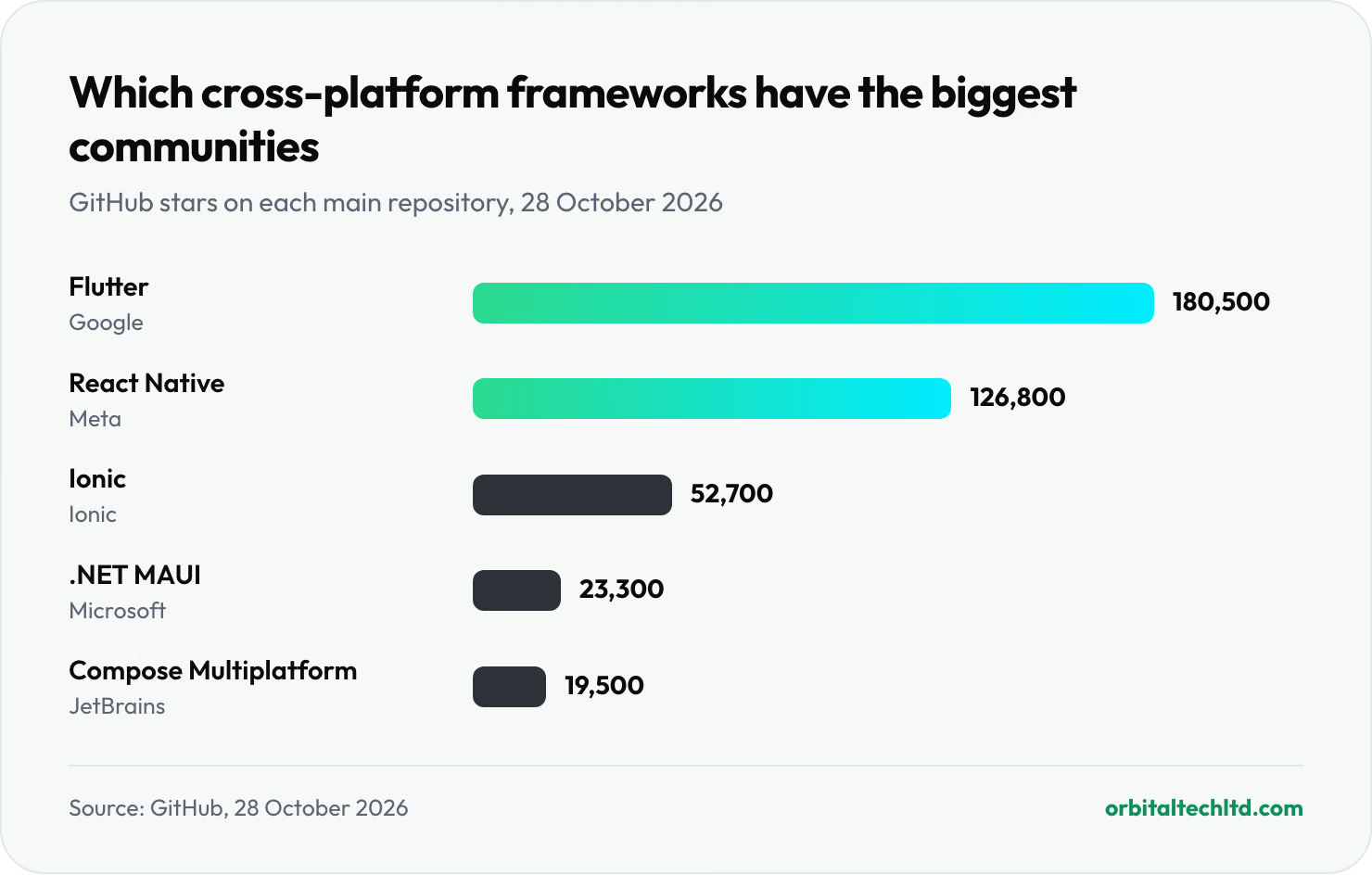
Community size matters because it decides how fast bugs get fixed, how many plugins exist and how easy it is to hire. One rough, live measure is GitHub stars. On 28 October 2026, Flutter's main repository had about 180,500 stars, React Native about 126,800, Ionic about 52,700, .NET MAUI about 23,300 and Compose Multiplatform about 19,500. Stars are not usage, but the gap tells you which two ecosystems have the deepest pool of answers when something goes wrong.
How to choose a platform for building cross-platform apps
If you have decided on one codebase for iOS and Android, the choice usually comes down to Flutter, React Native or Kotlin Multiplatform. Work through these questions in order:
- What does your team already know? If your web product is in React, React Native lets the same people read and contribute to the mobile code. If you have Android developers in Kotlin, Kotlin Multiplatform builds on what they know. If nobody on your side will touch the code, the agency's strongest framework matters more.
- How custom is the design? Flutter draws every pixel itself, so a heavily branded, animated interface looks the same everywhere. React Native and Kotlin Multiplatform lean on each platform's own components, so apps feel more "at home" on each OS.
- How much will you share with the web? React Native shares the most with a React web app. Flutter can target the web but suits app-like tools better than content sites.
- Which phone features do you need? List them (Bluetooth devices, background location, NFC, health data, AR) and check that each has a maintained plugin in the framework you are considering. A missing plugin means custom native code in Swift and Kotlin anyway.
- How long will the app live? For a five-year product, pick the framework with the healthiest ecosystem and the easiest hiring in your market, not the one that is newest.
When should you skip cross-platform and go native? When the app is only for one platform, when it depends on demanding real-time graphics or audio, or when it must use new OS features the week they ship. For most business, ecommerce, booking and field-staff apps, a cross-platform build is the better trade: one codebase to build, test and update.
How mobile app development affects SEO and app store search
An app does not rank in Google the way a web page does, but the decisions you make while building it still shape how people find you. There are two search engines to plan for.
App store search (ASO). Most downloads start with a search inside the App Store or Google Play, and both stores give you very little room. On Apple, the app name and subtitle are limited to 30 characters each, plus a hidden keyword field of 100 characters (Apple's product page guide). On Google Play, the title is 30 characters, the short description 80 and the full description 4,000, and Google indexes that description, so it is written for people and search at once (Google's store listing guidance). Ratings, reviews, downloads and crash rates also feed both stores' rankings, which ties ASO straight back to the testing stage.
Google search. People also search Google for the problem your app solves. Your app's website, help pages and landing pages are what rank there, and Universal Links on iOS and App Links on Android send a tapped search result straight into the installed app. As AI answers take a bigger share of searches, a clear, crawlable page that explains what the app does and who it is for also helps you get cited; our guide to AI search optimization covers that side.
Keyword research and gap analysis tools for apps: which to use when
| Tool | Use it for | When |
|---|---|---|
| Apple Ads (formerly Apple Search Ads) | Apple's own popularity scores for App Store search terms | Before writing the iOS name, subtitle and keyword field |
| AppTweak, Appfigures or Sensor Tower | Store keyword volumes, competitor keyword gaps, ranking history | Discovery (to size demand) and after launch (to track rankings) |
| Google Play Console store listing experiments | A/B testing icons, screenshots and descriptions | From the first month after launch |
| Ahrefs or Semrush | Web keyword research and content gap analysis against competitor websites | Planning the app's website and help pages |
| Google Search Console | How the app's website performs in Google | From launch day, every month |
The practical habit: run a store keyword gap analysis during discovery. Listing the terms your three closest competitors rank for and you do not is a quick test of demand, and it often changes which feature goes first.
How to choose a mobile app development company
The right app development company is the one that has built something close to your app, shows you working apps on real phones, writes down who owns the code and accounts, and quotes a scope you can check line by line. Before you sign, ask each candidate:
- Which of your live apps can I download today, and what did your team build in each?
- Who exactly will work on my app, and how many hours a week?
- Do you cover all seven stages, including the backend, store submission and support after launch?
- Which framework do you recommend for my app, and why not the alternatives?
- Will the developer accounts, code repository and hosting be in my company's name from day one?
- How do you handle a store rejection, and is fixing it included in the price?
- What does support cost after launch, and what does it include when iOS and Android update?
Red flags: a fixed price after one call with no written scope, no mention of the backend, accounts registered in the agency's name, and no test builds until the end. Our guide to choosing a development agency goes deeper on contracts, references and red flags, and most of it applies to app studios too. If you need to add developers to your own team instead of hiring a studio, see staff augmentation.
3 mobile app development tips that save the most money
- Pay for discovery and design separately first. A fixed-price phase of three to six weeks that ends in a written scope, tested designs and an estimate costs a fraction of the build, gives you a document you own, and lets you compare build quotes on identical scope.
- Ship one platform's worth of features, on both platforms. Cutting features saves far more than cutting a platform. A cross-platform MVP with three strong features beats a native iOS app with ten, and it reaches both halves of the US market.
- Put the boring launch work in the scope. Account deletion, privacy labels, the Data safety form, demo accounts for reviewers, crash reporting and analytics each take hours. When they are missing from a quote they turn into change requests in the final weeks, when you have the least leverage.
How we run the mobile app development process at Orbital
For transparency, here is how our own team runs these stages, so you can compare us with anyone else. We build most apps cross-platform with Flutter or React Native, and say so in discovery when native is the better call. Discovery and design are quoted as a fixed phase. Development runs in two-week sprints with a test build on your phone at the end of each, and we handle store listings, review feedback and release. The code repository, developer accounts and hosting are in your company's name. We also build and run our own warehouse software, Spiffy, which includes the scanning and offline workflows that field and warehouse apps depend on. You can see what is included and how we price it on our mobile app development services page, and for first versions, on MVP development.
Our verdict
The mobile app development process is the same seven stages wherever you build: discovery, planning, design, development, testing, launch and maintenance. What separates a good project from an expensive one is how much care goes into the first three, which cost about a quarter of the budget and decide whether the other three quarters are spent on the right thing. Budget the hours, insist on a test build every sprint, keep the accounts in your name, and plan for the annual store updates from day one.
If you would like a written estimate for your app, broken down by these seven stages, our mobile app team will send one. If the app needs a larger web platform behind it, our custom software development team builds both.