Short answer: HR management software is one system that holds every employee's record and runs the jobs around it: hiring, onboarding, payroll, time off, performance reviews, documents and reports. For a small business, nine features do almost all of the work, and the rest of a long feature list is mostly for companies with an HR department. The best HR management software for you is the one that covers those nine at a price that does not climb every time you hire, and that your managers will actually open.
We build and run our own HR platform, Orbital HRMS, so we spend a lot of time on demo calls with founders and office managers who are choosing one. The same thing happens on most of those calls: the buyer arrives with a list of 20 to 40 features copied from a vendor blog, and leaves knowing that only a handful decide whether the system works for a team of 10 to 100 people. This guide is that shorter list. Every figure links to the page we checked in November 2026, and we compare our own product openly with the alternatives.
What is HR management software?
HR management software, often called an HR management system or HRMS, is an application that stores employee data in one place and automates the people processes built on it. Instead of an offer letter in email, a start date in a spreadsheet, hours in a timesheet app and pay in a separate payroll file, one record follows each person from the day they apply to the day they leave.
Most products are cloud based and sold as a monthly subscription. A small business HR system usually starts with a core module (the employee database and self-service portal) and adds payroll, time tracking, recruiting and performance as the team grows. Human resources software is the broad name for all of these tools, from a single applicant tracker to a full suite.
HRMS vs HRIS vs HCM: how they differ
Vendors of HR management system software use these three labels loosely, and some use all three on the same page. In practice the difference is scope, as the table shows.
| HRIS | HRMS | HCM | |
|---|---|---|---|
| Stands for | Human resource information system | Human resource management system | Human capital management |
| Core job | Store and report on employee data | Store the data and run the daily processes: payroll, time, hiring, reviews | All of the HRMS plus long-term talent planning: succession, learning, workforce analytics |
| Typical buyer | Teams that already have payroll and want clean records | Small and mid-sized businesses that want one system | Large and global employers with an HR department |
| Typical setup time | Days | Days to a few weeks | Months, often with a consultant |
| Examples | BambooHR core, Deel HRIS | Gusto, Zoho People, Orbital HRMS | Workday, Oracle, SAP SuccessFactors, UKG Pro |
If a vendor calls its product an HCM and you have 30 employees, read the implementation section of its contract carefully. A human resource management system built for growing teams is usually the better fit until you have a full HR team to run something larger.
HR software in 2026, by the numbers
These are the figures we share with owners before a demo. Each links to the page we checked.
| Measure | Figure | What it means for a small business | Source |
|---|---|---|---|
| Median pay of a US human resources manager | $149,280 a year, May 2025 | A full-time HR lead is out of reach for most teams under 50 people, so software and the owner share the work | US Bureau of Labor Statistics |
| Median pay of a US human resources specialist | $75,940 a year, May 2025 | The usual first HR hire, and the role HR software makes productive | US Bureau of Labor Statistics |
| Projected growth in HR manager and specialist jobs | 6% from 2025 to 2035 | HR skills stay in demand, and so do their salaries | US Bureau of Labor Statistics |
| HR leaders whose teams spend more than half their time on admin | 45.1% | Admin, not strategy, is still where HR hours go | Rippling, State of the People Leader |
| Small businesses exploring or using AI for payroll and HR | More than 70%; 76% expect their HR provider to offer built-in AI | AI is becoming a standard part of HR software, not an add-on | ADP, 2026 |
| Median time to fill a non-executive role | 39 calendar days | Every slow handoff in hiring adds to a month-long wait | SHRM Recruiting Benchmarking 2026 |
| Gusto payroll and HR, entry plan | $49 a month plus $6 per person | Per-person pricing grows with every hire | Gusto pricing, Nov 2026 |
| Zoho People, cheapest paid plan | $1.25 per user a month billed yearly; free for up to 5 users | Core HR can be very cheap when payroll is handled elsewhere | Zoho People pricing, Nov 2026 |
| How long US employers must keep a Form I-9 | 3 years after hire or 1 year after employment ends, whichever is later | Your HR system has to keep records after people leave | USCIS, Handbook M-274 |
Why small businesses outgrow spreadsheets and need HR management software
A spreadsheet and a payroll app work for the first five or ten hires. They stop working for three reasons, and none of them is about software features.
- The same fact lives in four places. A pay rise has to be typed into payroll, the employee file, the budget and the offer template. Sooner or later one copy is wrong, and it is usually the one payroll reads.
- Managers become the bottleneck. Leave requests arrive by text message, approvals happen in hallways and nobody can see who is off next Friday.
- Records go missing at the worst moment. An audit, a claim from a former employee or a visa renewal is when you discover the signed contract was never saved.
Even teams with a dedicated HR person feel this. In Rippling's survey of more than 400 US HR leaders, 45.1% said their team spends more than half its time on admin. In a small business, that admin usually falls on the owner or an office manager, at the expense of the work they were hired to do.
The benefits of HR software, in plain terms
| Problem today | What HR software changes | Who feels it first |
|---|---|---|
| Payroll built from copied numbers | Pay reads hours, leave and salary from one record | The owner or bookkeeper who runs payroll |
| Leave tracked in chats and calendars | Requests, approvals and balances in one place, visible to the team | Managers and employees |
| Hiring in inboxes | One pipeline with every candidate, note and scorecard | Hiring managers |
| New starters waiting for laptops and logins | Onboarding checklists with owners and due dates | New hires in their first week |
| Reviews skipped or done from memory | Scheduled cycles with goals and notes from the whole year | Employees who want to grow |
| Contracts and policies in personal folders | Signed documents stored against each employee, with expiry reminders | Whoever handles an audit or a dispute |

The 9 features of HR management software that actually matter
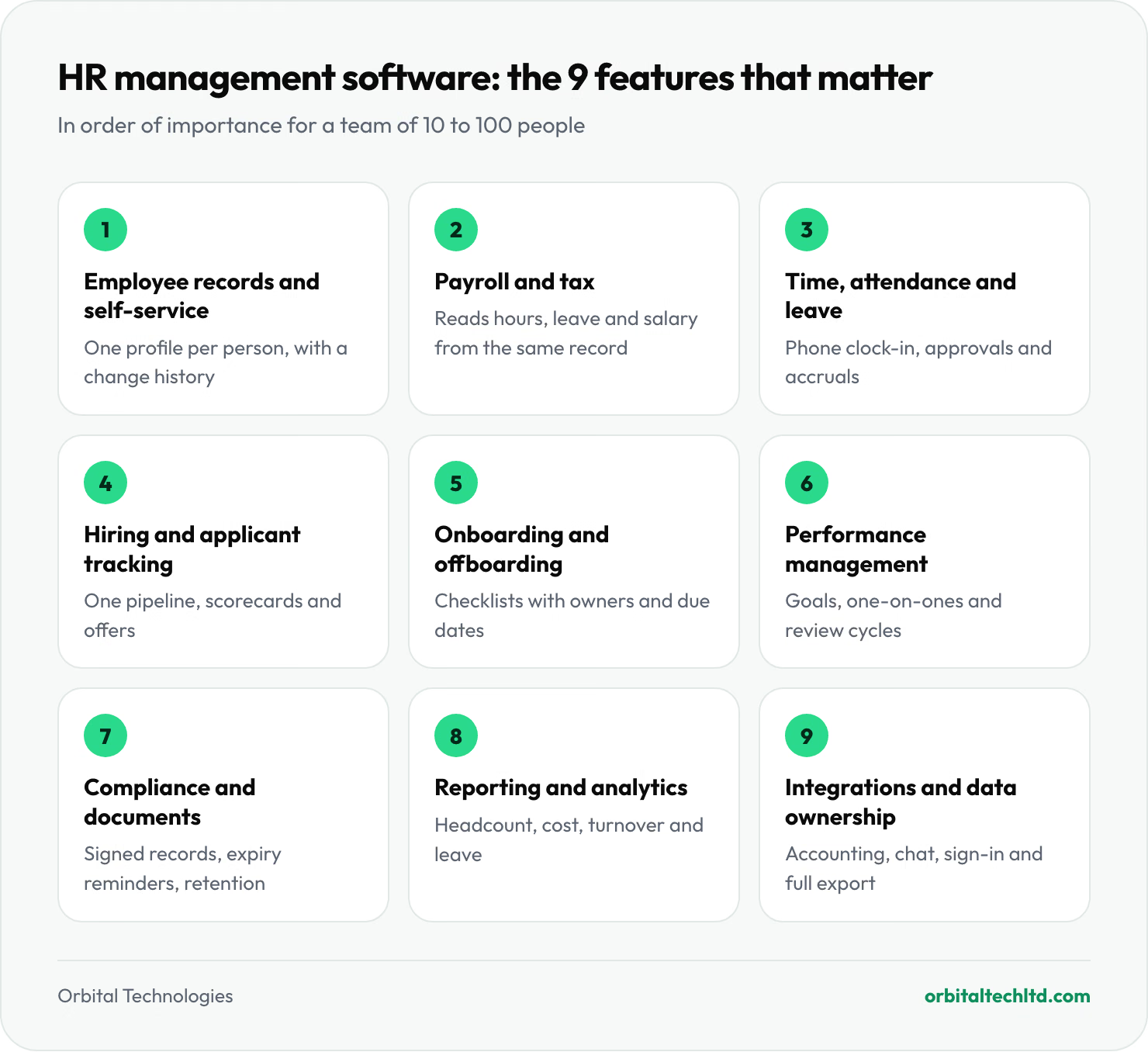
Rippling's own feature guide lists 24 features. A team of 10 to 100 people needs nine of them to work well, in roughly this order of importance. For each one we note what good looks like and the question that exposes a weak version in a demo.
1. A single employee record with self-service
Everything else reads from this record: name, role, manager, salary history, bank details, emergency contacts, documents and time off. Self-service means employees update their own address and download their own payslips, so the owner stops being the help desk.
What good looks like: one profile per person with a change history, so you can see who changed a salary and when. Demo question: "Show me the audit trail when a manager changes someone's pay."
2. Payroll and tax that read from the same record
Payroll is where mistakes cost real money, so it is the feature to test hardest. Good HR management software calculates gross to net pay, withholds and files taxes, pays by direct deposit and produces year-end forms, all from the hours, leave and salary already in the system. If payroll is a separate product that syncs once a day, you have bought two systems.
What good looks like: payroll flags anomalies before you approve, such as a 40% jump in one person's pay. Demo question: "Which states or countries do you file taxes in automatically, and which do I file myself?"
3. Time, attendance and leave
Clock-in on a phone, leave requests with one-tap approval, accruals that calculate themselves and a team calendar that shows who is out. For hourly staff this feature feeds payroll directly, which is where most overtime errors start.
What good looks like: leave policies you can set per location, because a team split between two states or two countries rarely has one policy. Demo question: "How do I set a different holiday calendar and accrual rule for one office?"
4. Hiring and applicant tracking
A light applicant tracking system (ATS) posts jobs, collects applications in one pipeline, keeps interview notes and scorecards together and sends the offer letter. A small business does not need a full recruiting suite; it needs to stop losing good candidates in someone's inbox.
Speed matters more than polish here. SHRM's 2026 recruiting benchmarks put the median time to fill a non-executive role at 39 calendar days, and in a small company the delay is rarely the job board. It is the CV sitting unread for a week and the offer waiting for a signature.
Demo question: "When I mark a candidate as hired, does their profile move straight into onboarding and payroll, or do I type it again?"

5. Onboarding and offboarding
Onboarding turns an accepted offer into a ready first day: contract e-signature, tax and identity forms, equipment, accounts and a buddy. Offboarding does the reverse and is the half most teams forget, which is how former staff keep access to shared drives for months.
What good looks like: reusable checklists where each task has an owner and a due date, and an exit checklist that removes access the same day. Demo question: "Show me what IT and the manager see when someone resigns."
6. Performance management: goals, one-on-ones and reviews
HR performance management software does not need to be a corporate calibration machine. For a growing team it means goals or OKRs that people can see, one-on-one notes kept in one place and a review cycle that runs on schedule. The value is that the review is built from a year of notes rather than last week's memory.
This is also the feature where AI is most useful today: drafting a one-on-one agenda from last month's notes, or summarising a quarter of feedback before a review. ADP found that 76% of small businesses expect their HR provider to offer built-in AI, so ask each vendor exactly what its AI does and who approves the output.
Demo question: "Can a manager open last quarter's one-on-one notes from inside the review form?"
7. Compliance, documents and record keeping
This is the unglamorous feature that matters most when something goes wrong. The system should store signed contracts, policies and right-to-work documents against each employee, remind you before anything expires and keep records for as long as the law requires.
In the US, for example, you must keep each Form I-9 for three years after the hire date or one year after employment ends, whichever is later, according to USCIS. The Department of Labor requires payroll records to be kept for at least three years under its FLSA recordkeeping rules, and the IRS asks for employment tax records for at least four years. A system that deletes a profile when someone leaves is a compliance risk, not a tidy database.
Demo question: "What happens to a former employee's documents and payroll history, and for how long?"
8. Reporting and analytics
You do not need predictive attrition models. You need headcount, payroll cost by team, turnover, time to hire, leave balances and overtime, filterable by location and exportable without a support ticket. Ask to build one report live in the demo, because a polished dashboard tells you nothing about how hard it is to answer your own question.
9. Integrations, security and data ownership
Your HR system should talk to accounting (QuickBooks or Xero), chat (Slack or Teams), your email and calendar provider and your sign-in provider. On security, look for encryption, role-based permissions so managers see only their team, two-factor sign-in and single sign-on on larger plans. Then ask the question vendors least like: "How do I export all my data if I leave?" A full export to CSV or JSON, at any time and at no extra cost, is the answer you want.
The features you can safely skip under 100 employees
Long feature lists in HR management software are written for enterprise buyers. These are the ones we tell small teams to leave off the shortlist, because they add cost and setup time before they add value.
- Succession planning. At 40 people you know who would step in. Write it down in the employee record instead.
- A full learning management system. A shared folder of training documents and a checklist in onboarding covers most needs until you run regular courses.
- Predictive analytics and attrition scoring. The models need years of data from hundreds of employees to say anything a manager does not already know.
- Attribute-based access rules. Simple roles (admin, manager, employee) are enough until you have several legal entities.
- Compensation planning suites. A salary band document and payroll history do the job at this size.
Skipping these is often the difference between a system that goes live in a week and one that takes a quarter.
What is the best HR management software?
There is no single best HR software; the honest answer depends on headcount, where your people work and whether payroll is the main job. The table compares the options our clients most often shortlist, with the prices each vendor publishes as of November 2026. Prices change often, so treat them as a starting point and confirm on the vendor's page.
| HR software | Best for | Published price (Nov 2026) | Payroll | Watch out for |
|---|---|---|---|---|
| Orbital HRMS | Teams of 10 to 100 that want hiring, payroll and reviews in one place | $99, $199 or $499 a month flat for up to 10, 25 or 100 seats | Included on Pro and Scale; 12 currencies, auto tax in 8 countries | Little to watch: the price stays flat as you hire, and most teams migrate in under a day |
| Gusto | US small businesses where payroll is the main job | $49 a month plus $6 per person (Simple) to $180 plus $22 per person (Premium) | Core product, US only | Multi-state payroll and time tracking start on Plus ($80 plus $12 per person) |
| BambooHR | Growing teams that want a polished core HR system | From about $10 per employee a month, or a flat $250 a month for up to 25 employees (Core) | Add-on, priced on quote | Payroll, benefits and time tracking add to the bill |
| Rippling | Teams that want HR, IT and devices in one system | From $8 per employee a month plus a monthly base fee | Quote only | Modules are priced separately, so the final bill depends on what you add |
| Zoho People | Budget core HR, leave and attendance | Free for up to 5 users; $1.25 to $4.50 per user a month billed yearly | Separate product (Zoho Payroll) | Paid plans need at least 5 users; payroll lives in another app |
| Deel | Remote teams in many countries | HR Core $5 per person a month; Advanced $19; Elite $29 | Global payroll and employer of record, priced separately | Costs add up fast when you add employer of record seats |
| HiBob | Mid-sized companies focused on culture and engagement | Quote only | Add-on in some countries | Pricing rises as modules are added |
| ADP RUN | US businesses that want a long-established payroll provider | Quote only | Core product | HR features depend on the package you buy |
For the bigger shortlists, Workday, UKG Pro and ADP Workforce Now are the names that come up above several hundred employees; all are quoted and usually come with an implementation project.
Best HR software by business size
- Under 10 people, US only: start with payroll-first HR software such as Gusto. Payroll and tax filing are the risk at this size, and the HR tools it bundles are enough.
- 10 to 100 people, one or a few countries: an all-in-one HRMS with flat or low per-employee pricing. Look for hiring, onboarding, payroll and reviews in one record. This is where Orbital HRMS, BambooHR, Zoho People and Rippling compete.
- Remote team across many countries: an employer of record or global payroll platform such as Deel, because the hard part is employing people legally in countries where you have no entity.
- Several hundred people and up: an HCM suite such as Workday, UKG or ADP Workforce Now, chosen through a formal selection project.
Orbital HRMS: where our HR management software fits
Orbital HRMS is the HR management software we built for teams of roughly 10 to 100 people that want hiring, onboarding, attendance, payroll and performance in one calm dashboard. Pricing is flat rather than per employee: Lite is $99 a month for up to 10 seats, Pro is $199 a month for up to 25 seats with everything turned on, and Scale is $499 a month for up to 100 seats with single sign-on (Okta or Azure AD), advanced approvals, a custom report builder and a dedicated success manager.
Payroll runs in 12 currencies with automatic tax calculation in eight jurisdictions: the USA, UK, UAE, Saudi Arabia, Canada, Singapore, Pakistan and Egypt. Elsewhere, payroll is calculated for you and run manually. It connects to Slack, Google Workspace, QuickBooks, Xero, Jira, Notion and Linear, and imports data from BambooHR, Lever, Greenhouse, Deel or any CSV, which is why most teams move over in under a day. The AI assistant screens CVs, drafts welcome notes, flags payroll anomalies and prepares one-on-one notes, and nothing is sent without a person approving it. Your data exports to CSV or JSON at any time, and we never sell it or train models on it.
Which plan to choose: Lite suits teams under 10 people that need a clean people directory, time off and onboarding while payroll stays with their accountant. Pro is the plan most teams choose, because it turns on everything: the hiring pipeline, multi-currency payroll, performance reviews and OKRs, the AI assistant and the QuickBooks and Xero connections, for one flat price up to 25 seats. Scale adds single sign-on, advanced approvals, custom reports and a dedicated success manager for teams up to 100. Every plan comes with the same promise: no per-seat fees, migration from your current tool in under a day and your data exportable at any time.
How much does HR management software cost?
Three pricing models cover almost every product, and the model matters more than the headline price because it decides what happens as you hire.
| Pricing model | How it works | Watch out for |
|---|---|---|
| Per employee per month (PEPM) | A base fee plus a fee for each person, the most common model | Costs rise with every hire, and modules such as payroll or performance are often priced separately |
| Flat tiers by headcount band | One price for up to a set number of seats | The jump to the next tier; check where your headcount will be in 18 months |
| Quote only | Price set after a sales call, common above 50 employees | Implementation fees, minimum contract terms and price rises at renewal |
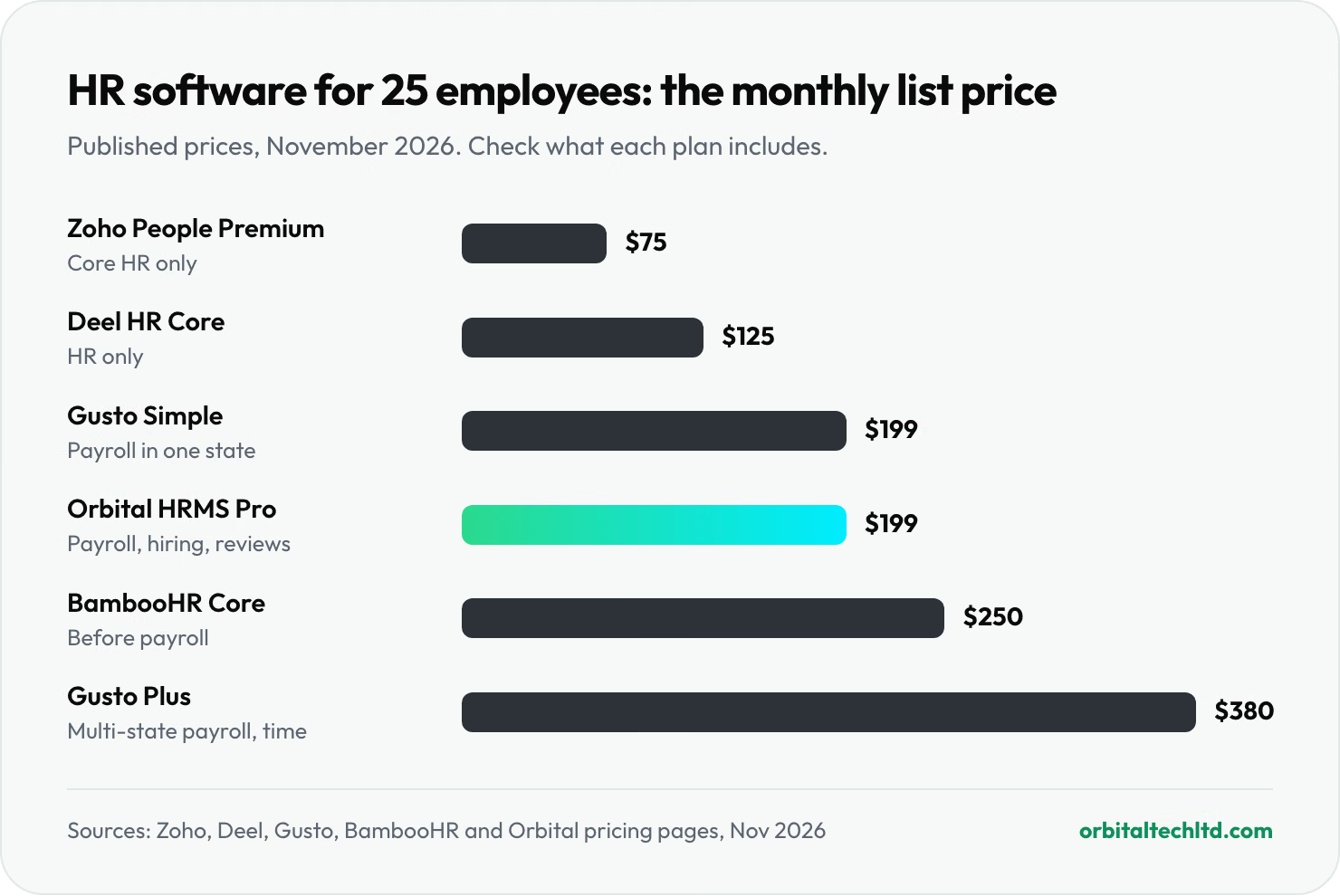
Here is what that means for a 25-person team, using the prices each vendor publishes. Zoho People Premium costs about $75 a month ($3 per user) but covers core HR only. Gusto Simple costs $199 a month ($49 plus 25 times $6) and covers payroll in one state, while Gusto Plus, which adds multi-state payroll and time tracking, costs $380. BambooHR's Core plan is a flat $250 a month at this size, before payroll. Orbital HRMS Pro is $199 a month with payroll, hiring and reviews included, and it stays $199 until you pass 25 seats.
The headline numbers are close. The difference shows up at 40 or 60 employees, and when you add the second and third module. Price every option at your expected headcount 18 months from now, with every module you will actually use.
HR software vs hiring an HR person
The US Bureau of Labor Statistics puts the median salary of an HR specialist at $75,940 a year, and an HR manager at $149,280. Even the cheaper of the two is more than 25 years of a $199-a-month HR subscription. The two are not substitutes, though. Software removes the admin; a person handles judgment calls, difficult conversations and policy. Most teams under 50 people do well with HR software and a part-time owner of HR, then hire their first HR specialist somewhere between 50 and 100 employees, when that person can spend their time on people rather than paperwork.
How to choose an HR system in 7 steps
- Write down the three problems you are solving. "Payroll takes two days", "we lost two candidates to slow offers" and "nobody knows leave balances" are better buying criteria than a feature list.
- Count where people work. List every state and country you pay people in. This one list rules out more vendors than any other question.
- Price it at today's headcount and at 18 months. Include every module you will need, not just the core.
- Shortlist three. One payroll-first tool, one all-in-one HRMS and one wildcard.
- Run the demo on your own data. Bring a real pay run, a real leave policy and a real job opening, and ask the vendor to set them up live.
- Ask a manager and an employee to try it. Adoption fails when the people who approve leave or write reviews find it confusing.
- Read the exit terms. Contract length, renewal price caps and how you get your data back.

Build or buy?
Almost every small business should buy. Payroll tax rules change every year, and keeping up with them is a full-time job a subscription does for you. Custom HR tools make sense in narrower cases: a workforce with unusual shift or commission rules, an HR process that is part of the service you sell, or an existing ERP that needs a people module. In those cases our custom software development team builds on top of an HR platform rather than replacing payroll, and our guide to what it costs to build a web app gives realistic budgets.
The 7 HR basics, and which features cover each
Most HR courses and textbooks group the work into seven core functions, and good human resources software supports every one of them. Mapping them to software shows why the nine features above are the ones that matter.
There is no single official list, but most HR guides, including AIHR's guide to core HR processes, settle on these seven.
| HR basic | What it covers | The HR software feature that supports it |
|---|---|---|
| 1. Recruitment and selection | Job posts, interviews, offers | Hiring and applicant tracking |
| 2. Onboarding | Contracts, forms, first-week setup | Onboarding and offboarding |
| 3. Training and development | Skills, courses, career growth | Goals and one-on-ones in performance management |
| 4. Performance management | Goals, feedback, reviews | Performance management |
| 5. Compensation and benefits | Pay, raises, bonuses, benefits | Payroll and tax, plus the employee record's salary history |
| 6. Employee relations | Concerns, discipline, engagement | Documents, notes and self-service |
| 7. Compliance | Labor law, records, right to work | Compliance, documents and record keeping |
Health and safety is often listed as an eighth, especially in manufacturing and field work. Time and attendance and reporting do not appear on the list because they are not functions in their own right; they are the data every one of the seven depends on.
Mistakes we see when small teams switch HR management software
- Migrating messy data. Duplicate employees, old job titles and wrong managers come across exactly as they are. Clean the spreadsheet first.
- Switching payroll mid-quarter. In the US, moving at the start of a quarter, and ideally at the start of the year, keeps tax filings simple.
- Turning on every module at once. Go live with records, time off and payroll, then add hiring and reviews a month later.
- Skipping manager training. A 30-minute session on approving leave and writing one-on-one notes decides whether the system is used.
- Forgetting offboarding. Build the exit checklist on day one, not after the first awkward departure.
3 tips before you sign
- Run one parallel payroll. Run your next payroll in the old system and the new one, compare every payslip and switch only when they match to the cent.
- Negotiate the renewal, not the first year. First-year discounts are easy to get. A written cap on the renewal price is worth more.
- Decide who owns the system. Name one person, even part time, who owns the settings, policies and reports. HR software without an owner drifts back into spreadsheets within a year.
Our verdict
The best HR management software for a small business is not the one with the longest feature list. It is the one that gets the nine features above right, prices fairly as you grow and that your managers open without being reminded. Payroll-first tools win for very small US teams, all-in-one HR systems win between roughly 10 and 100 people, and employers of record or HCM suites take over beyond that.
If you are in that middle band, book a 20-minute demo of Orbital HRMS and bring a real pay run. If what you need is people rather than software, our BPO services can take payroll admin and HR support off your plate, and our guides to business process outsourcing, what a virtual assistant costs and AI agents for business cover the other ways to free up your team's time.