Short answer: a warehouse management system (WMS) is software that runs the work inside a warehouse. It records what stock arrives, tells staff where to store it, builds pick lists for each order, checks every item with a barcode scan, and confirms what shipped. Businesses use one to stop losing stock, ship the right items first time and know exactly what they have and where it sits.
Most guides to WMS software are written by the vendors that sell it, and none of them tells you what it costs or which option fits a small operation. This one covers the ten things worth knowing before you choose, with prices, current market data and the questions vendors tend to skip. We build and run our own WMS, Spiffy, so we will say where it fits and where it does not.
Warehouse management systems by the numbers
| Measure | Figure | Source |
|---|---|---|
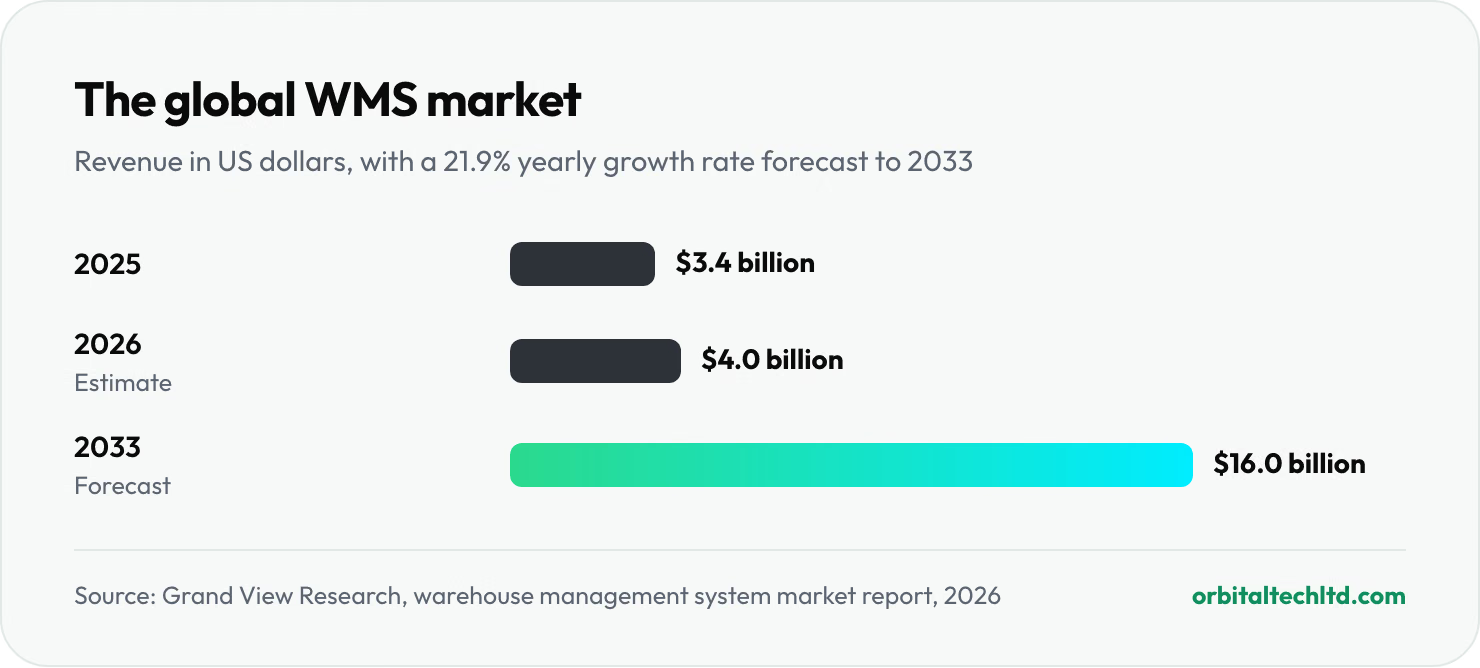
| Global WMS market, 2025 | $3.4 billion | Grand View Research, 2026 |
| Forecast WMS market, 2033 | $16.0 billion, growing 21.9% a year | Grand View Research, 2026 |
| Share of WMS revenue from services (setup, integration, support) | 80.7% | Grand View Research, 2026 |
| Inventory records found inaccurate in a major retail study | About 65% of nearly 370,000 records | DeHoratius and Raman, Management Science |
| Best-in-class inventory count accuracy by location | 99.5% or higher | WERC DC Measures, 2025 |
| Operations already running warehouse robots | 52%, with another 32% planning to within three years | Peerless Research Group, 2026 |
| Latest Gartner Magic Quadrant for WMS | Published April 2026, 18 vendors evaluated | Oracle announcement, 2026 |
1. What is a warehouse management system?
A warehouse management system is software that manages and directs the physical work of a warehouse, distribution center or fulfillment center: receiving, putaway, storage, counting, picking, packing and shipping. WMS is simply the abbreviation. Gartner's market definition describes the same core jobs and adds labor management and inventory placement as more advanced capabilities.
The key word is directs. Spreadsheets and basic stock apps record what happened. A WMS tells people what to do next, where to go and what to scan, and refuses a scan that does not match. That is what turns a warehouse from "ask the person who knows" into a process anyone can follow on day one.
2. How a WMS works, step by step
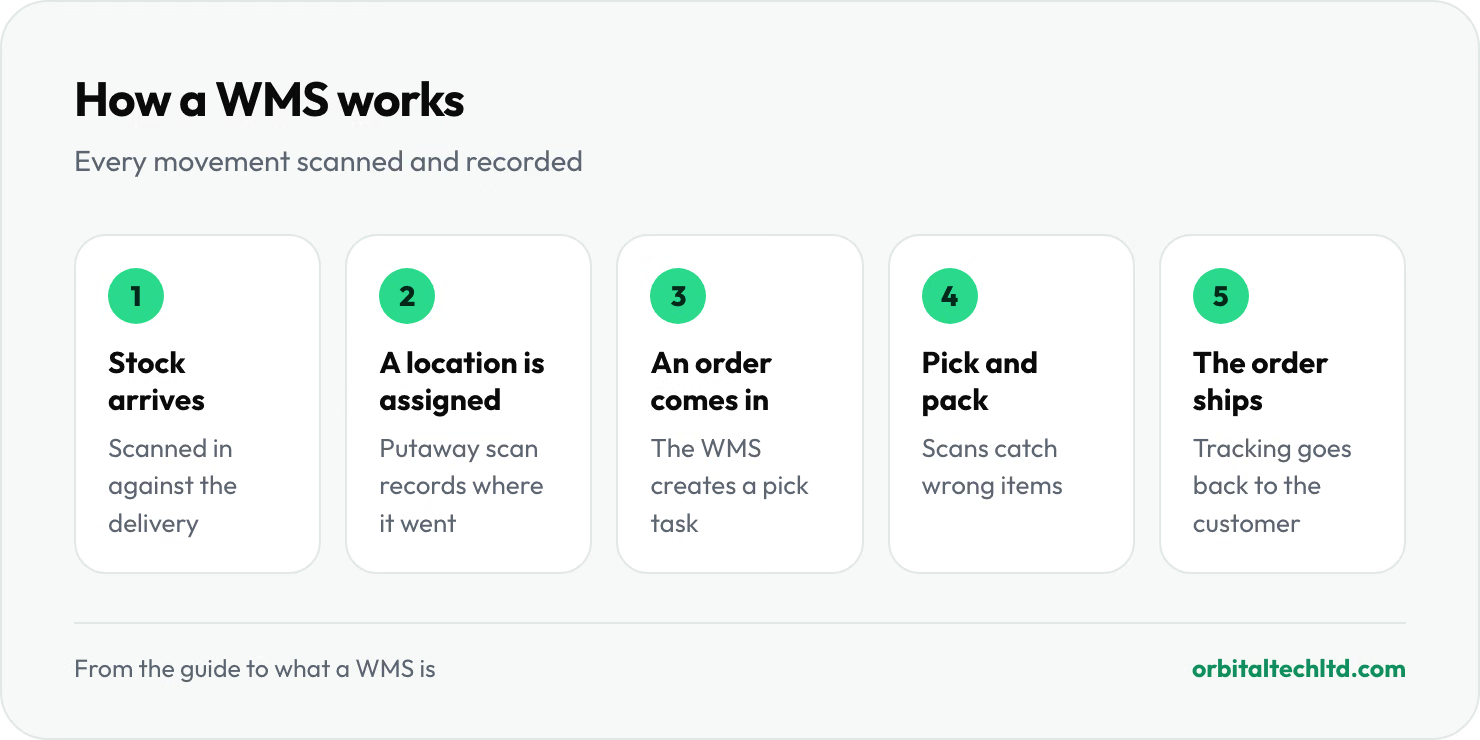
- Stock arrives and staff scan it in against the expected delivery, flagging shortages or damage.
- The system assigns a location, and the putaway scan records exactly which shelf, bin or pallet it went to.
- An order comes in from your store, marketplace or ERP, and the system turns it into a pick task.
- Staff pick and pack, scanning each item so the wrong product or quantity is caught before it ships.
- The order ships with a carrier label, and tracking flows back to the customer and the sales channel.
3. The core features of a WMS

Feature lists run to hundreds of lines, but these are the ones that decide whether a system fits your floor:
- Receiving: scanning inbound stock against purchase orders or advance notices, with damage and shortage handling.
- Putaway and slotting: directing each item to a location, ideally putting fast sellers closest to packing.
- Inventory control: live stock by item and location, lot and expiry tracking, and cycle counting so you never need a full shutdown count.
- Picking strategies: single-order picking for small operations, batch picking (several orders in one walk), zone picking (each picker owns an area) and wave picking (orders released in timed groups).
- Packing and shipping: verification scans, carrier rate comparison, label printing and tracking updates.
- Returns: receiving, inspecting and restocking returned items with a reason code.
- Labor and yard management: on larger systems, tracking productivity per person and scheduling dock doors and trailers.
- Reporting: accuracy, throughput, order cycle time and stock ageing.
- Client billing: for 3PLs, charging each client for storage, handling and extras automatically.
Two features matter more than the list suggests: integrations (your store, marketplaces, carriers and accounting software) and mobile scanning. A modern system should run on an ordinary phone; dedicated scanners are faster for heavy use, but no longer a requirement to start.
The KPIs a WMS should report
A system is only as useful as the numbers it shows you. These are the measures warehouse benchmarking groups such as WERC track, and the ones to ask a vendor to demonstrate:
- Inventory count accuracy by location: the share of locations where the count matches the system. Best-in-class operations hold 99.5% or better.
- Order picking accuracy: orders shipped with the right items and quantities.
- Dock-to-stock time: how long received goods take to become available to sell.
- On-time shipment: orders that leave by the promised cut-off.
- Orders or lines per labor hour: the productivity number that picking strategies and slotting improve.
If a system cannot produce these without an export to a spreadsheet, you will stop looking at them within a month.
4. The advantages of a warehouse management system
The benefits of a warehouse management system come from one habit: every movement is scanned and checked. That changes the numbers that cost you money.
- Accurate stock. A study of nearly 370,000 retail inventory records found about 65% were wrong. Scanning every receipt, move and pick closes that gap; leading warehouses hold count accuracy at 99.5% or better, according to WERC's benchmarks.
- Fewer picking errors. The system rejects the wrong item or quantity before the box is sealed, so returns and re-shipments fall.
- Less walking, more picking. Picking is often the largest single labor cost in a warehouse. Batch picking and smart slotting cut the distance per order.
- Faster training. New staff follow the scanner instead of memorizing the building.
- Less overselling. Live stock syncs to every sales channel, so you stop selling items you do not have.
- Revenue you were missing. For 3PLs, automated storage and handling billing catches charges that spreadsheets miss.
The value a WMS delivers, problem by problem
| Problem without a WMS | What the system does | Value delivered |
|---|---|---|
| Stock counts never match the system | Scans every receipt, move and pick; cycle counts | Reliable stock, no surprise stockouts |
| Wrong items ship | Verification scan at pick and pack | Fewer returns, re-shipments and complaints |
| Only one person knows where things are | Location for every item, guided picking | Any trained person can pick on day one |
| Orders re-typed from several stores | Orders imported from every channel | Hours saved daily, fewer typing errors |
| Storage and handling go unbilled | Meters storage days and activity per client | Accurate invoices, recovered revenue |
5. The four types of WMS
These systems are usually grouped into four types:
- Standalone WMS: a dedicated warehouse system that connects to your other software. Deepest warehouse features, one more system to integrate.
- Cloud or SaaS WMS: hosted by the vendor and paid for monthly. Quick to start, updated for you, and now the common choice for small and mid-sized operations.
- ERP-integrated WMS: the warehouse module inside an ERP such as SAP, Oracle, Microsoft Dynamics or Odoo. One database, but often thinner warehouse features unless you buy the advanced module.
- Supply chain execution suite: a WMS bundled with transport, labor and yard management, aimed at large networks.
Two specialist kinds sit alongside these: 3PL WMS, built for warehouses holding stock for many clients, with separate data, client portals and billing per client; and custom WMS, built when an operation is too unusual for any product. Our guide to what a 3PL is explains why 3PLs need the multi-client features.
Which type fits which business
| Business | Usual best fit | Why |
|---|---|---|
| Online brand with one small warehouse | Cloud WMS or inventory app | Fast setup, connects to the store, phone scanning |
| 3PL or package forwarder | Cloud 3PL WMS | Separate client data, portals and automated billing |
| Wholesaler already on an ERP | ERP-integrated WMS or a standalone system synced to it | One source of truth for orders and stock |
| Multi-site distributor with automation | Enterprise standalone WMS or execution suite | Labor, yard and robot orchestration at scale |
| Unusual operation no product fits | Custom WMS | Built around your process, at a higher cost |
6. WMS vs ERP vs warehouse inventory management software
| System | Main job | Where it stops |
|---|---|---|
| Warehouse inventory management software | How much stock you have and when to reorder | Usually does not direct work on the floor |
| WMS | Running the warehouse: receiving, locations, picking, packing, shipping | Not your accounts, purchasing or wider business |
| ERP | Running the business: finance, purchasing, sales, basic inventory | Warehouse features are often basic without a dedicated system |
Many businesses run the two side by side: the ERP owns the money and purchasing, the warehouse system owns the physical stock, and the two sync orders and stock levels. Warehouse inventory management software is the lighter step before that, fine while one or two people run the stockroom.
Are SAP and WMS the same?
No. SAP is a software company, best known for its ERP. A WMS is a type of software. SAP sells its own WMS, called SAP Extended Warehouse Management (EWM), which works inside or alongside SAP's ERP. So a business can run SAP's ERP on its own, add SAP EWM, or connect another vendor's WMS to it.
7. What a WMS costs, and the affordable options

None of the big vendor guides publish prices, so here are real ones, checked in October 2026. They split into three tiers.
| Option | Published price | Best for |
|---|---|---|
| Zoho Inventory | Free for 50 orders a month; $29 to $249 a month billed yearly | Small sellers that need inventory control more than floor management |
| Odoo Inventory | One app free; full plans from $8.95 per user a month | Businesses that want inventory inside a wider ERP |
| Spiffy | $199 a month (Starter) or $449 a month (Growth); Enterprise on quote | 3PLs, package forwarders and growing brands |
| Mid-market WMS | Usually quoted, often thousands of dollars a month | High-volume brands and 3PLs with complex workflows |
| Enterprise WMS (SAP EWM, Manhattan, Blue Yonder and others) | Quoted, plus implementation projects | Large networks with automation and many sites |
Look beyond the subscription. Grand View Research puts services at 80.7% of market revenue, which tells you where the money really goes on larger systems: implementation, integration and support. For a small operation, the questions to ask are whether setup is included, whether you need new hardware, and whether the price rises with every order.
Where Spiffy fits
Spiffy is the warehouse management system we built and run. The Starter plan covers one warehouse, up to five users and 2,000 orders a month; Growth covers up to three warehouses with unlimited orders, multi-client data walls, client portals and automated billing. Any modern phone works as the barcode scanner, data migration from spreadsheets is free, and pricing is flat, with no per-order fees. Most teams go live within seven days. It is built for 3PLs, package forwarders and e-commerce brands, and it connects to Shopify, Amazon, WooCommerce, eBay, Etsy, TikTok Shop, the major carriers, QuickBooks and Xero. It is not the right choice for a large manufacturer that needs production planning or a network of automated distribution centers; that calls for an enterprise system.
8. The most popular WMS platforms
At the enterprise end, Gartner's Magic Quadrant is the reference most buyers use. Vendors announcing Leader placements in the April 2026 edition include Manhattan Associates, Blue Yonder, SAP, Oracle, Infios (formerly Körber) and Infor; Oracle says it is its eleventh year as a Leader. These systems run large, often automated networks, and are bought through long selection projects.
Among small and mid-sized businesses, the popular choices look very different: inventory tools built into commerce and accounting platforms, ERP inventory apps such as Odoo, and cloud systems built for a specific model, such as 3PLs or direct-to-consumer brands. Popularity at one end says little about fit at the other.
9. How to choose a WMS: run a fit-gap analysis
The most useful step in any selection is a fit-gap analysis: write down how your warehouse actually works, then score each system on what it does out of the box (fit), what needs configuration or an add-on (gap), and what it cannot do at all. These questions cover most of it:
- Integrations: does it connect to your store, marketplaces, carriers and accounting software without manual exports?
- Your model: one brand or many clients, parcels or pallets, one site or several?
- Hardware: does it run on phones, or require dedicated scanners and printers?
- Billing, for 3PLs: can it charge storage, handling and extras per client automatically?
- Setup time: a week, a quarter or a year? Cloud systems for small operations can go live in days; enterprise projects often take months.
- Total cost: subscription, setup, hardware and per-user or per-order fees, priced on your real volumes.
For research, Gartner Peer Insights, G2 and Capterra collect user reviews, and you can filter them by company size. The best test is still a demo using your own products and a real day's orders, not the vendor's sample data.
Common implementation mistakes
- Buying for the warehouse you might have in ten years. An enterprise system in a small operation means months of setup and features nobody uses.
- Customizing before learning. Run the standard workflows for a few weeks before asking for changes; many "must-haves" turn out to be old habits.
- Treating integrations as an afterthought. If orders, stock and tracking do not sync with your store and carriers on day one, staff go back to re-typing.
- Skipping floor training. Managers often get the demo; pickers get a login. Train the people who scan, on the floor, with real orders.
Signs you need a WMS now
- Stock counts do not match the system, and you find out when a customer orders something you do not have.
- Staff spend time searching, because only experienced people know where things are.
- Wrong items or quantities ship, and returns eat your margin.
- Spreadsheets run the warehouse, and orders from several channels are re-typed by hand.
- You run a 3PL and billing clients for storage takes days every month.
10. Where warehouse management is heading
Three shifts are changing what this software does:
- Robots on the floor. In a 2026 Peerless Research Group survey, 52% of operations already ran robots, such as autonomous mobile robots or automated storage, and 32% planned to within three years. The warehouse system is what tells those robots which task comes next, alongside the people.
- AI in planning. Vendors are adding AI for labor forecasting, slotting and exception handling. The useful version predicts tomorrow's workload and flags problems early; check what a vendor's AI actually changes on your floor before paying extra for it.
- Phones instead of scanners. Mobile scanning has lowered the entry cost, which is a big reason small operations now adopt one years earlier than they used to.
3 tips before you buy a WMS
- Clean your data first. Product codes, units and locations need to be consistent before go-live. Good software makes good data fast and bad data loud.
- Label every location before launch. Rack and bin labels are cheap, and without them even the best system cannot direct anyone.
- Run in parallel for a week. Keep your old method running alongside the new system for the first week, compare counts daily, and switch off the old one only when the numbers match.
Our verdict
If stock accuracy, mis-picks or client billing are costing you money, the right system pays for itself sooner than most owners expect. Small operations should start with a cloud WMS that runs on phones and connects to their sales channels; large networks with automation need an enterprise system and a proper selection project. Whatever the size, choose on your own data, not a feature list.
See how Spiffy handles intake, storage billing and shipping, or if your operation needs custom tools and integrations, our logistics software development team builds them. If you sell online, our comparison of Shopify vs WooCommerce covers the store side, and our guide to what it costs to build a web app covers the price of going custom.